
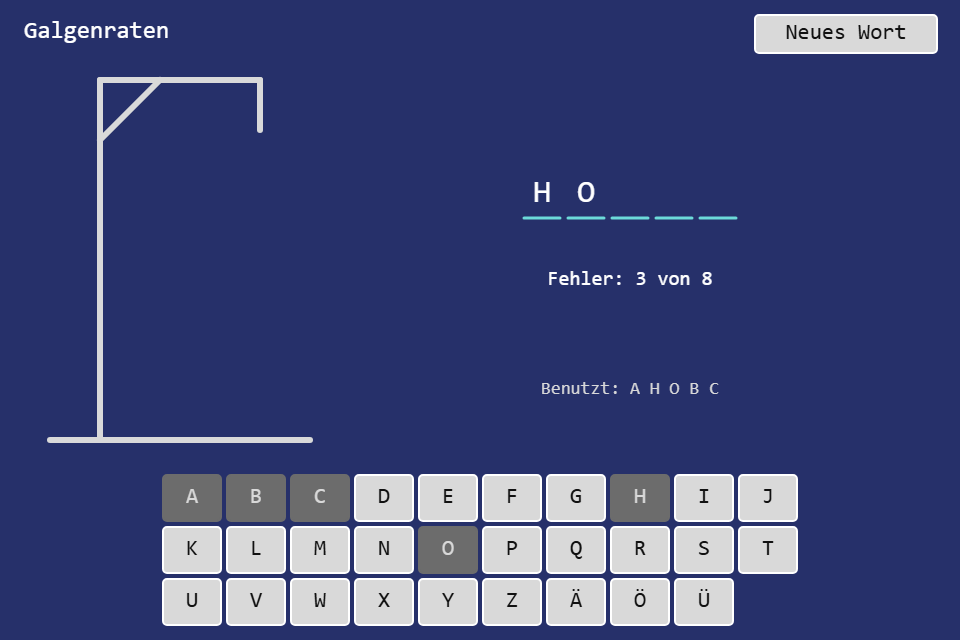
Galgenraten is hangman in German: one secret word, eight wrong guesses, a gallows that grows with every miss. It is also the first step with real keyboard input, and the place to learn how a game loop should read keys: once per frame, from a state, not inside event handlers. The new toolbox module is KeyboardState.
Play it · Source: collection-spielwerk/02-galgenraten · Toolbox 5.4.0 or later
The game
The element picks a German noun (5 to 12 letters, umlauts allowed, no ß) and shows one empty box per letter. Every hit fills all matching boxes, every miss draws the next part of the gallows and is listed under "Falsch geraten" (wrong guesses). Find the word for "Gewonnen!" (won); the eighth miss ends with "Verloren – das Wort war …" (lost, the word was …) and reveals it. "Neues Wort" (new word) or "Nächstes Wort" (next word) continues with the next seed.
- Mouse/touch: the on-screen alphabet A to Z plus Ä, Ö, Ü; "Neues Wort".
- Keyboard: any letter, upper or lower case, guesses; Enter starts the next word.
New in the toolbox: KeyboardState
The first idea for keyboard input is a keydown listener that decides on the spot: a letter? guess it. Enter? new word. That works for Galgenraten, but it is the wrong pattern for games:
- Wrong time. A listener runs whenever the browser delivers an event, not when the game loop is ready to decide. Two keys in one frame, or a key during the intro, land wherever the handler happens to be.
- Held keys. As soon as a game needs "walk while Left is held", the handler has to start tracking state itself, and every game reinvents it.
- Scattered decisions. Each handler writes to the game state on its own; there is no single place to read what the input did this frame.
The idea: turn it around. DOM events go in and are only recorded; the loop asks plain questions out, at the one place it decides things, and then closes the frame so the next one starts empty.
export class KeyboardState {
    attach(target: EventTarget, signal?: AbortSignal): void;  // keydown, keyup, blur
    detach(): void;
    is_down(key: string): boolean;       // held right now
    was_pressed(key: string): boolean;   // went down since end_frame()
    was_released(key: string): boolean;  // went up since end_frame()
    typed(): string[];                   // printable characters, in order
    end_frame(): void;                   // once per frame, after reading
    clear(): void;                       // forget everything, held keys included
}
Keys are KeyboardEvent.key values: "ArrowLeft", "a", "Ä", " ", "Enter". The difference between is_down and was_pressed is the core of it. is_down("ArrowLeft") is true in every frame the key is held: movement. was_pressed(" ") is true in exactly one frame: jump, shoot, confirm. The recording side is three small handlers:
private readonly on_key_down = (event: Event): void => {
    if (!is_keyboard_event(event)) {
        return;
    }
    const key = event.key;
    if (!event.repeat && !this.down_keys.has(key)) {
        this.pressed_keys.add(key);              // an edge: only the first keydown counts
    }
    this.down_keys.add(key);
    if (is_printable(event)) {
        this.typed_characters.push(key); // auto-repeat types, as expected
    }
};

private readonly on_key_up = (event: Event): void => {
    if (!is_keyboard_event(event)) {
        return;
    }
    const key = event.key;
    if (this.down_keys.delete(key)) {
        this.released_keys.add(key);
    }
};

private readonly on_blur = (): void => {
    this.clear();                                // keyup outside the focus is never seen
};

public end_frame(): void {
    this.pressed_keys.clear();                   // edges and characters belong to one frame,
    this.released_keys.clear();                  // held keys stay
    this.typed_characters = [];
}
is_printable accepts single-character keys without Ctrl or Meta; Ctrl together with Alt still counts, because that is AltGr on Windows keyboards. attach uses an internal AbortController, so detach() or an aborted signal removes all listeners at once, and attaching twice moves them to the new target. Only EventTarget is used, never document or window, so the class runs in jsdom.
Galgenraten reads the keyboard in one method, called from the tick:
// src/TceGalgenratenLogic.ts
protected override update(): boolean {
    const keyboard = this.properties.keyboard;
    for (const character of keyboard.typed()) {
        this.guess(character);
    }
    if (keyboard.was_pressed('Enter')) {
        this.restart();
    }
    return false;                                // guess() marks the screen dirty itself
}
The shell calls keyboard.end_frame() right after update().
Keys and the on-screen buttons end in the same guess(), and the DOM-free Game normalizes the character ("ö" becomes "Ö", a digit is ignored). While the intro runs, the tick only calls keyboard.clear(), so a key pressed during the logo never becomes a guess.
The test (src/input/KeyboardState.test.ts) dispatches synthetic events and checks the two kinds of question:
it("reports a key as down while it is held and as pressed once", () => {
    const { keyboard, element } = setup();
    key_down(element, "ArrowLeft");
    expect(keyboard.is_down("ArrowLeft")).toBe(true);
    expect(keyboard.was_pressed("ArrowLeft")).toBe(true);
    keyboard.end_frame();
    expect(keyboard.is_down("ArrowLeft")).toBe(true);
    expect(keyboard.was_pressed("ArrowLeft")).toBe(false);
});

it("forgets held keys on blur", () => {
    const { keyboard, element } = setup();
    key_down(element, "ArrowUp");
    element.dispatchEvent(new Event("blur"));
    expect(keyboard.is_down("ArrowUp")).toBe(false);
});
The blur case is the trap: without it, a player who holds a key and clicks into another window comes back to a key that is still "down" forever.
The module is src/input/KeyboardState.ts.
From earlier steps
SeededRandomfrom step 01: picks the word from the seed, so the sameinit-seedis always the same word.
The scaffold, the GO logo intro, the start screen and the scaling are explained once in Spielwerk 00: The workbench. The alphabet is a toolbox UiPage of Buttons; a CSS-like class plus a theme rule recolors a letter once it has been tried, as a hit or a miss. What this step first wrote by hand for the key handling, the start picture and a status line that follows the game is part of the canvas game shell now; the workbench lists it under "Extracted along the way".
Embed it
<script src="https://www.game-object.de/tce-elements/tobidot/dll-tce-assets"></script>
<script src="https://www.game-object.de/tce-elements/tobidot/tce-galgenraten"></script>
<tce-galgenraten init-seed="4711"></tce-galgenraten>
| Attribute | Values | Default |
|---|---|---|
init-seed |
whole number; picks the word, every new word continues with seed + 1 | random |
init-intro |
true / false; play the GO logo first |
true |
Next
Previous: Spielwerk 01: Zahlen raten · Next: Spielwerk 03: Tic-Tac-Toe · All steps
Comments