
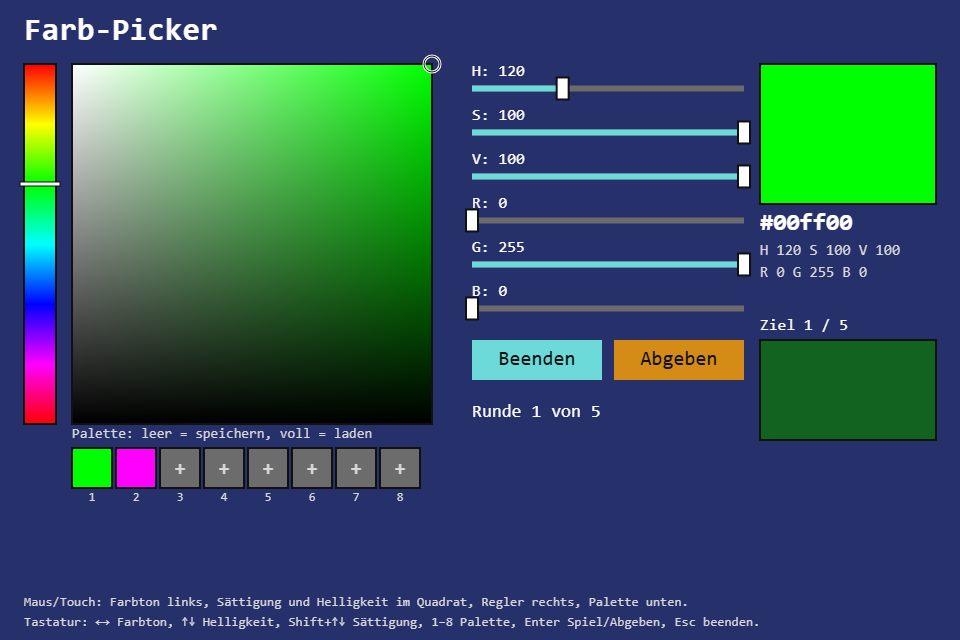
A color picker like the one in every paint program, plus a game: the element shows a target color, I mix it, and it tells me in percent how close I came. The new toolbox module is HsvColor: a color as hue, saturation and value, the conversion to and from RGB, and a hue that is a circle, not a line.
Play it · Source: collection-spielwerk/09-farb-picker · Toolbox 5.5.0 or later
The game
As a tool: the hue strip picks the hue, the square beside it saturation and brightness, and six sliders set H, S, V and R, G, B in numbers. Every slider rewrites all the others, so moving R also moves H, S and V. Eight palette slots store a color when empty and load it when full. As a game: "Spiel" (play) shows a target color, I mix it and press "Abgeben" (submit). Five rounds, then the average and the session's best score; "Nochmal" (again) plays on, "Beenden" (quit) returns to the tool.
- Mouse/touch: click or drag in the strip and the square, drag the sliders, click palette slots and buttons.
- Keyboard: Left/Right turn the hue by 2°, Up/Down change brightness (with Shift: saturation),
1to8are the palette, Enter starts the game or submits, Escape quits it.
New in the toolbox: HsvColor
RGB is the screen's language: three lamps, red, green and blue, 0 to 255 each. For a picker it is the wrong one. "A bit lighter" means raising all three channels in the right ratio, or the color shifts. HSV separates what people actually change: the hue as an angle on the color wheel, the saturation (how far from grey) and the value (how far from black). Lighter is then one slider.
RGB to HSV in words: the largest channel is the value. Largest minus smallest is the chroma, and saturation is chroma divided by value. The hue depends on which channel is largest: red puts it between magenta and yellow, green between yellow and cyan, blue between cyan and magenta, each piece 120° wide, and the other two channels say where inside it.
/** From 0..255 channels (an `RgbColor` fits). Grey has hue 0 and saturation 0; black has value 0. */
public static from_rgb(color: RgbLike): HsvColor {
    const r = HsvColor.clamp(color.r / 255);
    const g = HsvColor.clamp(color.g / 255);
    const b = HsvColor.clamp(color.b / 255);
    const alpha = color.a === undefined ? 1 : color.a / 255;
    const max = Math.max(r, g, b);
    const min = Math.min(r, g, b);
    const chroma = max - min;
    let hue = 0;
    if (chroma > 0) {
        if (max === r) {
            hue = ((g - b) / chroma) % 6;
        } else if (max === g) {
            hue = (b - r) / chroma + 2;
        } else {
            hue = (r - g) / chroma + 4;
        }
        hue *= 60;
    }
    const saturation = max === 0 ? 0 : chroma / max;
    return new HsvColor(hue, saturation, max, alpha);
}
The way back goes by sextant. Hue divided by 60 says which sixth of the wheel the color is in; in each sixth one channel sits at chroma, one at zero and the third rises or falls. Finally value - chroma, the grey under the color, is added to all three:
public to_rgb(): RgbColor {
    const chroma = this.value * this.saturation;
    const sector = this.hue / 60;
    const x = chroma * (1 - Math.abs((sector % 2) - 1));
    const sextants: ReadonlyArray<[number, number, number]> = [
        [chroma, x, 0], [x, chroma, 0], [0, chroma, x],
        [0, x, chroma], [x, 0, chroma], [chroma, 0, x],
    ];
    const [r, g, b] = sextants[Math.min(5, Math.floor(sector))];
    const m = this.value - chroma;
    return new RgbColor(Math.round((r + m) * 255), Math.round((g + m) * 255), Math.round((b + m) * 255), Math.round(this.alpha * 255));
}
The trap is the hue. It is a circle: 350° and 10° are 20° apart, not 340°. Interpolate naively and the blend passes through cyan instead of red. hue_delta returns the short way with a sign, and lerp and distance build on it:
/** The signed shortest turn from hue `from` to hue `to`, in -180..180. */
public static hue_delta(from: number, to: number): number {
    const delta = HsvColor.wrap_hue(to - from);
    return delta > 180 ? delta - 360 : delta;
}

public distance(other: HsvColor): number {
    const dh = Math.abs(HsvColor.hue_delta(this.hue, other.hue)) / 180;   // 180° counts like a full S or V step
    const ds = this.saturation - other.saturation;
    const dv = this.value - other.value;
    return Math.sqrt((dh * dh + ds * ds + dv * dv) / 3);                  // 0..1
}
The rest of the API: the constructor wraps the hue onto 0..360 and clamps the rest to 0..1; from_hex reads #rgb, #rgba, #rrggbb and #rrggbbaa; to_hex, to_css, with_hue/with_saturation/with_value/with_alpha, equals and clone. The toolbox's existing RgbColor got a one-line to_hsv().
The game scores a round straight from distance:
// src/game/Game.ts, in submit()
const distance = this.color.distance(this.target);
const percent = this.percent_of(distance);

/** 100 % at distance 0, falling linearly to 0 % at `tolerance` (0.5). */
public percent_of(distance: number): number {
    return Math.round(Math.max(0, 1 - distance / this.tolerance) * 100);
}
A grey has no hue, so from_rgb returns hue 0. The game's set_rgb therefore keeps the hue the picker had when the R, G, B sliders reach grey, and the H slider does not jump.
The test (src/data/HsvColor.test.ts) checks the round trip for the house palette, the hex forms, and the way across zero:
it("lerps the hue the short way across 350° -> 10°", () => {
    const a = new HsvColor(350, 1, 1);
    const b = new HsvColor(10, 0, 0);
    expect(a.lerp(b, 0.5).hue).toBeCloseTo(0, 10);
    expect(a.lerp(b, 0.25).hue).toBeCloseTo(355, 10);
    expect(b.lerp(a, 0.5).hue).toBeCloseTo(0, 10);
    expect(HsvColor.hue_delta(30, 300)).toBe(-90);
});
The module is src/data/HsvColor.ts.
From earlier steps
SeededRandomfrom step 01: draws the target colors, so the same seed plays the same five.
Scaffold, start screen, intro and the shared fit are explained in Spielwerk 00: The workbench. The sliders are the toolbox HouseSlider (the toolbox Slider in the house look, name and value above the track) on the UiPage, placed in layout coordinates like every widget. What this step first wrote by hand for sliders in layout coordinates, pointer capture, the start card and the house slider is part of the canvas game shell now; the workbench lists it under "Extracted along the way".
Embed it
<script src="https://www.game-object.de/tce-elements/tobidot/dll-tce-assets"></script>
<script src="https://www.game-object.de/tce-elements/tobidot/tce-farb-picker"></script>
<tce-farb-picker init-seed="4711"></tce-farb-picker>
| Attribute | Values | Default |
|---|---|---|
init-seed |
whole number; decides the target colors | random |
init-color |
#rgb or #rrggbb; the starting color |
#6cdad9 |
init-intro |
true / false; play the GO logo first |
true |
A script can read element.color (an HsvColor) or element.hex, and set the picker with element.color = HsvColor.from_hex('#d48c17').
Next
Previous: Spielwerk 08: 2D-Koordinaten-Picker · Next: Spielwerk 10: Hau den Maulwurf · All steps
Comments