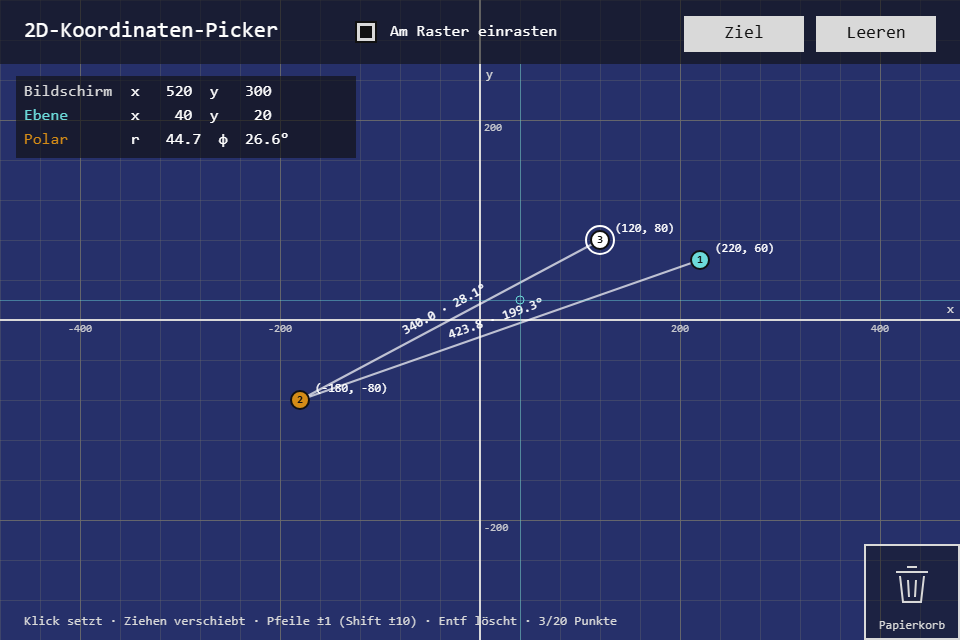
No game this time, a tool with a score: a coordinate plane that shows the pointer as screen, plane and polar coordinates, and a "Ziel" (target) mode that asks for coordinates to hit. The new toolbox module is PointerInput: mouse, touch and pen as one state, read once per frame, in the coordinate space the game wants instead of the one the browser delivers.
Play it · Source: collection-spielwerk/08-koordinaten-picker · Toolbox 5.5.0 or later
The game
A click places a point, up to twenty. Points can be dragged, and a point dropped on the "Papierkorb" (trash) is gone. The panel beside the plane follows the pointer in three readings: "Bildschirm" (screen, origin top left, y down), "Ebene" (plane, origin in the centre, y up) and "Polar" (distance and angle). Consecutive points are joined by a line labelled with its length and angle. "Ziel" shows coordinates like (-180, 70); a point that lands within 8 plane pixels counts as a hit and brings the next target, drawn from the seed. "Am Raster einrasten" (snap to grid) settles points on the grid when they are placed or dropped.
- Mouse/touch: click to place or select, drag to move, drag onto the trash to delete; "Ziel", "Leeren" (clear), the snap box.
- Keyboard: arrows nudge the selected point by 1 (Shift: 10), Delete removes it, Escape deselects.
New in the toolbox: PointerInput
A click on the canvas lives in three coordinate systems. The browser reports clientX/clientY, window pixels. The canvas has its own pixel size, twice its CSS size on a high-density screen. And the game thinks in its own units, here pixels of the plane, which sits somewhere inside a scaled layout. Every step so far redid that conversion in its Logic, next to five event types and the question whether a pointerdown followed by a pointerup was a tap or the start of a drag.
The idea: treat the pointer like the keyboard in KeyboardState. Listen on the element, keep one state, run every position through a single transform function before storing it, and let the frame loop read the result once and call end_frame().
export interface PointerState {
    position: PointerPoint | null;       // last known, null outside the target
    is_down: boolean;
    down_position: PointerPoint | null;  // where the current press started
    drag: PointerDrag | null;            // { start, current, delta } once past the threshold
    button: number;                      // 0 left / 1 middle / 2 right / -1 touch
    pointer_type: "mouse" | "touch" | "pen" | "none";
}

export class PointerInput {
    constructor(options?: {
        transform?: (client_x: number, client_y: number, target: HTMLElement) => PointerPoint;
        drag_threshold?: number;          // default 4
        prevent_context_menu?: boolean;   // default true
    });
    attach(target: HTMLElement, signal?: AbortSignal): void;
    detach(): void;
    get state(): Readonly<PointerState>;
    taps(): PointerPoint[];               // presses released without a drag, since end_frame()
    drops(): PointerDrop[];               // drags that ended: { start, end }
    wheel(): number;                      // wheel steps, ±1 per event
    end_frame(): void;
}
Pointer events already unify mouse, finger and pen. What they don't solve is a second finger: PointerInput follows only the primary pointer, and during a press only that pointerId, so a second finger can neither move the position nor end the first press. On press it asks for pointer capture, so a drag that leaves the canvas keeps going.
Tap or drag is decided while moving, not on release:
public handle_move(point: PointerPoint): void {
    const state = this.current;
    state.position = point;
    if (!state.is_down || state.down_position === null) {
        return;
    }
    // still within the threshold: a shaky tap is still a tap
    if (state.drag === null && distance(state.down_position, point) < this.drag_threshold) {
        return;
    }
    const start = state.down_position;
    state.drag = { start, current: point, delta: point_of(point.x - start.x, point.y - start.y) };
}

public handle_up(point: PointerPoint): void {
    const state = this.current;
    state.position = point;
    if (!state.is_down || state.down_position === null) {
        return;
    }
    if (state.drag === null) this.frame_taps.push(state.down_position);   // a tap, at its press position
    else this.frame_drops.push({ start: state.down_position, end: point });
    state.is_down = false;
    state.down_position = null;
    state.drag = null;
}
The handle_* methods are public. The DOM listeners only map an event through transform and call them, so the logic can be driven without a browser.
The game passes a transform that goes from client pixels through the stage's to_layout (the same fit the scene and the UiPage use) and then to the plane's corner. The game never sees a client pixel:
// src/TceKoordinatenPickerLogic.ts
public plane_coordinates(client_x: number, client_y: number): Point {
    const stage = this.references.stage;
    const point = stage.to_layout({ clientX: client_x, clientY: client_y });
    return { x: point.x - stage.layout.plane.left, y: point.y - stage.layout.plane.top };
}
and reads the pointer once per frame:
if (state.drag !== null && properties.dragging !== null) {
    game.move(properties.dragging, state.drag.current);
}
for (const tap of pointer.taps()) {
    const index = game.point_at(tap);
    if (index !== null) {
        game.select(index);
    } else {
        game.place(tap);
    }
}
for (const drop of pointer.drops()) {
    if (properties.dragging !== null) {
        game.drop(properties.dragging, drop.end); // snap or trash
    }
    properties.dragging = null;
}
pointer.end_frame();
The test (src/input/PointerInput.test.ts) runs in jsdom and fires real PointerEvents, so the listeners are checked too:
it("turns a press that moves past the threshold into a drag and a drop", () => {
    const { pointer, element } = setup({ drag_threshold: 6 });
    fire(element, "pointerdown", 100, 100);
    fire(element, "pointermove", 104, 100);
    expect(pointer.state.drag).toBeNull();
    fire(element, "pointermove", 110, 108);
    expect(pointer.state.drag).toEqual({
        start: { x: 100, y: 100 },
        current: { x: 110, y: 108 },
        delta: { x: 10, y: 8 },
    });
    fire(element, "pointerup", 150, 120);
    expect(pointer.taps()).toEqual([]);
    expect(pointer.drops()).toEqual([{ start: { x: 100, y: 100 }, end: { x: 150, y: 120 } }]);
});
The trap a per-frame state brings: a quick Shift+Arrow can be over before the next frame asks whether Shift is held. The Logic therefore takes shiftKey from the arrow's own keydown.
The module is src/input/PointerInput.ts.
From earlier steps
SeededRandomfrom step 01: draws the targets, so the same seed asks the same series.KeyboardStatefrom step 02: arrows, Delete and Escape as per-frame presses.
Scaffold, start screen, intro and the shared fit are explained in Spielwerk 00: The workbench. The buttons and the toolbox CheckBox sit on a UiPage and get the raw events in canvas pixels; a press on a widget is not passed on to the plane. What this step first wrote by hand for outlines, the header rule per layout, the rounded clip and the point-in-rect test is part of the canvas game shell now; the workbench lists it under "Extracted along the way".
Embed it
<script src="https://www.game-object.de/tce-elements/tobidot/dll-tce-assets"></script>
<script src="https://www.game-object.de/tce-elements/tobidot/tce-koordinaten-picker"></script>
<tce-koordinaten-picker init-seed="4711"></tce-koordinaten-picker>
| Attribute | Values | Default |
|---|---|---|
init-seed |
whole number; decides the targets of "Ziel" | random |
init-intro |
true / false; play the GO logo first |
true |
init-snap |
true / false; start with grid snap on |
false |
Next
Previous: Spielwerk 07: Dance Combo Trickster · Next: Spielwerk 09: Farb-Picker · All steps
Comments