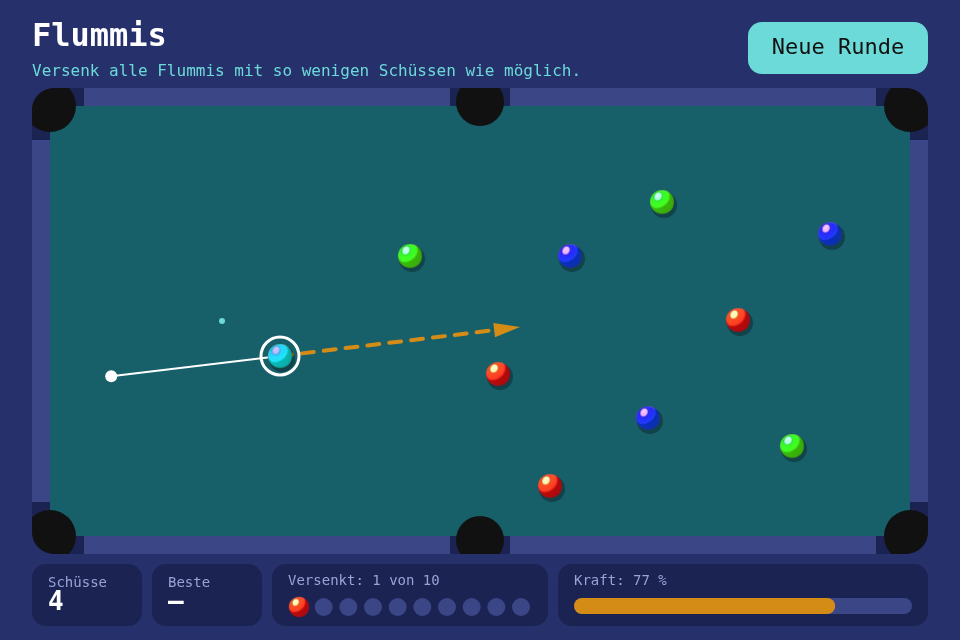
A table with six pockets, ten coloured balls and a slingshot: sink them all in as few shots as you can. The new toolbox module is Bounce, four pure functions that turn "these two things touch" into new velocities.
Play it · Source: collection-spielwerk/16-flummis · Toolbox 5.7.0 or later
The game
A "Flummi" is a bouncy ball. Ten lie on a walled table, placed from the seed. You pull back from your own ball and let go; everything it hits flies on and slowly loses speed, and the next shot waits until all has stopped. Sinking your own ball costs an extra shot and puts it back. "Alle versenkt!" (all sunk) ends the round, and the fewest shots stay up as the session's best.
- Mouse/touch: press on your ball, drag back, release. Dragging back to the ball calls the shot off.
- Keyboard: the arrow keys turn the aim, holding Space charges, letting go shoots.
- Click, Space or Enter on the finished round, or "Neue Runde" (new round), starts the next.
New in the toolbox: Bounce
The aabb_* functions from step 11 stop a box at a wall and let it slide. A ball has to go back where it came from, and a ball hitting a ball has no wall at all: both move, and the speed has to be shared out.
The module keeps two questions apart. Where do two shapes touch? That gives a contact: a unit normal and how deep they overlap. And given a contact, what are the new velocities?
export interface Circle { x: number; y: number; radius: number }
export interface Contact { normal: Vector2I; depth: number }
export interface Impactor { velocity: Vector2I; mass: number }

export function reflect(velocity: Vector2I, normal: Vector2I, restitution?: number): Vector2I;
export function circle_contact(a: Circle, b: Circle): Contact | null;
export function circle_rect_contact(circle: Circle, rect: RectI): Contact | null;
export function elastic_impact(a: Impactor, b: Impactor, normal: Vector2I, restitution?: number): { a: Vector2I; b: Vector2I };
Reflecting a velocity
A cushion only cares about the part of the velocity that runs against it, which the dot product with the normal measures. Take it away and you slide along the wall; take it away twice and you bounce. Restitution says how much comes back: 1 bounces perfectly, 0 stops dead along the normal.
export function reflect(velocity: Vector2I, normal: Vector2I, restitution: number = 1): Vector2I {
    const along_normal = dot(velocity, normal);
    if (along_normal >= 0) {
        return { x: velocity.x, y: velocity.y }; // already moving away
    }
    const change = (1 + restitution) * along_normal;
    return { x: velocity.x - change * normal.x, y: velocity.y - change * normal.y };
}
That early return is the trap: a ball still touching the cushion after its bounce would be reflected back into it, and stick there, shaking.
The impulse between two balls
Two balls exchange a push along the line between them; across it nothing happens, which is why a glancing hit sends the other ball off at an angle. The push grows with how fast they close in, and each ball changes by the same push divided by its own mass, so what one gains, the other loses.
const closing = dot(a.velocity, normal) - dot(b.velocity, normal);
if (closing >= 0) {
    return unchanged; // moving apart
}
const impulse = (-(1 + restitution) * closing) / (1 / a.mass + 1 / b.mass);
a_after = a.velocity + (impulse / a.mass) * normal;
b_after = b.velocity - (impulse / b.mass) * normal;
The old Baby-Steps AABBPhysicsEngine got this wrong in an instructive way. It took a box's area as its mass and gave each box the summed "force" divided by its own mass. For equal boxes that is right. But a big box hitting a small one at rest stops dead, and the small one leaves at the mass ratio times the speed: energy from nowhere. A fudge factor of 0.999 on every hit tried to drain it again. No factor fixes a wrong formula.
Why a game also has to separate the balls
The formulas change velocities, not positions. By the time two balls are found touching they already overlap. Leave that, and they still overlap next frame, and a third ball pressing in makes it worse. So the module reports the depth, and the game moves the bodies apart, because only the game knows which of them may move. Balls share it; a cushion leaves it all to the ball.
// src/game/Game.ts, for two balls
const contact = circle_contact(a, b);
if (contact !== null) {
    const push = contact.depth / 2 + SEPARATION_SLOP;
    a.x += contact.normal.x * push;
    a.y += contact.normal.y * push;
    b.x -= contact.normal.x * push;
    b.y -= contact.normal.y * push;
    const after = elastic_impact({ velocity: a.velocity, mass: 1 }, { velocity: b.velocity, mass: 1 }, contact.normal, BALL_RESTITUTION);
    a.velocity = after.a;
    b.velocity = after.b;
}
Moving one ball apart can push it into its neighbour, so each physics step looks again, up to six times, with the walls last. The steps are a fixed 1/240 s whatever the frame rate: a ball moves at most 4.4 pixels in one, far less than a cushion is thick, and a shot plays out the same on every machine. FixedStepClock does the counting: a frame hands it whatever time has passed, it gives back that many even steps, and what is left over waits for the next frame.
The cushions are six boxes, and the gaps between them are the pockets. circle_rect_contact uses the closest point on the box, so at a box's corner the normal comes out diagonal and a ball clipping the end of a cushion is deflected as on a real table.
The tests pin the physics by name: a heavy body barely notices a light one, momentum holds for any masses, and:
it("swaps the velocities of two equal masses head-on", () => {
    const after = elastic_impact(
        { velocity: { x: -5, y: 0 }, mass: 1 },
        { velocity: { x: 3, y: 0 }, mass: 1 },
        { x: 1, y: 0 },
    );
    expect_vector(after.a, 3, 0);
    expect_vector(after.b, -5, 0);
});
The game's tests play seeded tables out and check on every step that no ball has left the table and none overlaps. The module is src/physics/bounce/Bounce.ts.
From earlier steps
SeededRandomfrom step 01: places the ten balls.StateMachinefrom step 04: the phasesaim,rollingandover.Timerfrom step 05: how far Space has charged the shot.Tweenfrom step 15: a sunk ball shrinking into its pocket.settings.imagesandpaint_image()from step 15: the four ball sprites.
Scaffold, start screen, intro and scaling are explained in Spielwerk 00: The workbench. Flummis would have been the third game with its own "score the round once, a click starts the next" code, so that moved into the shell: the game says is_round_finished() and offers its result in on_round_finished().
Embed it
<script src="https://www.game-object.de/tce-elements/tobidot/dll-tce-assets"></script>
<script src="https://www.game-object.de/tce-elements/tobidot/tce-flummis"></script>
<tce-flummis init-seed="4711"></tce-flummis>
| Attribute | Values | Default |
|---|---|---|
init-seed |
whole number; the first table, every next table is seed + 1 | random |
init-intro |
true / false; play the GO logo first |
true |
Next
Previous: Spielwerk 15: Memory · Next: Spielwerk 17: Bricks · All steps
Comments