
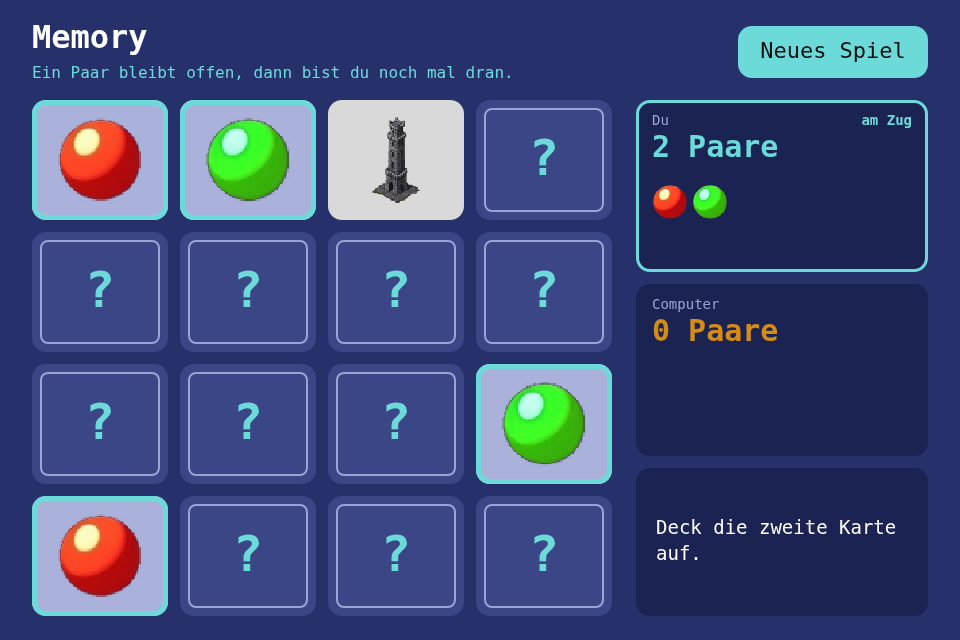
The card game everybody knows, against a computer that forgets: turn over two cards, keep the pairs, find more than your opponent. The new toolbox module is Tween, a value that moves from one number to another over a time, because the flip of a card is the whole point of the game and should not be hand-written arithmetic.
Play it · Source: collection-spielwerk/15-memory · Toolbox 5.7.0 or later
The game
Sixteen cards lie face down, eight pairs of sprites. On your turn you flip two. A pair stays open, counts for you, and you go again; anything else stays up for a short look and flips back, and it is the other player's turn. More pairs wins. The computer remembers what it sees, yours as well as its own, but only about two cards in three, and only the last eight, so it can be beaten by someone paying attention. At the end the screen says "Gewonnen!" (won), "Verloren" (lost) or "Unentschieden" (a draw), and the most pairs you found stays up as the session's best.
- Mouse/touch: click a card; "Neues Spiel" (new game), or a click on the finished game, starts the next.
- Keyboard: the arrow keys move a cursor, Space or Enter flips; on the finished game they start the next.
New in the toolbox: Tween
A flip is a trick: squash the card's width to nothing, swap the picture at that moment, grow it back. Written by hand, on the frame deltas every update() gets, that is arithmetic:
// the first half of the flip, written out
this.elapsed += delta_seconds;
const t = this.elapsed / 0.14;
const width = 1 - t * t;
Now every animation in every game has its own version of that formula, and the trap is the next frame. The frame after the flip's end gives t a little above 1, the width a little below 0, and a canvas scaled by a negative number draws the card mirrored. So you clamp. And you make sure the last value is exactly the end value, not 0.0000001, because a game that asks "is it there yet?" should get a yes.
A tween holds all of that in one object. It knows where a value starts, where it ends and how long that takes, and it moves when the frame loop says so. How the value gets there is a separate function, the easing: it takes the time from 0 to 1 and says how far along the value should be by then.
export type Easing = (t: number) => number;
export function ease_linear(t: number): number; // constant speed
export function ease_in(t: number): number;     // t * t: speeds up
export function ease_out(t: number): number;    // t * (2 - t): comes to rest
export function ease_in_out(t: number): number; // slow, fast, slow

export class Tween {
    public constructor(from: number, to: number, seconds: number, easing?: Easing);
    public update(delta_seconds: number): void;
    public get value(): number;
    public get is_done(): boolean;
    public restart(): void;
}
The core is short, and the two guarantees are visible in it:
public update(delta_seconds: number): void {
    if (delta_seconds > 0) {
        // never past the end, however long the frame was
        this.elapsed = Math.min(this.seconds, this.elapsed + delta_seconds);
    }
}

public get value(): number {
    if (this.is_done) {
        return this.to;   // exactly, no rounding on the way
    }
    const eased = this.easing(this.elapsed / this.seconds);
    return this.from + (this.to - this.from) * eased;
}
The toolbox already has a ThemeValueTween in ui/theme, and it stays as it is. It reads performance.now(): a theme value fades on the clock, whatever the game is doing. A Tween runs on frame deltas like the Timer from step 05, so a paused game holds its animations, and a test can jump to any moment without waiting.
The flip is two of them, one after the other. The closing half speeds up, the opening half comes to rest, and together they read as one turn of a real card:
// src/game/Card.ts
private readonly closing = new Tween(1, 0, FLIP_HALF_SECONDS, ease_in);
private readonly opening = new Tween(0, 1, FLIP_HALF_SECONDS, ease_out);

public flip(): void {
    this.wants_face = !this.wants_face;
    this.closing.restart();
    this.opening.restart();
}

public update(delta_seconds: number): void {
    if (this.closing.is_done) {
        this.opening.update(delta_seconds);
        return;
    }
    this.closing.update(delta_seconds);
    if (this.closing.is_done) {
        this.shows_face = this.wants_face;   // the width is 0: nobody sees the swap
    }
}

public get width(): number {
    return this.closing.is_done ? this.opening.value : this.closing.value;
}
The game stays DOM-free: it only knows shows_face and width. The renderer turns the width into one scale around the card's middle and paints the card as if nothing were happening. And is_flipping tells the game when both cards have stopped moving, which is when the look begins.
The test drives time directly:
it("lands exactly on to after one huge step", () => {
    const tween = new Tween(0, 1, 0.1, ease_in_out);
    tween.update(1000);
    expect(tween.value).toBe(1);
    expect(tween.is_done).toBe(true);
});
Others pin the exact start and end, the middle of each easing and restart. The module is src/flow/tween/Tween.ts.
From earlier steps
SeededRandomfrom step 01: shuffles the deal;fork()gives the computer's memory its own stream.StateMachinefrom step 04: the phases of a turn,pick,look,turn_backandover.Timerfrom step 05: how long a look lasts, and the computer's pause before each card.
Scaffold, start screen, intro and scaling are explained in Spielwerk 00: The workbench. This is the first step with image files, and four of the next five have them too, so loading them is shell work from the start: settings.images lists them by name and paint_image(name, rect) paints one, or nothing until it has loaded. The game has no loading code at all; the workbench lists this under "Extracted along the way".
Embed it
<script src="https://www.game-object.de/tce-elements/tobidot/dll-tce-assets"></script>
<script src="https://www.game-object.de/tce-elements/tobidot/tce-memory"></script>
<tce-memory init-seed="4711"></tce-memory>
| Attribute | Values | Default |
|---|---|---|
init-seed |
whole number; the first game, every next game is seed + 1 | random |
init-pairs |
6 to 12 | 8 |
init-mode |
computer, or duo for two people at one screen |
computer |
init-intro |
true / false; play the GO logo first |
true |
Next
Previous: Spielwerk 14: Pixel Paint · Next: Spielwerk 16: Flummis · All steps
Comments