
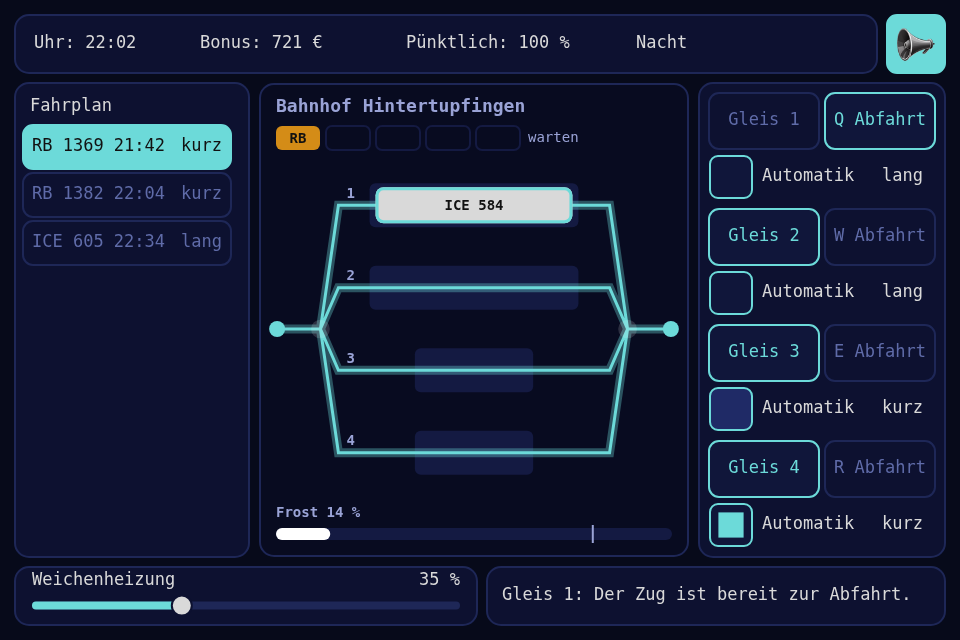
The evening shift in the signal box of a small station: trains come by timetable, four tracks, one way in, one way out, and the frost comes after dark. Every game in this series has a UiPage, and almost nothing on it except buttons, so this one is built from the widgets, and the page is about the page.
Play it · Source: collection-spielwerk/20-stellwerk · Toolbox 5.7.0 or later
The game
Bahnhof Hintertupfingen, 16:00 to midnight, three minutes of real time, and you can't lose it. Sixteen trains come in that time. An ICE is long and pays well; an RB is short and pays little. Gleis 1 and 2 take both, Gleis 3 and 4 only an RB. A train takes 8 to 14 seconds at the platform, then you send it off, and the entry and the exit each hold one train for 3 seconds.
The train that has waited longest is selected by itself, so pressing a Gleis usually just works. A train that waits 40 seconds, or stands ready for 30, counts as late and costs a small fine, but your bonus never goes below 0.
After 19:00 it gets cold. "Weichenheizung" starts at 35 %, which keeps the switches clear all shift, so you can ignore it. It also costs money by the second, so turning it down is a way to save. Turn it down too far and every route is refused with "Weiche eingefroren: Heizung höher stellen", and turning it up gets you out again. Five trains waiting makes the status line say "Rückstau bis Kleinkleckersdorf", and nothing else happens. Every shift ends in "Feierabend" at midnight, with your bonus.
- Mouse or touch: press a
Gleisfor the selected train, or a train in the timetable ("Fahrplan") to choose another.Abfahrtsends it off,Automatikdoes that by itself, the slider heats. Drag or turn the wheel to scroll the timetable. - Keyboard: Up and Down in the timetable, 1 to 4 route, Q W E R depart, Left and Right heat, S mutes.
New in the toolbox: the UI page
The problem. Across 19 games the element classes create one CheckBox and no Label, Panel, Slider or ValueLabel. The rest is painted with card() and text(). That's fine for a picture, but a painted key has no hover, no pressed look and no way to be disabled, and each game would have to find out by hand whether a press hit it. The page can do all of that, and no page here ever explained it.
The idea. One rule, from now on for the whole series:
What you can press is a widget. What you only look at may be painted.
| Thing | Is |
|---|---|
| Timetable | ScrollGroup of Button rows |
| Control panel | Panel with Button, CheckBox and Label |
| Clock, bonus, punctuality | ValueLabel in a Panel |
| Heating, status line | Slider and Label in a Panel |
| Tracks, trains, frost | painted |
A score on a playfield stays paint, and nothing old gets migrated for its own sake.
Widgets in a tree. A Panel is a Group, so its children's rects are relative to it. place() now takes a parent, and the panels move with the layout. On a phone the panels stack and the keys change size, and a second inner layout through one small rule turned out simpler than keeping one:
const controls = this.place(new Panel([], UNPLACED), (layout) => layout.controls);
this.route_buttons = tracks.map((track) => this.place(
    new Button(`Gleis ${track + 1}`, UNPLACED),
    (layout) => settings.track_parts(layout, track).route,
    controls,
));
States and classes. Element.state used to know active and hover. Now it is disabled, active, selected, hover, in that priority, one more comes further down, and a class says what a state can't:
protected override sync(game: Game): void {
    this.properties.route_buttons.forEach((button, track) => {
        button.is_disabled = route_problem(game, { kind: 'in', track }) !== null;
    });
    // and per row of the timetable:
    row.is_selected = game.selected === train;
    row.class = train.is_late ? 'late' : train.state === 'announced' ? 'upcoming' : null;
}
route_problem() is one pure function in the game: the first reason that holds, or null. A disabled key still gets hit, so a press can't fall through to the game, and it still gets hover, so the mouse can read the reason. But touch has no hover, so a press released on a disabled key dispatches ElementRefusedEvent, and the shell has on_refused() next to on_click():
this.on_click(button, () => this.route({ kind: 'in', track }));
this.on_refused(button, () => this.route({ kind: 'in', track }));
Both go to the same function, which asks the game. That matters: is_disabled is what the last repaint knew, and the game knows now.
A theme is a list of rules. A selector type.class:state, each part optional, and some properties:
function phase_rules(style: PhaseStyle): ThemeRule[] {
    return theme_rules_from([
        ['panel', { background_color: hex_color(style.panel), border_color: hex_color(style.panel_line) }],
        ['button', { background_color: hex_color(style.key), text_color: hex_color(style.key_text) }],
        ['button:selected', { background_color: hex_color(style.chosen), text_color: hex_color(style.chosen_text) }],
        ['button:disabled', { background_color: hex_color(style.quiet), text_color: hex_color(style.quiet_text) }],
        ['button.late', { background_color: hex_color(style.late), text_color: hex_color(style.late_text) }],
        // ...
    ]);
}
Daylight is that list with other values. The same panel, the same keys, three times:
| Tag | Dämmerung | Nacht | |
|---|---|---|---|
panel |
#d9d9d9 |
#1b2353 |
#0d1130 |
button |
#ffffff |
#3b4687 |
#10163a |
text on button |
#111111 |
#ffffff |
#6cdad9 |
button:disabled |
#c4c8d6 |
#232c63 |
#0d1130 |
And this is all the game code that swaps them. No widget knows:
// In the settings:
public override readonly themes = {
    tag: phase_rules(TAG),
    daemmerung: phase_rules(PHASE_STYLES.daemmerung),
    nacht: phase_rules(PHASE_STYLES.nacht),
};

// In the logic:
protected override theme_name(game: Game): string {
    return game.phase;
}
The shell asks every frame and swaps when the name changes. The house rules stay underneath, and they now cover all widgets, not only buttons, so a widget placed with no rules at all looks finished. A layout can bring rules of its own on top: the phone shows everything smaller, so its text is larger, and that is one line in the portrait layout, theme_rules: text_size_rules(21).
Scrolling. ScrollGroup is a Group with a vertical offset that clips its drawing, and whatever is clipped away can't be hit. Set row_height and it stacks its children too, so the game only adds and removes rows. A row is a Button with columns, each a share of its width:
const row = new Button(train.name, UNPLACED);
row.columns = [
    { text: train.name, share: 0.43, align: 'left' },
    { text: clock_text(due_minutes(train)), share: 0.32, align: 'left' },
    { text: train.is_long ? 'lang' : 'kurz', share: 0.25, align: 'right' },
];
It needed two things from UiManager. A press on a row locks the row, and a row doesn't drag, so a drag is now offered to the parents once it has moved 10 units; once a parent has taken it, the release is no click. Below that distance a shaky tap on a phone still presses the row. And the wheel is new, all the way down from bind_stage_input. Rows come and go, so Group.remove() exists now too, and a removed row loses its press and hover: a dead widget clicks nothing.
The test and the traps. The widgets had never been run inside a parent, and I suspected four bugs from reading the code. Each got a failing test first, and all four were real. The worst:
const slider = new Slider('s', 0, 100, 0, { left: 20, top: 10, width: 200, height: 40 });
const { ui } = page_of(new Panel([slider], { left: 300, top: 100, width: 300, height: 100 }));
// the panel starts at 300, the slider 20 further: its middle is at 420
ui.pointer_down({ x: 420, y: 130 });
expect(slider.value).toBeCloseTo(50);
It read 100: drag() got page coordinates, and compared them to a rect relative to the panel. Labels drew in the wrong place for a similar reason, a CheckBox couldn't have text, and a Slider showed two decimals; it now takes a format.
The trap you'll meet yourself is the order of the rules: .class:state beats :state beats .class beats type. So button:hover beats button.late, and a late train lost its color under the pointer until it got its own button.late:hover.
The end card was the last question, because the page draws after the scene and a painted card would lie under the panels. The simplest answer is one loop in sync(), panel.is_visible = !game.is_over, and the shell's result_panel() as before. Building the card from widgets would have repeated all of its layout. A press in the first moment after the end was meant for the game and not for the next shift, so round_end_hold_seconds in the settings makes the card wait a second.
docs/ui.md in the toolbox is rewritten with all of this. The modules are src/ui/Element.ts, src/ui/Group.ts, src/ui/UiManager.ts and src/ui/widgets/ScrollGroup.ts.
New in the toolbox: a theme that moves
The first version of this game had no motion. The spec named the fade at dusk as the first thing to cut, and I cut it: a key snapped on hover, and at 19:00 the whole panel snapped to dusk. Then the question came back, and rightly so: a theme ought to be able to do this. Now it can, and the game still has no timer for any of it. All of it is rules. It should stay quiet, too, since this is a signal box.
A transition goes from one value to another. transition_seconds on a rule says how long a change takes on that element:
const PRESSED = new ThemeTransformValue([{ type: 'scale', x: 0.97, y: 0.97 }]);

['button:hover', { background_color: color(style.key_hover) }],
['button:active', { background_color: color(style.key_active), transform: PRESSED }],
There is no duration in that sample, because the house rules already have 0.12 seconds on buttons, checkboxes and sliders, so a game gets this without asking. And a key held down gives a little, by the 3 percent in PRESSED. At rest nothing looks different: I compared all the earlier games against their last releases, pixel by pixel.
The part that matters is where it starts: from what shows right now, not from where the last state was. Cross a row quickly and its color turns around in the middle. Elements also re-evaluate their rules whenever anything changes, so each one remembers what the rules last asked for, and only a different answer starts anything.
Tweens were in the theme already, for numbers, and nothing used them. They came with a bug that got a failing test first:
const to_ten = new ThemeValueTweenNumber(0, 10, 1);
const to_twenty = new ThemeValueTweenNumber(0, 20, 1);
expect(to_ten.equals(to_twenty)).toBe(false);
It said true, because equals() compared the start values twice and never looked at the end. Colors and transforms got tweens of their own.
An animator keeps moving, for as long as its rule applies. A late train's row breathes between two oranges, once in 1.6 seconds, and the only thing the game does about it is row.class = 'late':
const late_pulse = theme_pulse(color(style.late), color(style.late_pulse), 1.6);

['button.late', { background_color: late_pulse }],
['button.late:hover', { background_color: late_pulse }],
A refused press gets the state that was still missing. A key that can't be used is usually disabled and says why in the status line. But the game has the last word, so it also says when:
const keys = request.kind === 'in' ? properties.route_buttons : properties.depart_buttons;
keys[request.track].show_refused();
For 0.35 seconds the key is in the state refused, which beats all the others. The house rules give it a small shake that dies away, and this game's own rule colors its text and border like a late train.
The phase fade is the same mechanism with one duration for one change. theme_fade_seconds = 4 in the settings, and every widget goes from what it shows to what the next theme says. But the track diagram is painted, so no rule reaches it. It has one line for that:
protected override frame(): FrameExtras<Frame> {
    return { best: this.properties.best, is_end_ready: this.is_round_end_ready, style: this.properties.blended(PHASE_STYLES) };
}
blended() takes a table with one entry per theme and returns the shown one, or during a fade the mix that goes with the widgets. I measured that on the frames: backdrop, board and panel showed the same share of the way at each of them, 8, 32, 68 and 92 percent. A key that changes state during the fade gets to the new color early, in its own 0.12 seconds, because a hover must stay quick. And around the middle, text and panel cross, so for most of a second the contrast is low. That's dusk, I left it.
A new game snaps, and so does a change of layout, because nothing should fade in when you turn your phone.
Why the repaint matters. A canvas game like this paints only when something changed. Without more, a hover would start its tween, one frame would paint the first step, nothing else would happen, and the key would stay a few percent of the way to its color until the mouse moved again. In a game that is painting anyway you'd never see it, so it has a test of its own, on a still game. The shell now asks once per frame:
if (properties.poll_animation()) {
    // A still game only repaints when something changed, and this is something.
    properties.is_dirty = true;
}
poll_animation() says whether a value moved, or just arrived, so there is one last paint at the exact end value and then it stops again.
Testing what moves. The theme reads the time from one place, and set_theme_clock() replaces it, so a unit test steps through a transition rather than waiting. The browser check does the same with Playwright's fake clock: it stops the page in the middle of a fade, a hover, a press and a refusal, reads the pixels, and saves a frame. A screenshot can't show motion, but a row of them can. That still leaves the feel of it to a person with a real phone.
From earlier steps
SeededRandomfrom step 01: the order of the trains and their gaps.SessionBestfrom step 05: the best bonus.AudioPlayerfrom step 17: route, refusal, late train.
The rest is in Spielwerk 00: The workbench, which now has a section on the UI page, and TimedNotice: step 19 wrote that message by hand, and this was the second.
This game is here to show the page, so its balance targets someone playing it for the first time, who may well be looking at the theme instead of the trains. My first balance got that wrong. I tuned it with bots that reacted in half a second and took "a bot reaches midnight" for fair. Then it was played by a person: doing nothing ended the shift after about 35 seconds, and with the slider left at 0 the switches froze for good. So there's no early end now, the shift is shorter and quieter, and the heating starts on.
The numbers are from bots again, but slower ones, 300 seeded shifts each. Doing nothing reaches midnight every time, with 0 €. A newcomer who takes 2 seconds per press, routes the oldest train to the first track it fits, presses Abfahrt when ready and never touches the slider or Automatik makes a mean bonus of 1010, with every train on time and never a freeze. At 4 seconds per press it's 795, with 93 % on time, the worst shift at 53 %, and still no freeze.
Some of the old decisions are gone with that, and I'm saying so rather than pretending. Keeping a long track free no longer pays: the planning bot makes 1012 against 1010. Automatik doesn't matter at 2 seconds per press, but at 4 it lifts the bonus from 795 to 1012, so it is relief for slow hands. The heating is what's left for a better score. 20 % all shift makes 1056 with no freeze, 15 % makes 1072 and freezes for the last few seconds, off and forgotten makes 1038, and full heating 811. No bot can say whether it feels right, and no person has confirmed that yet.
Embed it
<script src="https://www.game-object.de/tce-elements/tobidot/dll-tce-assets"></script>
<script src="https://www.game-object.de/tce-elements/tobidot/tce-stellwerk"></script>
<tce-stellwerk init-seed="4711"></tce-stellwerk>
| Attribute | Values | Default |
|---|---|---|
init-seed |
whole number; the first run, every next run is seed + 1 | random |
init-intro |
true / false: play the GO logo intro at the first connection |
true |
Next
Previous: Spielwerk 19: Schleim-Abwehr · Next: Spielwerk 21: Amtsschimmel · All steps
Comments