
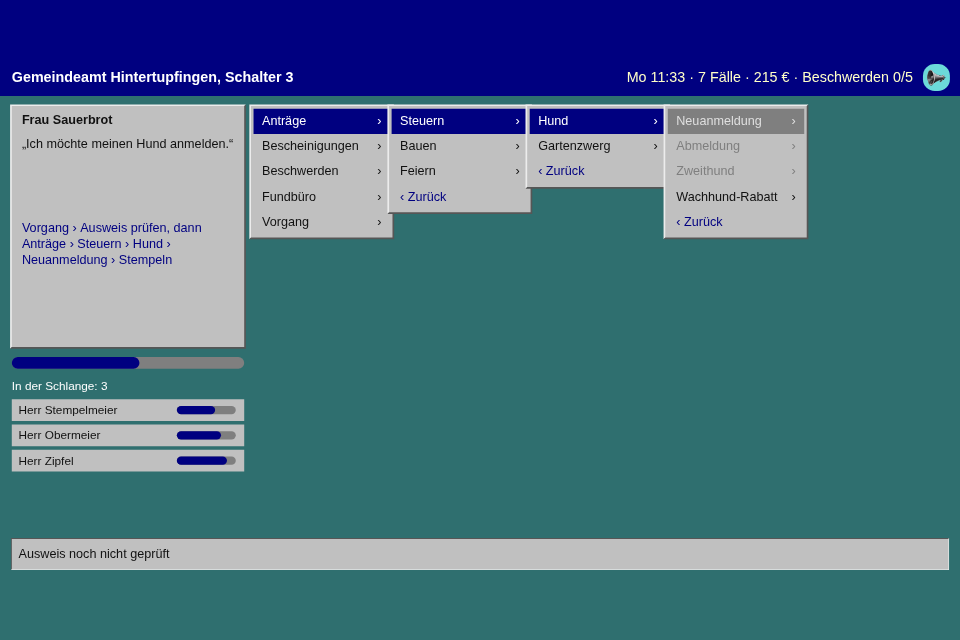
The counter of the Gemeindeamt Hintertupfingen in 1995: citizens queue, the office software is one big nested menu, and the old PC needs a moment for every submenu. A menu that is the whole game needs more than the cursor from step 18, so this step adds input of its own, a view that draws it in any style, and a buffer that lets a practised hand type ahead through "Bitte warten…".
Play it · Source: collection-spielwerk/21-amtsschimmel · Toolbox 5.7.0 or later
The game
"Ich möchte meinen Hund anmelden" is Anträge › Steuern › Hund › Neuanmeldung, then Stempeln. Some forms need a step first, and stay disabled until it's done: "Ausweis noch nicht geprüft" means Vorgang › Ausweis prüfen. The wrong form costs patience ("Falsches Formular!"), a citizen out of patience leaves a complaint, and five complaints get you moved to the archive. That takes real effort: patience outlasts the day, so nobody complains just because you took your time.
A week has five days of 75 seconds, about six minutes. It's a demo of a menu, so it doesn't rush you: the citizen's card shows the whole way from Monday to Wednesday, and where to start on Thursday and Friday. Between the days you buy improvements to the menu: Schnellerer Rechner in two steps, Kürzel (a letter per entry) and Favoriten (your three most used forms on top). On Wednesday morning, "Version 2.1: Alles ist jetzt besser" moves about half the folders, and the card knows the new way, so it's a surprise and not a punishment. "Feierabend" comes on Friday evening. All the German is a draft.
- Mouse or touch: hover shows why a form is disabled, a press goes straight through, a tap needs no second tap. Drag or turn the wheel on a long list.
- Keyboard: Up and Down move, Enter or Right opens, Escape or Left goes back. With
Kürzel, a letter picks its entry. F2 mutes, since S is a letter now.
New in the toolbox: MenuInput
The problem. Menu from step 18 has a tree and a cursor and knows nothing of the keyboard, so each game writes its own handle_key, and its own guess at what happens during a wait. Here the wait is the whole point. An old hand knows the tree: Down, Down, Enter, Enter, while the machine is still thinking. Without help those presses vanish, and everyone has to play at the speed of the slowest screen.
The idea. Three classes, one job each. Menu is the tree, MenuInput the keys, the presses and the buffer, MenuView the drawing. MenuInput works like KeyboardState from step 02: events go in, the game asks during update(), and the frame ends.
export class MenuInput<T> {
    public constructor(menu: Menu<T>, options?: { buffer_seconds?: number; buffer_size?: number });
    /** While true, presses wait in the buffer, and nothing moves. */
    public is_held: boolean;
    public choices(): T[];
    public get last_refused(): MenuEntry<T> | null;
    public on_choice: ((choice: T) => void) | null;
    public on_change: (() => void) | null;
    public handle_key(key: string, is_repeat?: boolean): void;
    public handle_hover(depth: number, index: number): void;
    public handle_press(depth: number, index: number): void;
    public update(delta_seconds: number): void;
    public end_frame(): void;
}
The shell runs it: a placed MenuView hands its input to the shell, which routes the keys after the intro and calls update() and end_frame() around the game's own update. So the game is only about the game. This is the heart of the glue between the two, trimmed, and the hold has to start inside the press, or a replayed press would overtake it:
this.forms_input.on_change = () => {
    if (this.forms.path.length > this.open_depth) {
        this.game.begin_submenu_wait();
        this.forms_input.is_held = true;
    }
};
this.forms_input.on_choice = (choice) => {
    this.game.file(choice);
    this.forms.reset();
    this.forms_input.is_held = this.game.is_waiting;
};
The buffer holds presses, not choices. Typing ahead means pressing Down, Down, Enter during a wait, so the moves have to wait as well. They replay in order when the hold ends, and a replayed Enter may open the next submenu and start the next wait.
The balance targets a first-time player. The first version was tuned so that fast bots had to work, and when the owner of this series played it, it was too hard and frustrating for something that exists to show a menu. Now nobody gets rushed out while looking at it, and being quick is an optional way to score better. I also had guesses about the rules of the buffer, so a throwaway probe played 60 seeded weeks per bot. The newcomer presses once per 1.5 seconds, follows the card and picks wrong about 10 percent of the time. A typist knows the tree and presses 8 keys a second without looking; the same typist with "waits" looks up until the machine is free. The next citizen comes sooner when the counter is empty, so a quick player does score better, and seconds per case is what shows the buffer:
| Bot | buffer_seconds |
Cases, of those who came | Seconds per case | Wrong | Dropped | Reached Friday |
|---|---|---|---|---|---|---|
| Idle, presses only "Weiter" | 1 | 0 of 25 | 0 | 0 | 60 of 60 | |
| Newcomer, 1.5 s per press | 1 | 26 of 34 | 12.6 | 1.0 | 0 | 60 of 60 |
| Distracted, 3 s per press | 1 | 12 of 33 | 25.1 | 0.5 | 0 | 60 of 60 |
| Typist | 0 | 0 of 26 | 10.1 | 858 | 60 of 60 | |
| Typist | 0.3 | 79 of 81 | 1.92 | 1.4 | 13 | 60 of 60 |
| Typist | 1 | 81 of 82 | 1.84 | 0.6 | 0 | 60 of 60 |
| Typist, waits | any | 72 of 74 | 2.42 | 0.7 | 0 | 60 of 60 |
| Masher, 30 % random | 1 | 25 of 39 | 11.07 | 70.7 | 96 | 58 of 60 |
| Masher, 10 % random | 1 | 71 of 74 | 2.47 | 15.5 | 20 | 60 of 60 |
| Tourist, 5 keys a second, never buys | 1 | 55 of 59 | 3.91 | 2.5 | 0 | 60 of 60 |
| Tourist, waits | any | 46 of 50 | 5.25 | 1.6 | 0 | 60 of 60 |
The newcomer's weeks have no complaints at all, it closes at least 70 percent of those who came on every seed, and it owns at least 3 upgrades by Thursday.
What the bots decided about the input:
- The default is 1 second, longer than any wait. I'd have guessed a small forgiving number, and 0.3 is shorter than a stamp of 0.35 seconds: on the slow Monday the oldest press dies, and with it all the presses after it. The rule is to make it longer than your longest hold. The gain over looking up is 24 percent per case for the typist and 26 for the tourist.
- What goes, goes with all behind it. A queue with a hole in it means something else. Down, Down, Enter without one Down opens the wrong form. So there are no holes.
- Time counts per hold. In my first version the oldest press aged through the whole chain, and a long case at short waits ran out half way, with nothing wrong anywhere. The bots found it. After each replayed press the rest start counting afresh.
- A replayed press on a disabled entry drops the rest. Playing on changes nothing for a typist or a tourist. It gives a 30 percent masher more wrong forms, 78.3 against 70.7, and no more cases, 24.1 against 25.1. It drops.
- A new tree drops the queue. With an update forced under a queue, in 58 weeks with the fingers then still, kept presses moved the menu 15 times in a tree they weren't meant for, 8 of those into a folder off the way, and cleared presses never did. Clearing was the guess, and it holds.
A masher doesn't gain: at 12 keys a second and 10 percent random presses it is slower per case than the typist at 8, with 15.5 wrong forms against 0.6, because the buffer can't aim. The archive stays a real effort: at the default buffer only the 30 percent masher gets there, in 2 weeks of 60. And the update costs a typist 4.3 cases of about 18 on the Wednesday, a tourist 2.6 of about 12, and a newcomer, who follows the card, nothing measurable.
Two rules I hadn't planned. stops_on_disabled on Menu: in an office program the cursor stops on a dimmed entry, a keyboard can read its reason too, and the number of Downs to a form doesn't depend on what's currently enabled. Without it, finishing a step would change the way to the form. And is_enabled on MenuInput, for the screen between the days: it has a menu of its own, placed like the other, and only one of them may listen.
The module is src/input/MenuInput.ts.
New in the toolbox: MenuView
With no thought at all, this is a finished menu:
this.forms_input = new MenuInput(this.forms);
this.forms_view = this.place(new MenuView(this.forms_input, UNPLACED), (layout) => layout.menu);
A row per entry, the cursor fading from row to row, › on a submenu, a marked back row, disabled rows dimmed and still pressable, a hint line with the reason, a list that scrolls, a long label ending in …. It reads the menu when it draws and when it's hit, so when Ausweis prüfen is done, the form lights up by itself in the open menu.
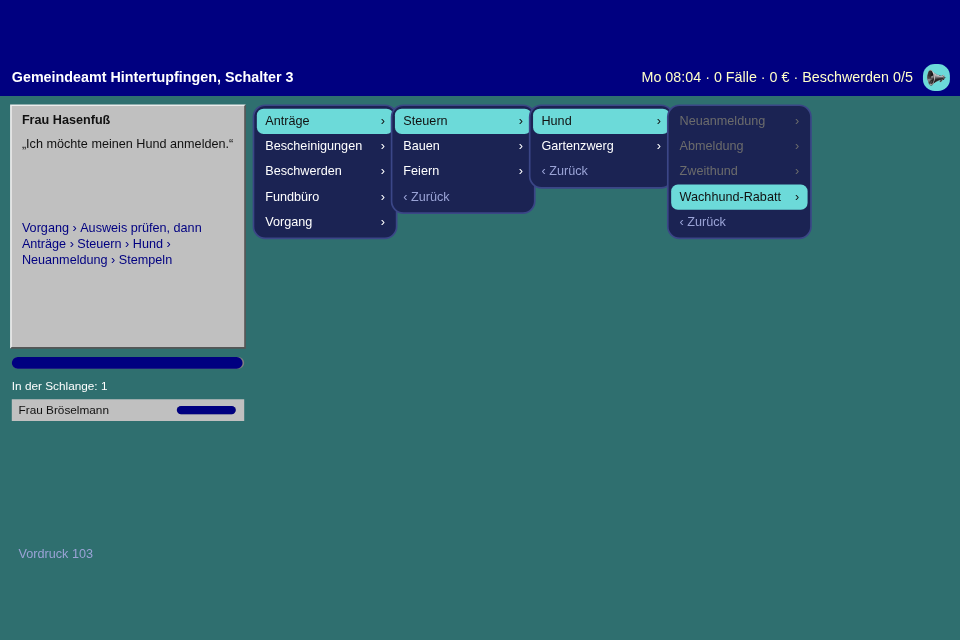
A style is a list of rules. There is no style class. The theme from step 20 already matches type.class:state, and the view's parts are elements with types of their own:
export const OFFICE_95 = theme_rules_from([
    ['menu', { background_color: silver, border_style: 'raised', border_color: silver, border_width: 2 }],
    ['menu:entering', { transform: theme_slide(-10, 0, 0.09) }],
    ['menu-row', { background_color: silver, text_color: black, border_radius: 0, transition_seconds: 0 }],
    ['menu-row:selected', { background_color: navy, text_color: white }],
    ['menu-row:disabled', { background_color: silver, text_color: gray }],
    ['menu-row:disabled_selected', { background_color: gray, text_color: light }],
    ['menu-row:refused', { background_color: red, text_color: white, transform: theme_shake(4) }],
    ['menu-hint', { background_color: silver, border_style: 'sunken', border_color: silver, border_width: 1 }],
    ['menu-hint.held', { background_color: theme_pulse(silver, amber, 0.5), text_color: black }],
    // ...
]);
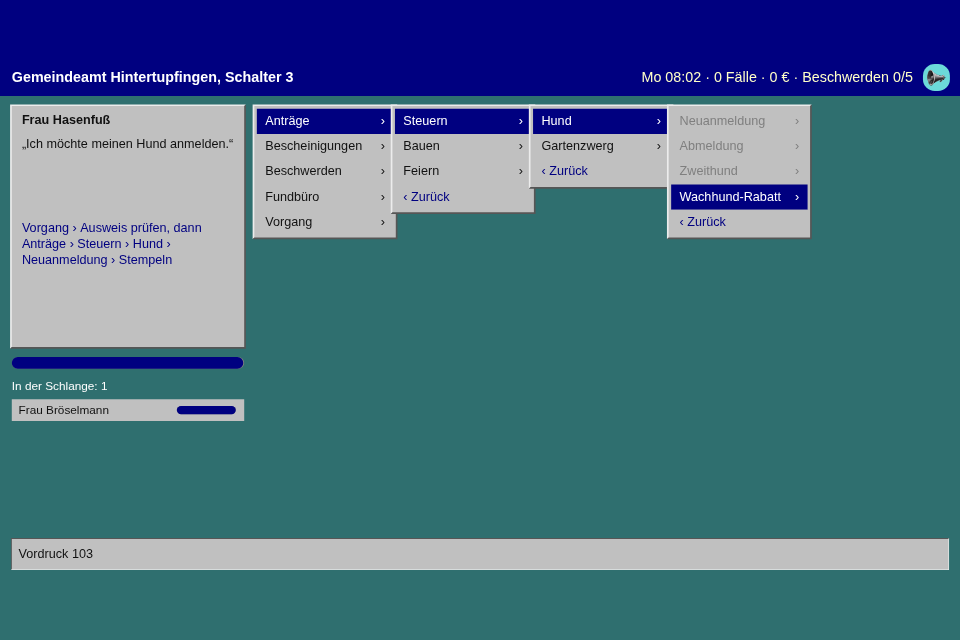
The bevels needed border_style: 'raised' and 'sunken', which existed as a name that nothing read. The rest needed nothing new but one state, entering, for what has just appeared.
The proof. This game's desktop is one MenuView per open level, each with its level, placed by a rule that reads menu.levels, which makes the cascade. On a phone it is one MenuView with the same rules at full width. The same Menu, the same MenuInput, and one picture is only a different layout:
this.cascade_views = Array.from({ length: settings.cascade_levels }, (_, level) => this.place(
    new MenuView(input, UNPLACED, { style: OFFICE_95, level, row_height: 30, row_gap: 0, padding: 3, show_hint: false }),
    (layout) => settings.cascade_rect(layout, this.desk.forms.levels, level),
    this.cascade,
));
this.phone_view = this.place(
    new MenuView(input, UNPLACED, { style: OFFICE_95, row_height: 66, row_gap: 0, padding: 4, show_path: true, root_text: 'Hauptmenü', held_text: settings.wait_text }),
    (layout) => layout.menus,
    this.phone,
);
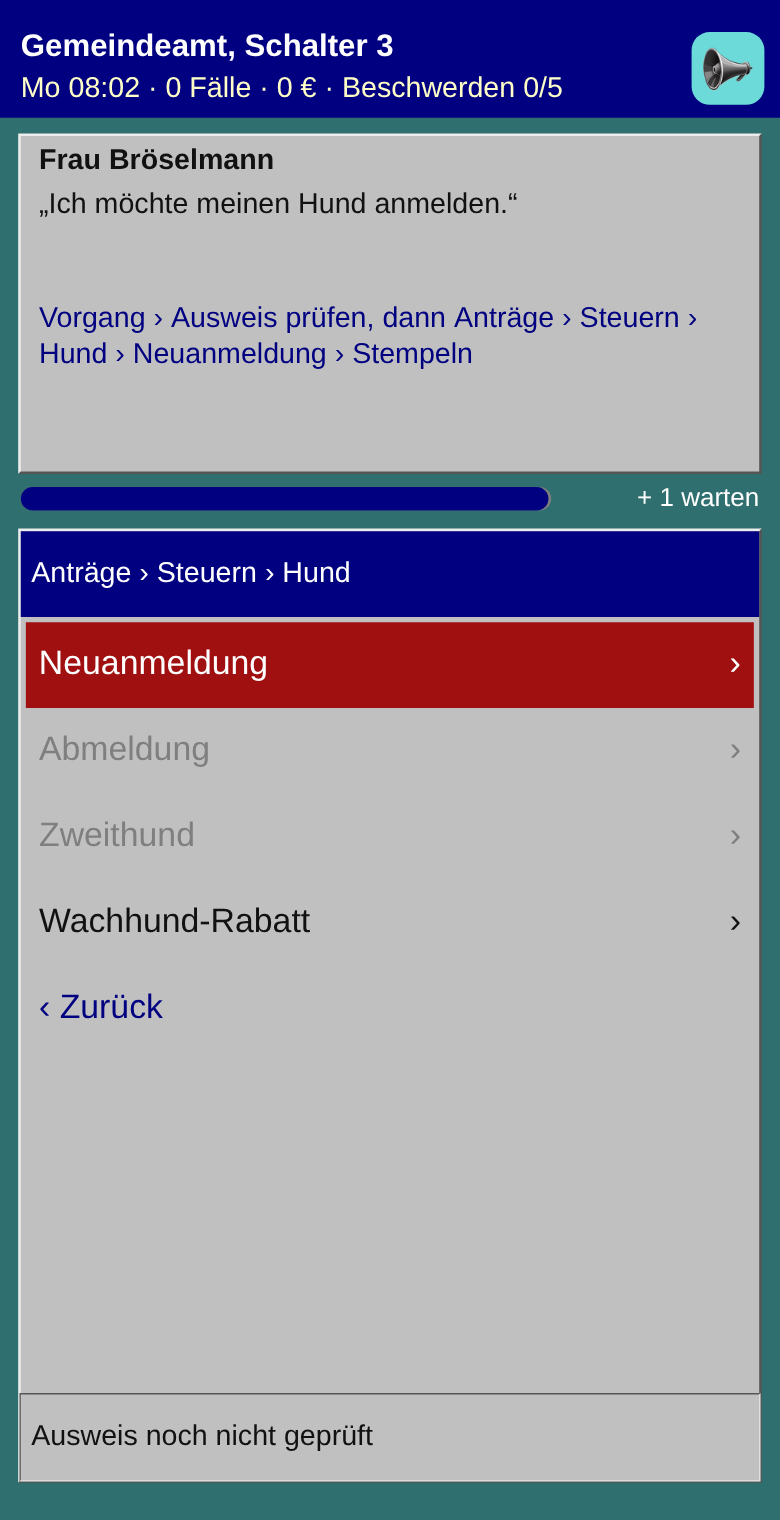
The renderer paints the title bar, the patience bar and the queue, and not one row. Nothing here needed a MenuRow subclass, which is what the spec said to stop and report.
What moves, by rules. The owner of this series wants more movement, and all of this is in the rules above and in src/ui/, with no timer in the game. The house cursor fades, the row it leaves and the row it reaches across each other. A press on a disabled row shakes and flashes red, as a refused press did in step 20. "Bitte warten…" pulses, an impatient citizen's card breathes, a level slides in over 0.09 seconds, under even the shortest wait, so it can't feel slower than the rule. And OFFICE_95 shows a style can decide the other way: transition_seconds: 0, because a program of 1995 snaps. I compared both on stepped frames. At 8 keys a second a fade never quite arrives anywhere, and three rows glimmer at once, so for this game the snap reads better; you may well want the fade in another.
The traps. A state beats a type. So a style that sets a row's background has to set :hover, :active and :refused too, or the house colors show through under the mouse, and the style as first planned did exactly that. A view whose level is empty had also never counted as appearing, so a cascade's levels didn't move at all until a test said so. And MenuView isn't quite the ScrollGroup the plan had: it holds one, because the path and the hint must not scroll away.
A test, from the input's own file:
it("counts time per hold: a chain of short waits doesn't run out", () => {
    const { menu, input } = setup({ buffer_seconds: 0.3 });
    input.on_change = () => {
        input.is_held = menu.path.length > 0;
    };
    input.is_held = true;
    type(input, "Enter", "Enter", "ArrowDown");
    for (let hold = 0; hold < 2; hold++) {
        input.update(0.25);
        input.is_held = false;
        input.update(0);
    }
    expect(input.dropped_presses).toBe(0);
    expect(menu.path).toEqual(["Anträge", "Steuern"]);
});
A wrapped Label, text_overflow = 'ellipsis' on a Button, reserves_gutter and a transform that moves a whole Panel came along, each with a failing test first where it was a bug. The module is src/ui/widgets/MenuView.ts, and docs/ui.md in the toolbox has a section on all three.
From earlier steps
Menufrom step 18: the tree and the cursor, now withback,key,levels,back_to()andset_entries().- The UI page from step 20:
ScrollGroup,selectedanddisabled, the refused state,transition_seconds,theme_pulse. SeededRandomfrom step 01: who comes, with what, and which folders move.SessionBestfrom step 05: the most cases in a week.AudioPlayerfrom step 17: a level, a stamp, a refusal.
The rest is in Spielwerk 00: The workbench.
Embed it
<script src="https://www.game-object.de/tce-elements/tobidot/dll-tce-assets"></script>
<script src="https://www.game-object.de/tce-elements/tobidot/tce-amtsschimmel"></script>
<tce-amtsschimmel init-seed="4711"></tce-amtsschimmel>
| Attribute | Values | Default |
|---|---|---|
init-seed |
whole number; the first run, every next run is seed + 1 | random |
init-intro |
true / false: play the GO logo intro at the first connection |
true |
Next
Previous: Spielwerk 20: Stellwerk · Next: Spielwerk 22: Leuchtfeuer · All steps
Comments