
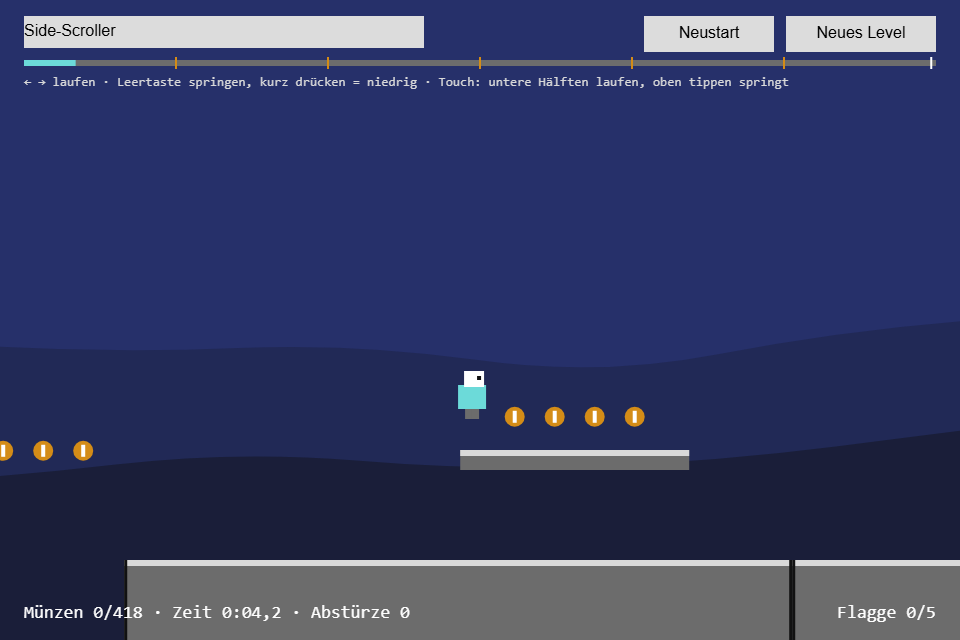
A seeded level sixty screens wide: platforms, gaps, coins, a flag every ten screens and the goal at the end. It is the first game in the series whose world is bigger than the screen, so the new toolbox module is Camera2D: a camera that follows the hero without shaking and lets the renderer forget about scrolling.
Play it · Source: collection-spielwerk/12-side-scroller · Toolbox 5.6.0 or later
The game
Run to the goal flag, collect coins and don't fall. A short tap on jump is a hop, holding it is a full jump; walking off an edge still allows a jump for a tenth of a second, and a jump pressed just before landing fires on landing. Falling out of the bottom brings the hero back at the last flag passed. At the goal, "Geschafft!" (made it) shows the time, the coins and the falls ("Abstürze"). "Neustart" plays the same level again, "Neues Level" (new level) rolls the next one.
- Keyboard: Arrow Left/Right or A/D run, Space, Arrow Up or W jumps; after the goal, Space or Enter plays again.
- Touch/mouse: the lower half runs left or right depending on the side, the upper third jumps and holds the jump while the finger stays.
New in the toolbox: Camera2D
The problem. Without a camera every draw call subtracts a scroll offset: fillRect(platform.left - scroll_x, ...), for platforms, coins, flags and the hero, and the click handler adds it back. Step 11 got away with one scroll_x; vertical scrolling, zoom or background layers multiply that bookkeeping all over the renderer.
The idea. A camera is a transform. The world is painted in its own coordinates, the hero stands at x = 23 000, and the camera tells the canvas that 23 000 is in the middle of the picture right now. One method per frame decides where it looks: through a dead zone, ahead in the running direction, eased, never outside the level.
The API, trimmed:
const camera = new Camera2D({
    viewport: { width: 960, height: 640 },   // the view in world units at zoom 1
    bounds,                                  // the world; the view never leaves it
    dead_zone,                               // relative to the view's center
    look_ahead: { x: 150, y: 0 },            // offset in the direction of the velocity
    smoothing: 0.85,                         // keep 85 % of the distance per 1/60 s
});
camera.follow(target, velocity, delta_seconds);  // once per frame
camera.center_on(point);                         // jump there, no easing
camera.apply(context);                           // the transform
camera.world_to_screen(p); camera.screen_to_world(p);
camera.view; camera.is_visible(rect, margin); camera.parallax(factor);
apply is the whole transform: position is the top-left corner of the view in world units, and it is multiplied onto whatever transform the context already has, so the letterbox scaling set before it stays.
public apply(context: CanvasRenderingContext2D): void {
    context.transform(this.zoom, 0, 0, this.zoom, -this.position.x * this.zoom, -this.position.y * this.zoom);
}
Where to look is follow. Keeping the hero exactly centered wobbles with every step, so the hero may move inside a dead zone without the camera moving. Once he leaves it, the camera moves exactly as far as it takes to catch him at the zone's edge:
function push_into_zone(center: Vector2I, zone: RectI, point: Vector2I): Vector2 {
    const wanted = new Vector2(center);
    const left = center.x + zone.left;
    const right = left + zone.width;
    if (point.x < left) {
        wanted.x += point.x - left;
    } else if (point.x > right) {
        wanted.x += point.x - right;
    }
    // y the same way
    return wanted;
}
The tracked point is the hero plus the look-ahead, an offset that slides towards the velocity's direction and stays when he stops. Both ease by the same rule, a share of the remaining distance per frame, independent of the frame rate:
private blend(delta_seconds: number): number {
    if (this.smoothing <= 0) {
        return 1;
    }
    return 1 - Math.pow(this.smoothing, Math.max(0, delta_seconds) * 60);
}
Then clamp keeps the view inside the bounds: never left of the level's start, never right of its end.
Parallax is one line: parallax(0.3) returns position * 0.3, a camera moving at 30 % of the speed. The two ranges of hills behind the level are painted minus that offset, each with its own factor.
How the game uses it. The Game owns the camera and updates it after the physics sub-steps; a respawn centers it without easing:
// src/game/Game.ts
this.camera = new Camera2D({
    viewport: { width: LEVEL.screen_width, height: LEVEL.screen_height },
    bounds: { left: 0, top: 0, width: this.level.width, height: this.level.height },
    dead_zone: CAMERA.dead_zone,
    look_ahead: CAMERA.look_ahead,
    smoothing: CAMERA.smoothing,
});
// in update():
this.camera.follow(this.hero_center, this.velocity, delta_seconds);
The renderer applies it and paints the world in world units. One trap: camera.view is the reference viewport, but the stage can be wider or taller than that, and the letterbox margin shows world too. So the renderer does not ask camera.is_visible; it turns the whole visible canvas area into world coordinates and culls against that:
// src/TceSideScrollerRenderer.ts, paint_world()
const camera = game.camera.position;
const world = view_of(this.visible, camera.x, camera.y);   // the shell's visible area, moved by the camera
context.save();
game.camera.apply(context);
this.paint_platforms(context, game, world);   // skips what lies outside `world`
// coins, flags, hero
context.restore();
The test (src/camera/Camera2D.test.ts) pins down the dead zone:
camera.center_on({ x: 1000, y: 320 });
camera.follow({ x: 1050, y: 300 });
expect(camera.center.x).toBe(1000);          // inside the zone: no movement
camera.follow({ x: 1130, y: 320 });
expect(camera.center.x).toBe(1030);          // out by 30: dragged by exactly 30
Other cases cover the bounds, the round trip world_to_screen/screen_to_world at zoom 2, and that one frame of 2/60 s eases as far as two of 1/60 s.
Path of the module: src/camera/Camera2D.ts.
From earlier steps
SeededRandomfrom step 01: builds the level; afork()builds the hills.KeyboardStatefrom step 02: read once per frame together with the fingers on the stage.Timerfrom step 05: coyote time and the jump buffer.integratefrom step 06: the hero under gravity, in sub-steps of 1/120 s.aabb_moveandaabb_overlapsfrom step 11: the hero against the platforms, and the coins.
Step 11 said a platformer hero needs the slide of aabb_move, and here it is. The hero stops at a wall and keeps falling along it, or stands on the floor and keeps running. The game only asks which sides were hit, and the hit's normal says that: it points away from the wall, so a floor is y < 0.
// src/game/Game.ts, step()
const moved = aabb_move(from, delta, this.level.platforms);
this.position.set(moved.rect.left, moved.rect.top);
if (moved.hits.some((hit) => hit.normal.x !== 0)) {
    this.velocity.x = 0;                        // a wall
}
if (moved.hits.some((hit) => hit.normal.y > 0)) {
    this.velocity.y = 0;                        // a ceiling
}
// normal.y < 0 is the floor: the hero is grounded and a buffered jump fires
The sub-steps stay because they keep the jump the same at any frame rate. The sweep already stops a fast fall from passing through a platform.
The scaffold, start screen, logo intro and scaling are explained once in Spielwerk 00: The workbench. "Neustart" and "Neues Level" are toolbox Buttons on a UiPage. What this step first wrote by hand for the button font size is part of the canvas game shell now; the workbench lists it under "Extracted along the way".
Embed it
<script src="https://www.game-object.de/tce-elements/tobidot/dll-tce-assets"></script>
<script src="https://www.game-object.de/tce-elements/tobidot/tce-side-scroller"></script>
<tce-side-scroller init-seed="4711"></tce-side-scroller>
| Attribute | Values | Default |
|---|---|---|
init-seed |
whole number; the level, "Neues Level" plays seed + 1 | random |
init-intro |
true / false; play the GO logo first |
true |
Next
Previous: Spielwerk 11: Flappy Bird · Next: Spielwerk 13: 2D-Puzzle mit Schaltern · All steps
Comments