
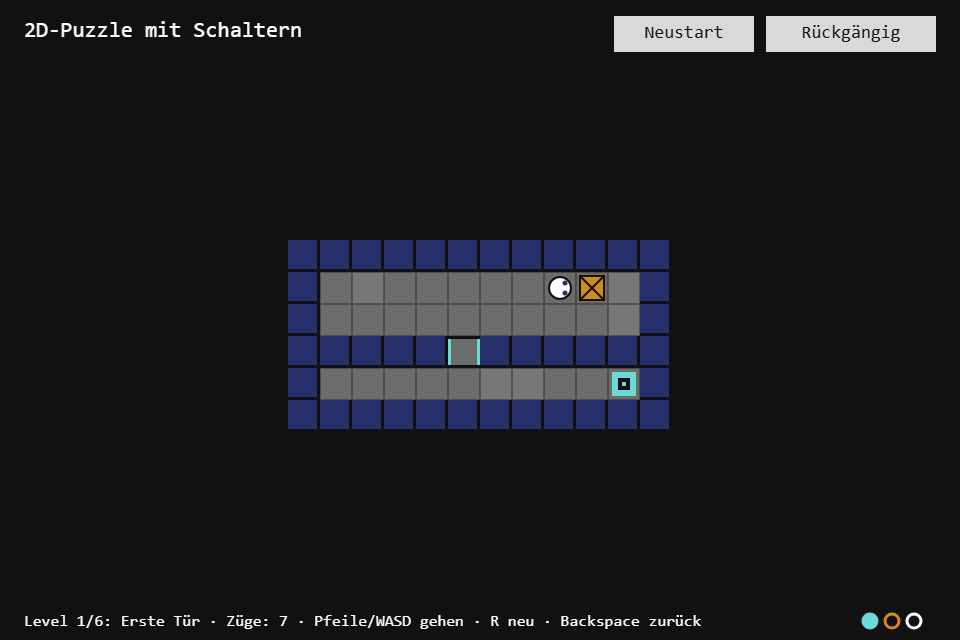
A puzzle seen from above: push boxes onto switches, doors open, the exit waits behind them. Six hand-built levels, counted moves, undo. The new toolbox module is TileMap, the data structure almost every 2D game stands on: a grid with layers, world coordinates, and levels you can draw as text.
Play it · Source: collection-spielwerk/13-schalter-puzzle · Toolbox 5.6.0 or later
The game
The figure walks one tile per move and pushes a box in front of it, but only one, and never into a wall or a second box. A switch is pressed while a box or the figure stands on it, and a pressed switch opens every door of its color; standing on the switch yourself does not get you through its door, a box does. A move that would close a door on something is not made. Reach the exit in as few moves ("Züge") as you can; after the sixth level the game shows the total.
- Keyboard: arrows or WASD walk (a held key keeps walking), R restarts the level, Backspace (or Z, U) undoes, Enter or Space goes on after the exit.
- Mouse/touch: tap a tile and the figure steps towards it; "Rückgängig" (undo), "Neustart" (restart) and "Weiter" (next).
New in the toolbox: TileMap
The problem. Step 03 gave the toolbox Grid2D, which answers one question: what is at (x, y)? A tile game asks more. Which tile is under this point in pixels? Which rectangle does a tile cover? Which tiles does this box touch? And it holds two kinds of data on one grid: a ground that never changes and things that move every turn (boxes, the player). In one Grid2D, every push has to remember what was underneath.
The idea. A tile map is several named layers of the same size, plus the arithmetic between tile positions and world coordinates: tile (x, y) covers the world rectangle from (x * tile_size, y * tile_size) with edge tile_size. What a value means stays the game's business. And a level is a picture: one string per row, one character per tile.
The API, trimmed:
export class TileLayer<T> extends Grid2D<T> {
    readonly name: string;
    visible: boolean;                                   // a renderer skips hidden layers
    clone(): TileLayer<T>;
}

export class TileMap<T> {
    static readonly GROUND = "ground";                  // the layer every map starts with
    constructor(options: { width: number; height: number; tile_size: number }, fill: T);
    static from_ascii<T>(rows: readonly string[], legend: Record<string, T>, tile_size: number, fallback: T): TileMap<T>;
    add_layer(name: string, fill: T): TileLayer<T>;     // throws on a duplicate name
    layer(name: string): TileLayer<T>;                  // throws when it is missing
    layers(): TileLayer<T>[];                           // bottom to top
    is_inside(x: number, y: number): boolean;
    world_to_tile(world_x: number, world_y: number): { x: number; y: number };
    tile_to_world(x: number, y: number): RectI;
    tile_at(layer: string, world_x: number, world_y: number): T | null;
    rects_where(layer: string, predicate: (value: T) => boolean): RectI[];   // collision lists
    tiles_in(layer: string, rect: RectI): TileEntry<T>[];                     // tiles a box touches
    clone(): TileMap<T>;
}
from_ascii is the cheapest level editor there is. The map is as wide as the longest row; short rows and characters missing from the legend become fallback, so a level may have any shape:
public static from_ascii<T>(rows: readonly string[], legend: Record<string, T>, tile_size: number, fallback: T): TileMap<T> {
    const width = rows.reduce((max, row) => Math.max(max, row.length), 0);
    const map = new TileMap<T>({ width, height: rows.length, tile_size }, fallback);
    const ground = map.layer(TileMap.GROUND);
    rows.forEach((row, y) => {
        for (let x = 0; x < row.length; x++) {
            const character = row[x];
            if (Object.hasOwn(legend, character)) {
                ground.set(x, y, legend[character]);
            }
        }
    });
    return map;
}
The world conversions are where games usually catch an off-by-one, so the edges are pinned down. world_to_tile is Math.floor(world / tile_size), and tiles_in makes a rectangle that ends exactly on a tile edge stop before the next tile:
const first = this.world_to_tile(rect.left, rect.top);
const last_x = Math.max(first.x, Math.ceil((rect.left + rect.width) / this.tile_size) - 1);
const last_y = Math.max(first.y, Math.ceil((rect.top + rect.height) / this.tile_size) - 1);
// every (x, y) from first to last, clipped to the map
How the game uses it. A level in src/game/levels.ts is drawn in text (# wall, $ box, @ player, a a switch, A its door, E the exit):
{ name: 'Erste Tür', rows: [
    '############',
    '#@...$...a.#',
    '#..........#',
    '#####A######',
    '#.........E#',
    '############',
] },
Game.parse reads it into the ground layer and then moves the two characters that move into their own layer:
// src/game/Game.ts
const map = TileMap.from_ascii<Tile>(level.rows, LEGEND, Game.TILE_SIZE, 'void');
const ground = map.layer(Game.GROUND);
const objects = map.add_layer(Game.OBJECTS, 'none');
for (const cell of ground.cells()) {
    if (cell.value === 'box' || cell.value === 'player') {
        objects.set(cell.x, cell.y, cell.value);
        ground.set(cell.x, cell.y, 'floor');
    }
}
clone() makes undo and the door rule almost free. Every move first copies the map, then changes the objects layer; if a door would now close on something, the copy is put back, otherwise it goes into the history (up to 50 moves):
const snapshot = this.map.clone();
objects.set(this.player.x, this.player.y, 'none');
if (box_target !== null) {
    objects.set(box_target.x, box_target.y, 'box');
}
objects.set(target.x, target.y, 'player');
if (!this.doors_hold()) {
    this.map = snapshot;
    return false;
}
this.history.push({ map: snapshot, moves: this.moves });
The renderer paints the ground layer, then the objects layer. Everything here sits on whole tiles and the board is scaled to fit its card, so this game skips the world conversions; they, rects_where and tiles_in serve a figure that moves in pixels over a tile world.
The test. The toolbox test (src/world/TileMap.test.ts) nails the edges: world_to_tile(31.9, 31.9) is still (0, 0) at a tile size of 32, world_to_tile(32, 32) is (1, 1), and
expect(positions({ left: 0, top: 0, width: 32, height: 32 })).toEqual(["0,0"]);   // ends on the edge
expect(positions({ left: 20, top: 20, width: 20, height: 20 })).toEqual(["0,0", "1,0", "0,1", "1,1"]);
The game's test plays a recorded solution for every level (found by a breadth-first search) and expects the exit, so a level edited into an unsolvable one shows up at once.
Path of the module: src/world/TileMap.ts.
From earlier steps
Grid2Dfrom step 03: everyTileLayeris one; the floor shades are another.KeyboardStatefrom step 02: the keys are read once per frame.Cooldownfrom step 05: a fresh press steps at once, a held key steps again whenever the cooldown is ready.Timerfrom step 05: one per door color, for the sliding animation.SeededRandomfrom step 01: only decides which floor tiles are lighter.
The scaffold, start screen, logo intro and scaling are explained once in Spielwerk 00: The workbench. The three buttons are toolbox Buttons on a UiPage.
Embed it
<script src="https://www.game-object.de/tce-elements/tobidot/dll-tce-assets"></script>
<script src="https://www.game-object.de/tce-elements/tobidot/tce-schalter-puzzle"></script>
<tce-schalter-puzzle init-seed="4711"></tce-schalter-puzzle>
| Attribute | Values | Default |
|---|---|---|
init-seed |
whole number; only decides which floor tiles are lighter | random |
init-level |
1 to 6; the level to start with | 1 |
init-intro |
true / false; play the GO logo first |
true |
Next
Previous: Spielwerk 12: Side-Scroller · Next: Spielwerk 14: Pixel Paint · All steps
Comments