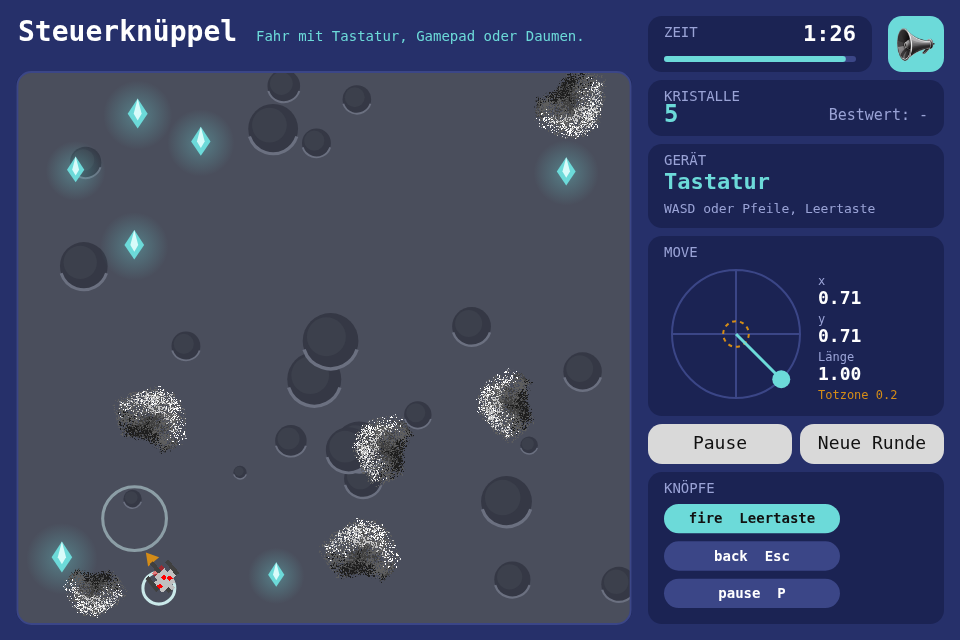
A small rover on a moon field picks up glowing crystals for 90 seconds, and you can drive it with the keyboard, a gamepad or your thumb. The game never asks which: it asks for "move" and "fire", and the toolbox's new ActionMap turns every device into exactly that.
Play it · Source: collection-spielwerk/30-steuerknueppel · Toolbox 6.1.0 or later
The game
Drive over a crystal to pick it up; a new one appears somewhere else, so there are always seven on the field. Boost is almost twice as fast. After 90 seconds the round ends on a card ("Die Zeit ist um") with your crystals and the best of the session. There is nothing to lose. The panel on the side is the real show: it names the device you used last ("Tastatur", "Gamepad", "Touch"), draws the move vector as a dot in a circle with the stick's dead zone as a ring, and lights up each button while it is held.
- Keyboard: WASD or the arrows drive, Space or Shift boosts, P pauses.
- Gamepad: the left stick or the cross drives, A or RT boosts, Start pauses, B goes on.
- Touch: put a thumb down on the left half and a stick appears under it; the Boost button sits on the right.
New in the toolbox: ActionMap
The problem. A game that reads keys is written for one device. Add a gamepad and every is_down("ArrowLeft") grows an || axes[0] < -0.5; add touch and the game grows a third branch, its own dead zone and its own idea of "pressed this frame". Worse, two devices at once add up: arrow key plus stick, and the rover is faster than it should be.
The idea. The game names its actions once, as plain data, and asks for them by name. A button action is is_down, just_pressed or just_released; a vector action is an x and y at most 1 long. Each frame the map reads every device, adds them up and cuts the result to 1.
export const ROVER_ACTIONS = {
    move: DEFAULT_ACTIONS.move,   // WASD, the arrows, the left stick, the cross, the touch stick
    fire: { kind: 'button', keys: ['Space', 'ShiftLeft'], pad: ['a', 'rt'], touch: 'button', label: 'Boost' },
    confirm: { kind: 'button', keys: ['Enter'], pad: ['a'] },
    back: DEFAULT_ACTIONS.back,
    pause: DEFAULT_ACTIONS.pause,
} as const satisfies ActionBindings;
Keys are KeyboardEvent.code, the key's place rather than its letter, so WASD stays WASD on a French keyboard. Pad buttons use the browser's "standard" mapping by name (a, b, rt, start, ...); a pad with any other mapping is ignored and named in unsupported_pad, and the shell says so on the page instead of guessing a layout.
The API, trimmed (src/input/actions/ActionMap.ts):
class ActionMap {
    constructor(options: { bindings?, keyboard?, gamepads?, touch?, dead_zone?, device? });
    update(): void;                                   // once a frame, before the game reads
    is_down(name): boolean;
    just_pressed(name, device?): boolean;             // true for exactly one frame
    just_released(name): boolean;
    vector(name, device?): { x: number; y: number };  // every device added up, at most 1 long
    nudge(name, device?): { x: number; y: number };   // -1, 0 or 1 once per push, for menus
    readonly last_device: "keyboard" | "gamepad" | "touch";
    readonly pad: string | null;                      // the standard pad in use
    readonly unsupported_pad: string | null;
}
A stick gets a radial dead zone, 0.2 by default: inside it the stick is still, and outside it the rest is scaled up so a stick pushed all the way still reaches 1. Cutting each axis separately would make the stick snap to the axes near the middle.
export function radial_dead_zone(x: number, y: number, dead_zone: number): ActionVector {
    const length = Math.hypot(x, y);
    if (length <= dead_zone || length === 0) {
        return ZERO_VECTOR;
    }
    const scaled = Math.min(1, (length - dead_zone) / (1 - dead_zone));
    return { x: (x / length) * scaled, y: (y / length) * scaled };
}
The shell owns it. You don't build the map yourself: settings.actions declares the actions (a game that declares nothing gets move, confirm, back and pause), and properties.actions is updated before every update(). The whole of the rover's input is one line:
game.update(delta_seconds, { move: actions.vector('move'), boost: actions.is_down('fire') });
Touch is opt-in, with settings.touch_stick and touch_buttons, because a stick on the left half would take every tap a puzzle game wants for itself. Once on, the shell draws the floating stick and one round button per action bound to touch: 'button', only after the first touch, and follows several fingers at once: one thumb steers while the other boosts. Because the shell owns the map, every menu on a shell page now works with a pad too (MenuInput.handle_actions(), stick and cross move, A confirms, B goes back), and a pad's A leaves the start screen and starts the next round. last_device also picks the start screen's hint: "Tippen zum Starten" on a phone.
A test worth copying. The promise is "each device alone, the same way". The test drives the real Game for one second through the real map, three times:
key(keys.target, 'keydown', 'KeyD');                     // a key
fake.axes[0] = 1;                                        // a pad from a fake source
thumb.touch.handle_down(1, { x: 200, y: 400 });          // a thumb, pushed past the stick's reach
thumb.touch.handle_move(1, { x: 300, y: 400 });
expect(gamepad.game.rover.x).toBeCloseTo(keys.game.rover.x, 3);
expect(thumb.game.rover.x).toBeCloseTo(keys.game.rover.x, 3);
The pads come from a function (gamepads: () => pads), so the tests never touch navigator.getGamepads(); the browser check stubs that one function and drives a fake pad through the built game.
From earlier steps
KeyboardStatefrom step 02: now also bycode(is_code_down,was_code_pressed), which is what the map reads.MenuInputfrom step 21:handle_actions()turns the pad into the keys it already knew.SeededRandomfrom step 01: lays out the field and every crystal that comes back.SessionBestand the end card from the shell; the scaffold, start screen, intro and scaling are explained in Spielwerk 00: The workbench.- The drone and the rocks come from the asset library by id (
settings.catalogue_images), as in step 29; the crystals and the ground are painted.
Embed it
<script src="https://www.game-object.de/tce-elements/tobidot/dll-tce-assets"></script>
<script src="https://www.game-object.de/tce-elements/tobidot/tce-steuerknueppel"></script>
<tce-steuerknueppel init-seed="4711"></tce-steuerknueppel>
| Attribute | Values | Default |
|---|---|---|
init-seed |
whole number | random |
init-intro |
true / false |
true |
Next
Previous: Spielwerk 29: Horde · Next: Spielwerk 31: Ameisenbau · All steps
Comments