
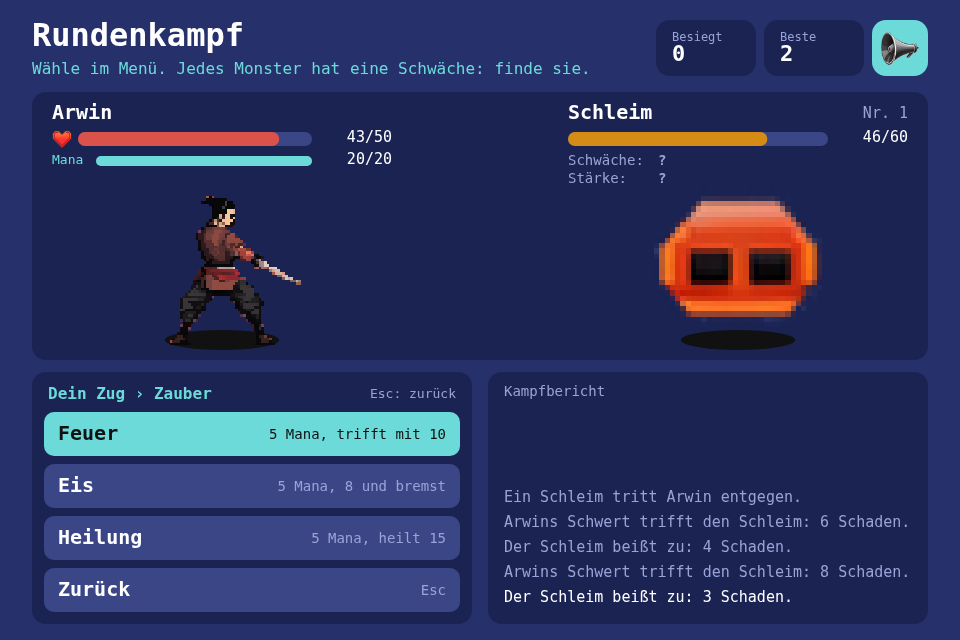
Arwin fights one monster after another until he falls, and every turn is a choice in a nested menu. The new toolbox module is Menu, a tree and a cursor with no drawing and no input in it, so keys and a pointer drive the same model.
Play it · Source: collection-spielwerk/18-rundenkampf · Toolbox 5.7.0 or later
The game
Each turn you choose, then the monster acts: "Angriff", "Zauber" (opens "Feuer", "Eis", "Heilung"), "Beutel" (opens "Trank", "Bombe") or "Abwehr". Spells cost mana, and what is used up stays in the menu, greyed out, with the reason beside it. Every monster takes double from one of sword, fire and ice and half from another. The seed decides which, and the fight log ("Kampfbericht") tells you once you have tried. It also says when a monster "holt weit aus": its next blow is the big one, and now is the turn to guard. Every win gives a small reward. Your score is the number of monsters beaten.
- Keyboard: arrow keys move, Enter or Space confirms, Escape goes back.
- Mouse: the cursor follows the pointer, a click confirms.
- Touch: a tap on a row points and confirms at once.
- The button or S mutes the sounds.
New in the toolbox: Menu
The toolbox's ui widgets are pointer-only and flat. Without a model, the arrow keys need an index of their own, the mouse a second idea of what is highlighted, and each new submenu another flag saying what Escape means. Then a click on a row is handled one way and Enter on the same row another, and sooner or later they disagree.
A tree and a cursor
A menu is a tree of entries. An open menu is a stack of levels, each remembering where its cursor stood, so going back is popping one level.
My old menu classes in Baby-Steps had a model, a view, a controller and the mouse in one family, and a menu looked the way that family drew it. This one knows no drawing, no DOM, no keys and no pointer:
export interface MenuEntry<T> {
    label: string;
    value?: T;                          // what confirming it returns
    entries?: MenuEntry<T>[];           // or a submenu
    disabled?: boolean | (() => boolean);
    hint?: string | (() => string);
    back?: boolean;                     // confirming it goes one level back
}

export class Menu<T> {
    public constructor(entries: MenuEntry<T>[]);
    public get entries(): readonly MenuEntry<T>[];  // the open level
    public get cursor(): number;
    public get current(): MenuEntry<T> | null;
    public get path(): readonly string[];           // the labels of the open submenus
    public is_disabled(entry: MenuEntry<T>): boolean;
    public hint_of(entry: MenuEntry<T>): string;
    public move(step: number): void;                // wraps, skips disabled entries
    public point_at(index: number): void;           // a pointer on an entry
    public confirm(): T | null;                     // opens a submenu, or returns the value
    public back(): boolean;                         // false when already at the top
    public reset(): void;
}
disabled and hint may be functions, asked again at every look, so the tree is built once and the entries are always current. confirm() holds the core of it:
public confirm(): T | null {
    const entry = this.current;
    if (entry === null || this.is_disabled(entry)) {
        return null;
    }
    if (entry.back === true) {
        this.back();
        return null;
    }
    if (entry.entries !== undefined) {
        this.open_levels.push(this.open_level(entry.entries, entry.label));
        return null;
    }
    return entry.value ?? null;
}
One trap: pointing at a disabled entry
move() skips disabled entries, so it seems natural for point_at() to do the same. Then a tap on a disabled row leaves the cursor where it was, and the confirm() right after it chooses the entry that was under the cursor before. You tap the empty "Trank" and throw a bomb. So point_at() may land on a disabled entry, and confirm() does nothing there.
A touch has no hover, so nothing has moved the cursor before the finger lands. That is why the press does both steps.
How the game uses it
The tree lives in src/game/. The game itself knows why something is refused, so the entry only asks:
function action_entry(game: Game, label: string, action: Action, hint: () => string): MenuEntry<Action> {
    return {
        label,
        value: action,
        disabled: () => game.refusal(action) !== null,
        hint: () => game.refusal(action) ?? hint(),
    };
}
A submenu has a "Zurück" entry, { label: 'Zurück', back: true, hint: 'Esc' }, because a pointer has no Escape key. To the model it is an entry like any other.
Keys and a pointer end in the same move, point_at and confirm. This game first did that itself, with a hit test and rows painted on the canvas. Step 21 brought MenuInput for the keys and presses and MenuView for the rows on the page, and this game went over to them later, as a test of whether they fit a game they weren't built for:
// Properties
this.menu_input = new MenuInput(this.menu, { buffer_seconds: 0 });
this.menu_view = this.place(
    new MenuView(this.menu_input, UNPLACED, { row_height: 44, row_gap: 8, padding: 12, row_hint_share: 0.67, show_hint: false }),
    (layout) => layout.menu_rows,
);

// Logic
menu_input.on_choice = (action) => {
    this.take_turn(action);
};
What the fight asks of them:
- A press during a turn is gone. A turn plays for seconds, and by its end the fight has changed, so a press kept for later would be a turn you chose without seeing it. That's
buffer_seconds: 0.is_heldstays true while the turn plays. - The turn starts inside the press, in
on_choice, so a second Enter in the same frame is no second turn. row_hint_shareputs every hint in its row. You choose by reading what each entry costs, and a finger has no cursor to read one line with.- The look is a list of theme rules. The hint is a caption, so it has its own color per state. While a turn plays another of the game's themes dims the rows, through
theme_name()from step 20. - The end card is paint, and the page lies on top of it. So
is_enabled = falsetakes the menu off the screen, and a press there starts the next run.
The renderer paints the menu's card and its title, which you only look at, and no row. One Menu now lasts as long as the element, and a new run hands it new entries with set_entries().
The test
it("lands on a disabled entry, so a tap on it chooses nothing instead of the old entry", () => {
    const menu = new Menu<string>([
        { label: "a", value: "a" },
        { label: "b", value: "b", disabled: true },
    ]);
    menu.point_at(1);
    expect(menu.cursor).toBe(1);
    expect(menu.confirm()).toBeNull();
});
The module is src/ui/menu/Menu.ts. The other tests cover wrapping, a level where all are disabled (it still opens, so its hints can say why), and the cursor coming back when you leave a submenu. The browser check plays it all by real keys, real clicks and real taps.
From earlier steps
SeededRandomfrom step 01: the monsters, their weaknesses and the rewards.SessionBestfrom step 05: the most monsters beaten.Tweenfrom step 15: the bars gliding, the steps forward, the effects and the numbers.AudioPlayerfrom step 17:selecton every cursor move,hit-*andslime-deadin the fight.
Scaffold, start screen, intro and scaling are explained in Spielwerk 00: The workbench. The mute buttons of step 17 moved there too: this game names one rectangle in its layout and has a sound button. Choosing has to matter, so I checked: over 5000 seeded runs, a bot that only attacks gets a median of 2 monsters, one that also uses weaknesses, guards and heals gets 8.
Embed it
<script src="https://www.game-object.de/tce-elements/tobidot/dll-tce-assets"></script>
<script src="https://www.game-object.de/tce-elements/tobidot/tce-rundenkampf"></script>
<tce-rundenkampf init-seed="4711"></tce-rundenkampf>
| Attribute | Values | Default |
|---|---|---|
init-seed |
whole number; the first run, every next run is seed + 1 | random |
init-intro |
true / false: play the GO logo intro at the first connection |
true |
Next
Previous: Spielwerk 17: Bricks · Next: Spielwerk 19: Schleim-Abwehr · All steps
Comments