
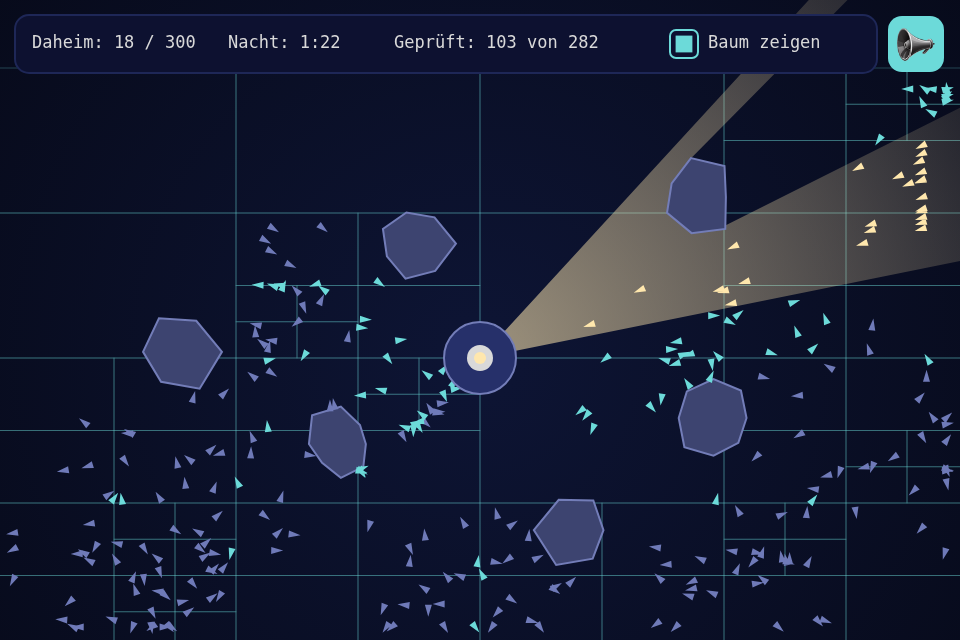
A lighthouse in the dark, 300 boats, and a beam that rocks can block. The toolbox has had QuadTree, Ray and Polygon since before this series, and no step ever taught them, so this one puts all three to work on one question: which boats are in the light right now?
Play it · Source: collection-spielwerk/22-leuchtfeuer · Toolbox 5.7.0 or later
The game
Boats in the light sail straight home to the harbour under the lighthouse. In the dark they wander, and the current carries them slowly away, so a beam that stays gets more done than one that passes. Rocks stop the light and cast shadows, and the boats behind them have to wait for a better angle. The night lasts 90 seconds, and your score is how many boats got home ("Daheim"). Nothing sinks, and if you just watch, the beam sweeps by itself and brings about a quarter of them in.
- Mouse or touch: the beam points where you point.
- Left and right arrow, or A and D: turn the beam. Three seconds after the last key it sweeps again.
- T or the "Baum zeigen" box: show the tree.
New in the toolbox: pick_polygon, and three old classes put to use
The problem. The light isn't a simple shape: it has as many corners as it has rays, and rocks bite pieces out of it. The obvious code asks every boat whether it's inside, 60 times a second, and each question walks around all those corners.
The idea. Split the work in three, one job for each class:
Ray: how far does the light get before a rock stops it?Polygon: the endpoints of those rays make the shape of the light, andcontains()says whether a point is inside.QuadTree: which boats need asking at all? It divides the sea into cells, more of them where the boats are.
The rays. A Ray starts at a point and runs one way. get_nearest_polygon_hit() returns the first edge it meets, and the distance along the ray if the direction has length 1. From src/game/Game.ts:
const points: Vector2I[] = [HARBOUR];
for (let index = 0; index < BEAM.rays; index++) {
    const angle = this.beam_angle - BEAM.half_width + (index / (BEAM.rays - 1)) * BEAM.half_width * 2;
    const ray = new Ray(HARBOUR, Vector2.from_angle(angle));
    let distance = BEAM.range;
    for (const rock of this.rocks) {
        const hit = ray.get_nearest_polygon_hit(rock.shape);
        if (hit !== null && hit.distance < distance) {
            distance = hit.distance;
        }
    }
    points.push(ray.get_vector_at(distance));
}
return new Polygon(points);
The shadows need no code of their own. They're simply where no ray arrived. This also pays off in the rules: a lit boat has a clear line to the harbour, so no boat needs a path around a rock.
The tree. A QuadTree holds anything with left, top, width and height, so a Boat is its own rect. There are two ways to ask it. pick(rect) returns what's near a rect, and you still have to test each result against the real shape. pick_polygon(polygon) does better by asking the polygon about whole cells: if no edge of the light touches a cell, the cell is entirely in or entirely out, so one test settles every boat in it. Only cells an edge runs through test their boats one by one.
this.tree.clear(0);
for (const boat of this.boats) {
    boat.is_lit = false;
    this.tree.add(boat);
}
const checked: Boat[] = [];
for (const boat of this.tree.pick_polygon(this.light, checked)) {
    boat.is_lit = true;
    boat.guided_seconds = BOAT.guided_seconds;
}
Every boat moves every frame, so the tree is refilled from empty. clear(0) drops the old branches: by default clear() keeps them for the next fill, and a corner the boats have left would stay subdivided.
"Geprüft" on the screen counts the boats tested one by one. "Baum zeigen" shows the cells, and turquoise marks the unlit boats that were tested.
What the tree is worth: less than you'd think
I expected a big number here, and measured instead. One frame's work on my machine, in milliseconds, with a beam like the game's:
| Boats | Plain loop | Tree, refilled each frame | Tree standing: pick + contains |
Tree standing: pick_polygon |
|---|---|---|---|---|
| 300 | 0.04 | 0.09 | 0.02 | 0.03 |
| 1,000 | 0.12 | 0.32 | 0.05 | 0.05 |
| 3,000 | 0.35 | 1.2 | 0.17 | 0.11 |
| 10,000 | 1.2 | 4.6 | 0.57 | 0.30 |
| 30,000 | 3.5 | 16.8 | 2.2 | 0.71 |
This game would run faster without its tree. All the boats move, so it has to refill every frame, and that costs three to five times as much as simply asking every boat. I kept the tree because this step is here to show it, but don't copy that choice.
The last two columns show when it pays: when the things stand still. Then pick_polygon is about 5 times faster than the loop at 30,000, and it stays roughly linear, because a beam that covers a fixed share of the sea really does light a fixed share of the boats. No structure gets around marking each of them.
A small question is where a tree shines. Finding what's in a 40 by 40 rect among 30,000 standing boats takes 1.86 ms with a loop and 0.03 ms with pick(), about 60 times faster. So use one when things mostly stand still, or when you ask many small questions per frame, such as every unit looking at its neighbours. There the loop's cost multiplies and the tree's doesn't.
A test worth copying. A tree that misses something fails quietly, so compare it with the slow way:
for (const boat of still.boats) {
    expect(boat.is_lit).toBe(still.light.contains(boat.center));
}
What using them found. This step's first real use turned up bugs in old code. The worst was Polygon.contains, which sent a fixed diagonal ray and could count a corner it only grazed, so a triangle far away "contained" points on its diagonal. The fix is the usual crossing test, and it's about 30 times faster, which is what overturned my first numbers here: with the slow version the tree looked three times better than the loop. pick() also returned elements twice when the rect covered a whole split branch, clear() couldn't shrink a tree, and Polygon had no bounding rect. Each fix has a failing test first. The code is in src/trees/QuadTree.ts, src/geometries/Ray.ts and src/geometries/Polygon.ts.
From earlier steps
SeededRandomfrom step 01: lays out the rocks and the shoals, and the drifting.SessionBestfrom step 05: the best night.- The mute button from step 17.
UiPage,place()and theme rules from step 20: the strip at the top, withValueLabels and aCheckBoxin aPanel. The sea is paint, because you only look at it.
The scaffold, start screen, intro and scaling are explained once in Spielwerk 00: The workbench.
Embed it
<script src="https://www.game-object.de/tce-elements/tobidot/dll-tce-assets"></script>
<script src="https://www.game-object.de/tce-elements/tobidot/tce-leuchtfeuer"></script>
<tce-leuchtfeuer init-seed="4711"></tce-leuchtfeuer>
| Attribute | Values | Default |
|---|---|---|
init-seed |
whole number; the first run, every next run is seed + 1 | random |
init-intro |
true / false: play the GO logo intro at the first connection |
true |
Next
Previous: Spielwerk 21: Amtsschimmel · Next: Spielwerk 23: Diaabend · All steps
Comments