
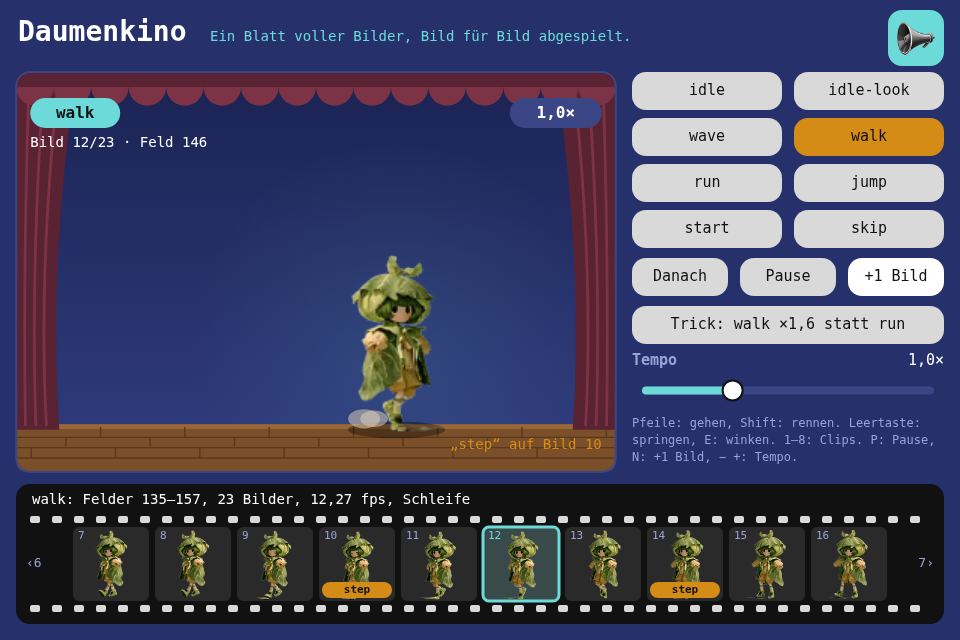
A flip book on a little stage: Cabbage Cob, a kid in a cabbage-leaf hood, plays the clips of her sprite sheet, at once or one after another, at any speed down to single frames. Up to now every Spielwerk game wobbled its sprites in code; the toolbox's new canvas/animation plays real frames.
Play it · Source: collection-spielwerk/32-daumenkino · Toolbox 6.1.0 or later
The game
There is nothing to win: it is a viewer. Each key on the right plays one of the eight clips of the sheet (idle, idle-look, wave, walk, run, jump, start, skip). Under the stage a film strip shows the clip's frames, the current one lit and the footsteps marked in orange; each footstep plays a sound and raises a puff of dust. The "Tempo" slider goes from 0.1 to 3, "Pause" and "+1 Bild" turn single pages.
- Mouse or touch: tap a clip key; with "Danach" on, it plays after the current clip. Tap the stage and she walks there (far away: she runs).
- Keyboard: the arrows walk her, Shift runs, Space jumps, E waves, 1 to 8 play the clips (with Shift: after the current one), P pauses, N turns a page, − and + change the speed.
- Pad: the stick walks, X runs, A jumps, Y waves.
New in the toolbox: sprite animation
The problem. A sheet is one picture with 240 frames of 132 by 128 pixels. Playing it by hand means a frame counter per sprite, a timer, a rule for what happens at the end of each clip, and footsteps that fire on the right frame. That last one breaks first: at speed 3, one frame of the game may pass two frames of the clip, and a if (frame === 9) misses the step.
The idea. Three small pieces. A SpriteSheet knows where each frame sits in the picture. A clip is plain data: which frames, how fast, and what comes after. An AnimationPlayer per sprite counts time through its clip and sends an event for every named frame it passes, however many one update skips.
const sheet = SpriteSheet.grid(image, 132, 128).add_clips({
    idle: { frames: "0-33", fps: 12, loop: true },
    walk: { frames: "135-157", fps: 12.27, loop: true, events: { 9: "step", 13: "step" } },
    jump: { frames: "195-208", fps: 12.44, then: "idle" },
}, "idle");

const cob = sheet.player();          // one player per sprite, playing the default clip
cob.play("walk");                    // at once (again "walk": it just goes on)
cob.queue("jump");                   // when the walk's round ends
cob.speed = 1.6;                     // time runs 1.6 times as fast
cob.events.attach(AnimationFrameEvent, (event) => { /* event.name === "step" */ });

cob.update(delta_seconds);           // every frame
cob.draw(context, x, floor_y, { scale: 1.6, flip_x: true });   // the anchor (her feet) at x, floor_y
A clip is { frames, fps, loop, then, events }, where loop may also be "ping-pong". That is exactly the shape of the asset library's sheet data, so the catalogue entry of Cabbage Cob feeds the sheet as it is. In the game shell it takes one line:
// settings: catalogue_images = { cob: "rendered/character/cabbage-cob" }
const player = this.load_animation("cob");
The entry brings the picture and its clips; the player waits while they are on the way and starts the default clip as soon as they arrive.
The heart of the player (src/canvas/animation/AnimationPlayer.ts) is a loop that moves on whole frames and keeps what is left over:
this.elapsed += delta_seconds * this.speed;
while (this.elapsed >= clip.durations[this.index]) {
    this.elapsed -= clip.durations[this.index];
    this.advance();     // next frame; at the end: the queue, `then`, back to 0, or stop
}
// advance() sends the frame's event for every frame it enters, skipped or not
Because the left-over time carries into the next clip, a queued clip starts exactly when the current one ends, not a frame later.
How the game uses it. The arrows don't play clips themselves; the game says each frame what she is doing, and play() of the clip already running changes nothing:
if (direction === 0) {
    if (this.gait !== null) {
        this.gait = null;
        this.player.play("idle");
    }
    return;
}
this.player.play(this.gait === "run" && !this.is_fake_run ? "run" : "walk");
Speed as a trick. speed changes how fast the pages turn, not what they show. Before the sheet had a run, a walk at 1.6 times its speed stood in for it, and it reads surprisingly well. "Trick: walk ×1,6 statt run" switches the run to that, so both can be compared: the real run has a lean and longer steps, the fast walk is a hurry. If she also moves across the stage, she must move at the same factor, or her feet slide.
The art. The clips were cut from video, so the walk and the run are a three-quarter view, not a side view. They look to the left; going right, the game mirrors them around her feet with flip_x. The front-facing clips are never mirrored.
A test worth copying. For speeds 0.1, 0.5, 1, 1.6, 2 and 3, two rounds of the walk in uneven frames must hear exactly the footsteps [9, 13, 18, 22, 9, 13, 18, 22]. The trap it guards against is the if (frame === 9) above: it passes at speed 1 and loses steps at 3.
From earlier steps
EventSocketfrom step 25: the player's frame events; the logic plays the footstep, the game raises the dust.SeededRandomfrom step 01: where the dust puffs go.- The
ActionMapfrom step 30: walking, running and jumping from keys or a pad with no code per device. - The UI page from step 20: the clip keys show the clip playing (
selected), the queued one with an orange rim (a theme rule), and a clip the sheet lacks would bedisabled. - The character comes from the asset library by id, as in step 29; the stage, the film strip and the dust are drawn in code. The scaffold, start screen, intro and scaling are explained in Spielwerk 00: The workbench.
Embed it
<script src="https://www.game-object.de/tce-elements/tobidot/dll-tce-assets"></script>
<script src="https://www.game-object.de/tce-elements/tobidot/tce-daumenkino"></script>
<tce-daumenkino init-seed="4711"></tce-daumenkino>
| Attribute | Values | Default |
|---|---|---|
init-seed |
whole number | random |
init-intro |
true / false |
true |
Next
Previous: Spielwerk 31: Ameisenbau · Next: Spielwerk 33: Feuerwerk · All steps
Comments