
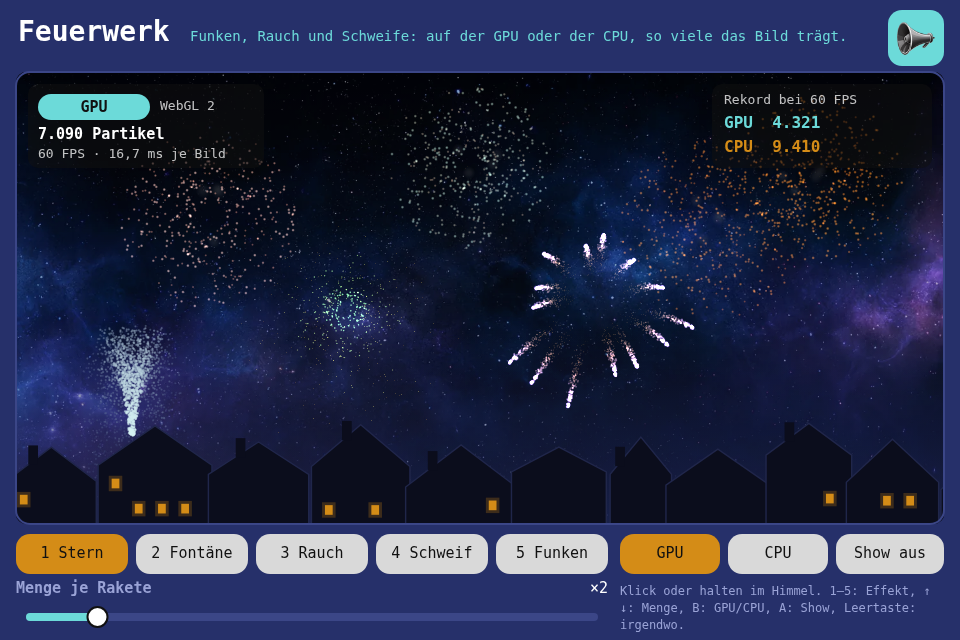
Fireworks over a town's roofs: a click sends a rocket up that bursts where the click was, in five effects, as many sparks as the frame allows. The toolbox's new canvas/particles runs them on the graphics card where the browser can and on the CPU where it can't, and the game can't tell the difference.
Play it · Source: collection-spielwerk/33-feuerwerk · Toolbox 6.1.0 or later
The game
There is nothing to lose. Click the sky and a rocket climbs with a trail and bursts there; hold and they go up one after another until the frames drop under 50 FPS, then the sky says "Voll" and waits. Leave it alone for four seconds and it puts on a slow show by itself. Top left you see the backend, the particles alive and the frame time; top right the record: the most particles each backend held at 60 FPS.
- Mouse or touch: tap the sky (hold for many), the keys "1 Stern" to "5 Funken" pick the effect, "GPU" and "CPU" switch while it runs, the slider sets the amount per rocket from ×1 to ×500.
- Keyboard: 1 to 5 the effect, ↑ ↓ the amount, B GPU or CPU, A the show on or off, Space a rocket anywhere.
- Pad: A launches, LB RB the effect, LT RT the amount, Y the backend.
New in the toolbox: particles
The problem. A star of this game is 180 sparks; at ×200 it's 36,000, and a held press sends six a second. Each spark needs a place, a speed that drag eats, gravity, a colour from white to orange and a fade. Drawn one drawImage at a time, a 2D canvas spends about 2.5 µs per spark: at 60 FPS that ends near 5,000.
The idea. A particle that is only looked at never has to come back. So each one is stored once, at its birth (place, velocity, birth time, lifetime, drag, gravity, colours, sizes), and where it is at any moment follows from a formula. The graphics card can then step and draw hundreds of thousands in shaders, and a CPU can run the same formula over typed arrays. Both sit behind one class:
const particles = new Particles();                 // WebGL 2 where it can, else the CPU
particles.emit(PARTICLE_EFFECTS.burst, x, y);      // when a rocket bursts

// every frame:
particles.update(delta_seconds);
particles.draw(context);                           // onto the 2D context, under its transform
An effect is plain data, so a game copies one and changes a number:
const STAR = { ...PARTICLE_EFFECTS.burst, count: 120, color: ["#c8f0ff", "#2050ff"] };
// count, speed [min, max], angle, spread, radius, lifetime [min, max], gravity,
// speed_half_life, color / alpha / size as [birth, death], blend "normal" or "glow"
particles.emit(STAR, x, y, { count: 120 * amount, vx: rocket.vx * 0.2 });
Drag is a half-life: speed_half_life: 0.5 halves the speed every half second. With k = ln 2 / half-life that gives a closed form, the same in TypeScript and GLSL:
const e = Math.exp(-k * t);
const moved = (1 - e) / k;                    // how far the starting speed carries
const settle = (t - moved) / k;               // how far gravity has pulled
x = x0 + vx * moved;
y = y0 + vy * moved + gravity * settle;
One long frame lands exactly where many short ones do, so a stutter never throws a spark off its path.
The GPU path (src/canvas/particles/GpuParticles.ts, lifted from Last Energy in Space). The motion lives in two float textures that take turns: a full-screen pass reads one and writes the other, only over the rows that are alive. A second pass draws every particle as a point with a soft dot, normal ones first, glowing ones adding light, into its own WebGL canvas; draw(context) puts that on the game's canvas with one drawImage. The count comes from the births and lifetimes, so nothing is ever read back. The shaders are plain strings in shaders.ts, because the toolbox ships TypeScript without a bundler step.
The CPU path is real, not a stand-in: it's what every unit test runs and what a browser without WebGL 2 shows. It splats each dot into a float buffer exactly as the graphics card rasterises a point, one buffer per blend, and puts each onto the canvas once.
Choosing. "auto" takes WebGL 2 with float render targets, else the CPU; use_backend("gpu" | "cpu") switches while it runs and the particles go on where they were. If the context is lost, the next update() notices, carries on on the CPU, and fallback_reason says why. The game only shows the reason:
if (particles.backend !== this.backend) {
    this.backend = particles.backend;
    this.notice = particles.fallback_reason === null ? null : `GPU verloren: …`;
}
What it holds at 60 FPS. I measured alone (a probe page, 960 by 640, glowing bursts) and in the game (the record, from FrameBudget):
| CPU alone | CPU in the game | GPU alone | GPU in the game | |
|---|---|---|---|---|
| Headless Chromium, software GL | 20,000 | 33,000 | 100,000 | 29,000 |
| Chrome on an RTX 4070 | 20,000 | 33,000 | 2,000,000 | 262,000 |
In software GL the graphics card is the CPU, so the game gains nothing; on a real card it carries eight times as many. Two traps from the card: GLSL samplers are lowp by default, and NVIDIA then reads float textures at half precision (every spark white, then black), so the shaders say precision highp sampler2D. And headless Chrome on a card loses the first WebGL context of a fresh page after two milliseconds, which is how I learned the fallback works.
A test worth copying. On the CPU path: after 2 s at gravity 50 and half-life 1, a particle started at (10, 20) with velocity (100, 0) must sit at x = 10 + 75 / ln 2 and y = 20 + 50 (2 − 0.75 / ln 2) / ln 2. The browser check then freezes the same seeded burst on both backends and finds the light within a quarter pixel.
From earlier steps
FrameBudgetfrom step 27: holds the rockets back below 50 FPS and keeps the record at 60.- The
ActionMapfrom step 30: keys and a pad with no code per device. SeededRandomfrom step 01: the show and every spark's spread replay from a seed.- The night sky comes from the asset library by id, as in step 29; the town is drawn in code. The scaffold, start screen, intro and scaling are explained in Spielwerk 00: The workbench.
Embed it
<script src="https://www.game-object.de/tce-elements/tobidot/dll-tce-assets"></script>
<script src="https://www.game-object.de/tce-elements/tobidot/tce-feuerwerk"></script>
<tce-feuerwerk init-seed="4711"></tce-feuerwerk>
| Attribute | Values | Default |
|---|---|---|
init-seed |
whole number | random |
init-intro |
true / false |
true |
Next
Previous: Spielwerk 32: Daumenkino · Next: Spielwerk 34: Inselkarte · All steps · Where the series is heading: Civilization
Comments