
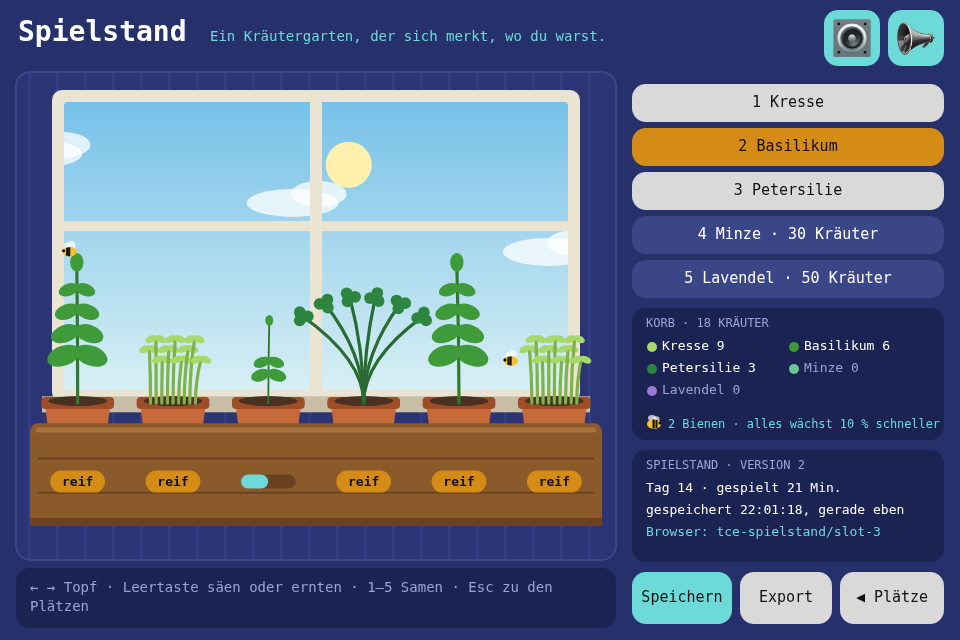
A herb garden in a window box that remembers where you were: sow, let it grow, pick, close the tab, come back. The toolbox's new storage/saves keeps it: save slots with a version, migrations from older versions, an autosave, and a slot list as a ready-made menu.
Play it · Source: collection-spielwerk/35-spielstand · Toolbox 6.2.0 or later
The game
Three slots at the start, each with its day, the herbs picked and when it was last played. Pick one and the window box opens: six pots. A press on an empty pot sows the chosen seed, the herb grows in real seconds while the garden shows, and a ripe one goes into the basket. The basket buys new kinds: basil, parsley, mint, lavender. Lavender brings bees, and bees make everything grow a little faster. Nothing withers, nothing is lost, and there is no end.
The garden saves itself every five seconds and whenever the page hides. "Speichern" saves at once; the card under the basket says when and where. Reload the page and the garden is as you left it. "Alten Spielstand laden (v1)" brings in a save from before the bees existed, "Export" downloads the slot as a file, "Datei importieren" brings one back.
- Mouse or touch: a pot sows or picks, the seed buttons choose or buy, "◀ Plätze" goes back to the slots.
- Keyboard: ← → the pot, ↑ ↓ or 1 to 5 the seed, Space or Enter sows or picks, Esc to the slots. On the slots: 1 to 3, Enter, L deletes after a confirm.
- Pad: the d-pad or stick, A, B.
New in the toolbox: saves
The problem. Landshape and Point and Click each built their own saving: a file, a queue so two writes don't cross, what to do with a file that doesn't parse. And the day a game's data changes shape, every old save breaks.
The idea. A game says what it saves, which version that is, and how version n becomes n + 1. SaveSlots does the rest. load() always answers with something playable.
// src/game/Garden.ts
export const GARDEN_VERSION = 2;

/** From version 1 to 2: the garden gains its bees. */
export const GARDEN_MIGRATIONS = {
    1: (old: GardenDataV1): GardenData => ({ ...old, bees: FIRST_BEES }),
};

export const GARDEN_SAVES = {
    fresh: new_garden,           // a new game's data
    migrations: GARDEN_MIGRATIONS,
    validate: check_garden,      // a throw makes the save broken
    summary: garden_summary,     // "Tag 12 · 34 Kräuter" for the slot list
};
The shell builds it with the version from the settings and hands it its store when the element connects:
// TceSpielstandSettings.ts
public override readonly save_version = GARDEN_VERSION;
public override readonly save_tag = 'tce-spielstand';

// TceSpielstandProperties.ts
public override readonly saves = this.save_slots<GardenData>(GARDEN_SAVES);
A slot opens with load_save(), which also says how the load went: empty, loaded, migrated, broken, newer or unreachable. Then the autosave starts:
const loaded = await properties.saves.load_save(slot);
game.open(slot, loaded);
properties.saves.autosave(slot, () => (game.screen === 'garden' ? game.garden : null), 5);
Nothing is ever overwritten that can't be read. A file that isn't JSON, fails validate, or comes from a newer version of the game is renamed first (slot-1.broken-20261118-201503), and the game gets fresh(). Saves run one at a time in the order asked, and a save still waiting is replaced by a newer one of the same slot, so the last one wins. No method rejects: problems go to saves.events and once to the console, never into the game.
Where the files lie. The toolbox doesn't know the TCE desktop. It asks for a SaveStore, four async functions of text, through a hook on the element, open_save_store(tag), the way it asks load_catalogue_url() for pictures. The default is the browser's local storage. @tce-v3/game-boot answers with the desktop's dll-tce-file-system when it is on the page, so on the site the garden is a file you can open in the explorer:
/saves/tce-spielstand/slot-1.json
{
  "format": "ts-game-toolbox/save",
  "version": 2,
  "saved_at": "2026-11-18T20:56:50.046Z",
  "seconds_played": 5.001,
  "summary": "Tag 1 · 0 Kräuter",
  "data": { "seconds": 5, "pots": [ ... ], "bees": 2, ... }
}
The slot list is SaveSlotsPage, a MenuView, so keys, a pad and the house look come with it. It reads the slots when it first shows, puts the cursor on the one played last, and reads them again after every save, so the game never tells it to refresh. "Löschen …" asks before it deletes.
Tested first. Toolbox tests cover a load of nothing, save then load, version 1 through two migrations, broken JSON kept aside, a newer version never overwritten, ten quick saves ending with the last, a store that throws, and the autosave on hide. The game's tests check that the shipped version-1 file gains its bees, and that ten minutes of growing with the autosave on write at most one save per five seconds.
From earlier steps
- The menu and its keys from step 18 and step 21:
SaveSlotsPageis aMenuView. - The
ActionMapfrom step 30: the arrows, Enter, Esc and a pad with no code per device. SeededRandomfrom step 01: the bees' flights. The scaffold, start screen, intro and scaling are explained in Spielwerk 00: The workbench.
Embed it
<script src="https://www.game-object.de/tce-elements/tobidot/dll-tce-assets"></script>
<script src="https://www.game-object.de/tce-elements/tobidot/dll-tce-file-system"></script>
<script src="https://www.game-object.de/tce-elements/tobidot/tce-spielstand"></script>
<tce-spielstand></tce-spielstand>
Without dll-tce-file-system the saves stay in the browser's local storage.
| Attribute | Values | Default |
|---|---|---|
init-seed |
whole number (the bees' flights) | random |
init-intro |
true / false |
true |
Next
Previous: Spielwerk 34: Inselkarte · Next: Spielwerk 36: Laterne · All steps
Comments