
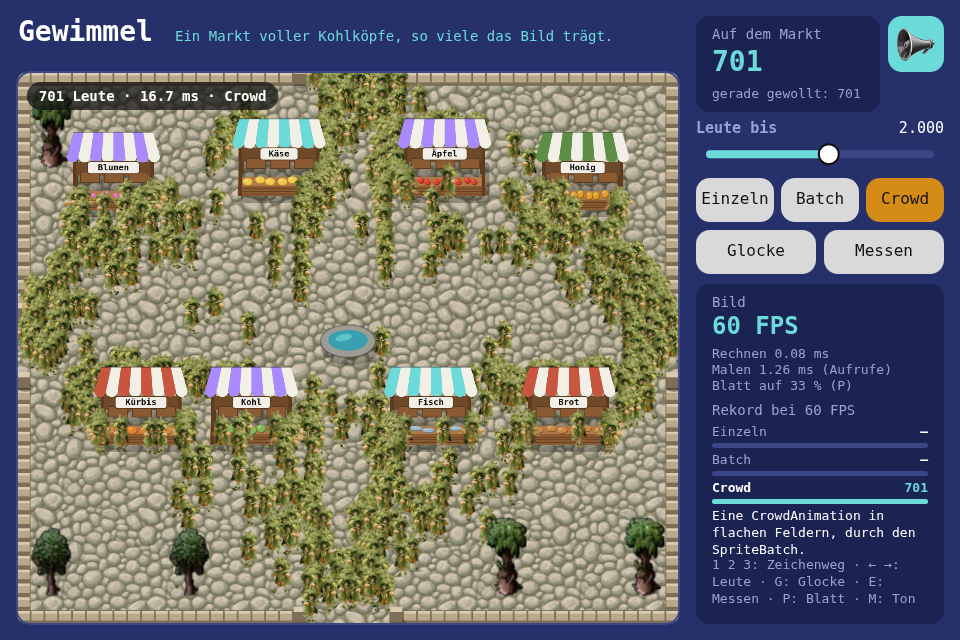
A market square fills with cabbage folk: they walk in from the gates, wait at the stalls, wave and leave, hundreds or thousands at once. The toolbox learns to draw animated crowds: sheet frames in the SpriteBatch, and a CrowdAnimation that keeps a whole crowd in a few flat arrays.
Play it · Source: collection-spielwerk/37-gewimmel · Toolbox 6.2.0 or later
The game
There is nothing to win. People come into the square, walk to a stall, wait there for a few seconds and go, and the market breathes: it fills up, empties a little and fills again. The slider says how many may come ("Leute bis", from 10 to 20 000); newcomers stop as soon as the picture can't keep 60 frames a second. Three buttons switch how the crowd is drawn: "Einzeln" (each player by itself), "Batch" (players through a batch) and "Crowd" (the new crowd arrays). The card on the right shows the frame rate and the record per way. "Glocke" rings the bell and everyone runs for six seconds. "Messen" measures: it fills the market step by step for each way until the frames come too slowly.
- Mouse or touch: the buttons and the slider.
- Keyboard: 1 2 3 or Tab picks the way, the arrows move the slider, G or Space rings the bell, E measures, P switches the small sheet off and on, M mutes. A gamepad works too.
New in the toolbox: crowds
The problem. Step 32 gave every sprite its own AnimationPlayer, which draws itself: one save, transform and drawImage per figure. Step 29 had a SpriteBatch, but it only drew whole pictures, not a frame cut out of a sheet. And the cabbage kid's sheet is 1980 × 2048 pixels, shown at about a third: every figure reads nine times the pixels it needs.
The idea. Three levers, each one line for a game:
- Hand the players to the batch. It draws one run of
drawImagecalls per picture and keeps the context's transform where it can: an unturned frame needs none of its own, and mirrored frames share one mirrored transform. - Draw from a picture the size it is shown:
sheet.prescale(scale)once, and again when the window changes size a lot. - If there are thousands, keep them as a
CrowdAnimation: clip, frame, time and speed of every member live in typed arrays, there is no object per figure, and nobody sends footstep events no one hears.
// players through the batch
batch.add_animation(player, x, y, { flip_x, scale: 0.38 });
batch.draw(context);

// or one object for the whole crowd
const crowd = new CrowdAnimation(sheet, 1024, { random, events: false });
const index = crowd.add("walk", { speed: 0.9 });   // starts at a random point of the walk
crowd.play(index, "run");
crowd.update(delta_seconds);
crowd.draw(batch, positions, { order, scale: 0.38 }); // positions: x0, y0, x1, y1, ...
batch.draw(context);

sheet.prescale(0.33);                                 // frames and anchors stay as they were
A member plays exactly the frames a single player would: then, ping-pong, time carried into the next clip, any speed. Removing one moves the last member into the gap, as a game's own arrays do. Packed sheets may now give every frame its own anchor (from_frames with a SheetFrame per frame), and the batch also takes a frame directly: add_frame(image, rect, x, y, { anchor, scale, flip_x, angle }). The old add() for whole pictures is unchanged.
In the game, the people are struct-of-arrays as well: positions, states, goals and timers in typed arrays, each stall's flow field flattened into a table of next cells. Every frame they are sorted by the y of their feet (a counting sort), and the stalls and trees are drawn between the runs of people in front of and behind them:
folk.crowd.draw(batch, positions, { order: order.subarray(from, to), scale: this.settings.sprite_scale });
batch.draw(context);
// then the stall whose front edge comes next, then the next run of people
What it costs. "Messen" doubles from 100 while the frames come at 57 FPS or more, then halves the gap, for each way. Intel i7-11700F, the small sheet:
| Drawing | RTX 4070, Chrome in a window | Headless Chromium (software canvas) |
|---|---|---|
| Each player alone | 6 000–6 400 | 2 000–2 200 |
| Players through the batch | 7 200–7 600 | 2 000–2 200 |
CrowdAnimation through the batch |
7 200–7 600 | 1 900–2 200 |
From the whole 1980 × 2048 sheet, the card carried 5 200 single, 5 600 batched and 5 600 as a crowd. So on a graphics card the batch brings about a fifth more, and the small sheet about a third more again. In software every way stops near 2 000. Updating is not what limits a crowd: 1 000 walkers update in 0.012 ms as a crowd and 0.024 ms as players (Node 22), and the whole market with 1 000 people takes 0.04 ms in Chrome. What a CrowdAnimation saves is objects, not time: the pixels are the bill.
Tests. The toolbox checks that 1 000 crowd members show the same frame as 1 000 players at every step, that start times come from the seed, that a flipped frame keeps its anchor on its point, and that the batch only switches the transform where flipped and unflipped frames take turns. The game checks that all three ways show every person the same frame over 30 seconds with the bell, that switching the way keeps clips and frames, and that nobody ever stands in a stall, the well or a tree. The trap I fell into: I expected the crowd arrays to win clearly and wrote a fast path for their update. It changed nothing measurable, because the update was never the cost.
The modules are src/canvas/animation/CrowdAnimation.ts, src/canvas/SpriteBatch.ts and src/canvas/animation/SpriteSheet.ts.
From earlier steps
load_animationandreferences.sheetfrom step 32: the cabbage kid from the library, walking, idling, waving and running.SpriteBatchfrom step 29: now with sheet frames.flow_fieldfrom step 31: one field per stall and one to the gates, so nobody walks through a stall.FrameBudgetfrom step 27: stops newcomers when the frame is full and finds the records.- The
ActionMapfrom step 30: keys and a gamepad. SeededRandomfrom step 01: the same seed sets up the same stalls and the same people.
The scaffold, start screen, intro and scaling are explained in Spielwerk 00: The workbench.
Embed it
<script src="https://www.game-object.de/tce-elements/tobidot/dll-tce-assets"></script>
<script src="https://www.game-object.de/tce-elements/tobidot/tce-gewimmel"></script>
<tce-gewimmel init-seed="4711"></tce-gewimmel>
| Attribute | Values | Default |
|---|---|---|
init-seed |
whole number: the stalls and the people | random |
init-intro |
true / false: play the GO logo intro |
true |
Next
Previous: Spielwerk 36: Laterne · Next: Spielwerk 38: Puppenspieler · All steps
Comments