A puppet of cut-out parts stands on a little stage: a thigh, a shin and a boot, each cut out on its own, each turning on its joint. It walks, runs, jumps and waves, shows its bones on demand, and changes into someone else with the same bones. A pose editor shows where its clips come from. The toolbox learns cut-out puppets, 2D skeletal animation: a rig as plain data, a player that blends one clip into the next, and reskinning.
Play it · Source: collection-spielwerk/38-puppenspieler · Toolbox 6.2.0 or later
The game
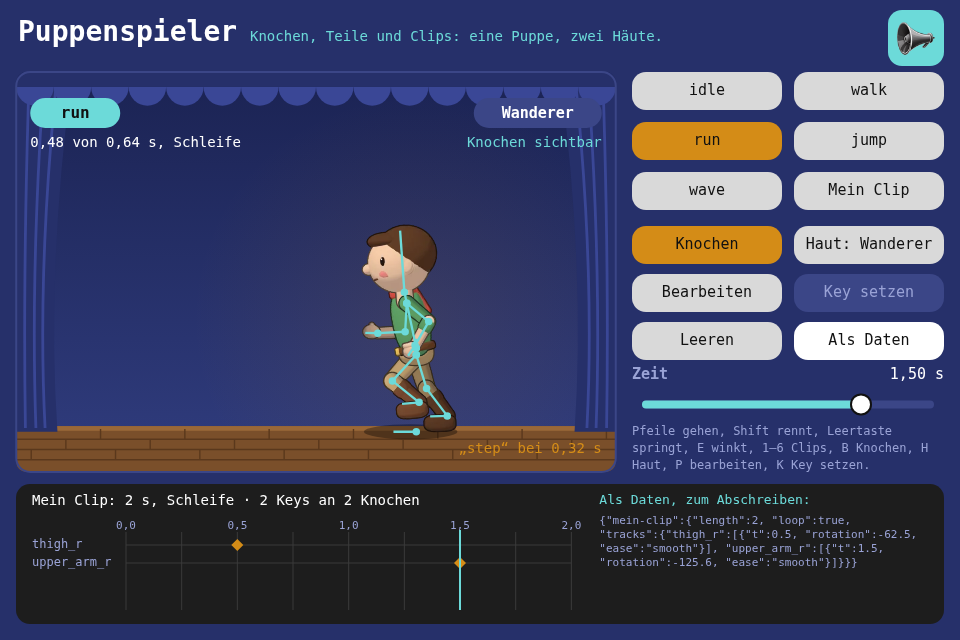
There is nothing to win. The keys on the right play the clips: idle, walk, run, jump, wave, and "Mein Clip", the one you make yourself. The arrows walk the puppet across the stage and Shift makes it run; it moves exactly as fast as its feet go, so nothing skates. "Knochen" draws the skeleton over the parts. "Haut" swaps the wanderer's parts for the gardener's: another person, the same bones, the same run.
"Bearbeiten", or a press on the puppet, holds it still. Pick a bone and drag it round; the stage shows its angle. The slider sets the time, and "Key setzen" stores the pose there in "Mein Clip", which plays back at once. Two or three keys and the puppet does something of its own. "Als Daten" copies the clip as JSON, exactly the shape the walk and the run have in the library.
- Mouse or touch: the buttons, the slider, a press and a drag on the puppet.
- Keyboard: 1 to 6 play the clips, the arrows walk, Shift runs, Space jumps, E waves, B shows the bones, H swaps the skin, P edits, K keys, M mutes. A gamepad works too.
New in the toolbox: cut-out puppets
The problem. A sprite sheet (step 32) is a flip book: every pose is a picture someone drew, nothing lies between two frames, and a second character means drawing everything again. The owner wanted what 3D games do: describe how a run moves once, on a skeleton, and put any character's parts on it.
The idea. The well-known model of Spine and DragonBones, in a small format of our own (no Spine runtime, which would need a paid editor licence):
- Bones in a tree, each with a rest angle, a position on its parent and a length.
- Slots, named places in the drawing order, each on a bone: the far arm before the torso, the near arm after it.
- Skins, sets of parts by slot name, all in one atlas: a part is a rectangle of the picture and the pivot that sits on its bone's joint.
- Clips, keys per bone: at a time, a turn (and for the hip a shift) on the rest pose, eased
linear,smoothorstep.
All of it is one JSON object, the rig of a picture in the asset library. A game needs four lines:
const hero = this.load_puppet("wanderer");             // catalogue_images: { wanderer: "rendered/puppet/wanderer" }
hero.play("run");                                      // blends from the pose before in 0.15 s
hero.update(delta_seconds);
hero.draw(context, x, floor_y, { flip_x: facing_left, scale: 0.58 });

hero.set_skin(this.references.puppet("gardener"));     // the same bones, other parts
The PuppetPlayer feels like the sheet's AnimationPlayer: play, queue, then, speed, paused, time carried from one clip into the next, and named moments as events, sent once each also when one update passes several (the footsteps here). What a sheet can't do: a switch fades, every bone turning the short way round. A clip may say how fast its standing foot slides back (travel), and the game walks the puppet at exactly that speed.
The art. Both puppets come from one Blender script (38-puppenspieler/puppet__blender/build.sh): it builds the figures from simple shapes, renders every part alone from the side with round ends at the joints, so nothing gaps when a knee bends, packs the parts into one atlas and writes the rig. The bones and pivots come from the script's joints, not from guessing, and the clips are tables in the same script. The run's feet are put on the ground at every step by working the hip's height out from the leg angles. One command makes everything again and puts both into the library.
Picking a bone sounds simple and wasn't. Seen from the side, the near arm hangs exactly over the torso, so their bone lines lie on each other and "the nearest line" picked the torso about every other time. puppet.pick_bone(x, y) now looks at the parts under the pointer and takes the one whose bone line is nearest, the part drawn on top on a tie.
What it costs. Intel i7-11700F, the wanderer (16 bones, 15 parts) running, drawn about 120 pixels tall:
| Node 22 | Headless Chromium (software canvas) | RTX 4070, Chrome in a window | |
|---|---|---|---|
| Update 1 000 puppets | 0.6 ms | 1.2 ms | 1.2 ms |
| Draw 100 puppets (script time) | – | 1.4 ms | 1.4 ms |
| Most running puppets at 57 FPS, 960 × 640 | 120 | 400 |
Updating is never the limit. Drawing is: one transform and one drawImage per part. A few dozen puppets on any machine, a few hundred on a graphics card; for thousands, step 37's crowds of sheet frames are the cheaper way.
Tests. The toolbox checks a bone's world position after its parent turns, a two-bone arm reaching a known point, every easing halfway between two keys, a loop's wrap, then, moments once each at every speed, the fade the short way round, a second skin on the same bones, picking where lines lie on each other, and clear messages for broken data. The game checks pinned angles of the walk and the run, that the run's feet touch the ground on its steps within a pixel and fly between them, that both skins draw every slot and wear the clips unchanged, and that two keys set in the editor play back exactly.
The modules are in src/canvas/puppet/; the docs are docs/puppet.md.
From earlier steps
- The catalogue hook from step 32:
load_puppetcomes through it asload_animationdid, waiting while the data is on its way. - The
ActionMapfrom step 30: keys and a gamepad. HouseSliderand the buttons from the UI steps: the editor's time.
The scaffold, start screen, intro and scaling are explained in Spielwerk 00: The workbench.
Embed it
<script src="https://www.game-object.de/tce-elements/tobidot/dll-tce-assets"></script>
<script src="https://www.game-object.de/tce-elements/tobidot/tce-puppenspieler"></script>
<tce-puppenspieler></tce-puppenspieler>
| Attribute | Values | Default |
|---|---|---|
init-intro |
true / false: play the GO logo intro |
true |
Next
Previous: Spielwerk 37: Gewimmel · Next: Spielwerk 39: Kleiderschrank · All steps
Comments