
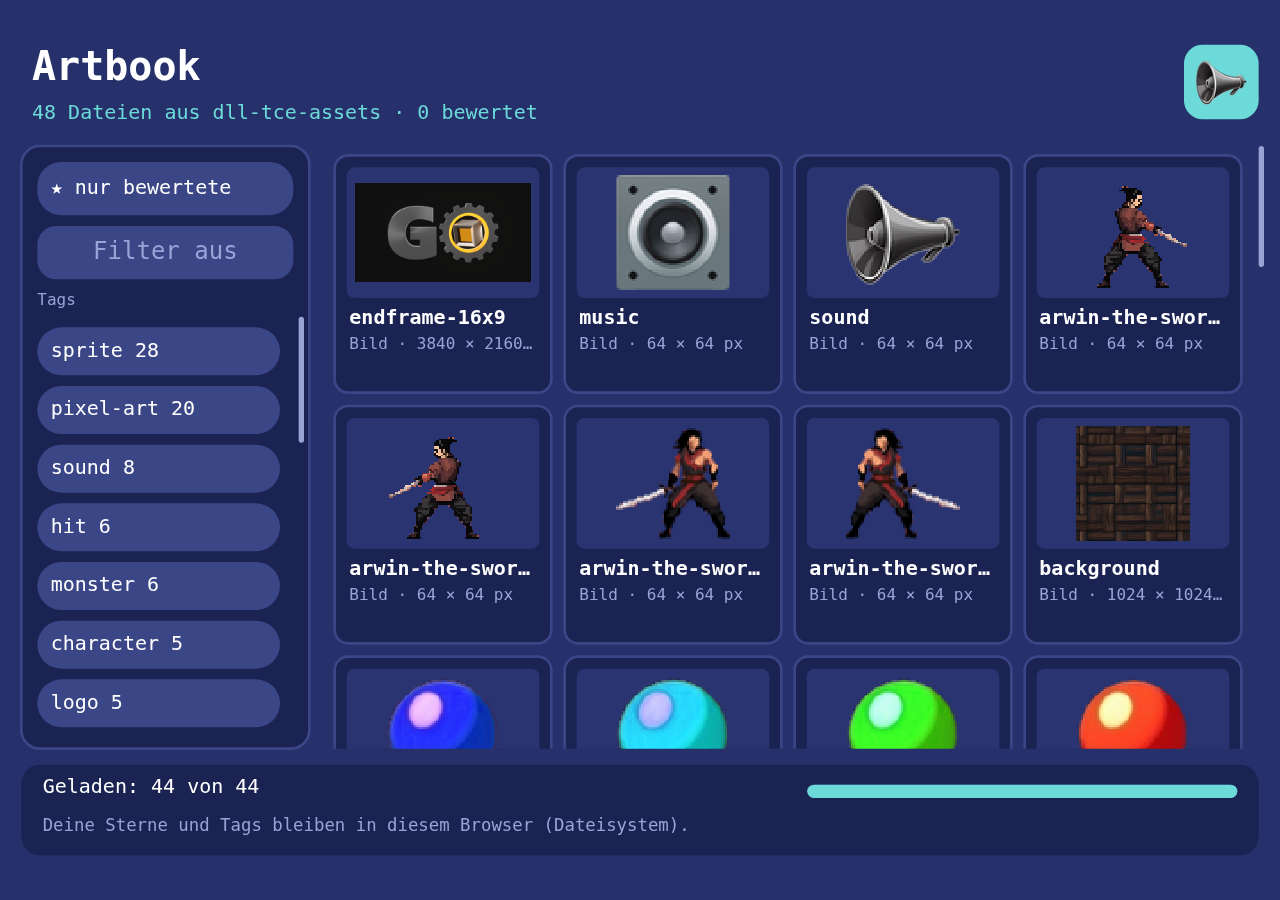
An artbook of the shared media library: every picture, sound, piece of music and film the Spielwerk series and its games use. Browse them by tag or license, see who made each one and under which terms, play them, and give them stars and tags of your own. It is the first step that loads its files off the network instead of carrying them inside the element, so the toolbox's AssetManager learns to load many files in the order you scroll to, with progress you can see and a failed file that says so.
Play it · Source: collection-spielwerk/28-artbook · Toolbox 6.0.0 or later
The game
It's a tool more than a game, and there is nothing to lose. The cards show every file of the shared library dll-tce-assets, each once: a file the library lists under several names (a role such as default/player, an old Spielwerk name) is one card under its library id. The chips on the left are the licenses ("CC BY 4.0", "CC0 (gemeinfrei)"), "KI-generiert", the library's tags ("sprite", "monster", "sound", ...) and your own; switched on, they narrow the cards to files that have all of them. The field above the chips narrows them further as you type: to files with a tag, yours or the library's, a name, an author or a tool that contains the text, in any case. Empty, it shows all again. A card opens the detail view: the picture large, pixel art drawn sharp, a sound with its play button, or the GO intro in a video player. Under it are the credits: the license with a link to its terms, who made the file and with what, whether a generator made it, the credit line the license asks for, a link to where a bought or borrowed file came from, and the other names a game can ask for it by. What the library doesn't say is "unbekannt" or left out. There you give 1 to 5 stars and tags: preset chips such as "Favorit", "für Zombies" or "zu laut", or one you type. Your stars and tags stay in your browser through dll-tce-file-system; without it they last for the visit, and the page says so.
- Mouse or touch: a chip filters, a tap on the text field brings up the phone's keyboard and "×" empties it, a card opens, "▶" on a sound card plays it, "‹ Übersicht" goes back, "‹" and "›" flip through the files. The cards and the chips scroll with a drag, the wheel, or the scroll bar beside them: drag its thumb, or press its track to move a page.
- Keyboard: letters go into the text filter, Escape empties it, Enter or the down arrow goes back to the cards; there the arrows move, Enter opens, Space plays. In the detail view the arrows flip, letters type a tag, Enter adds it, Escape goes back.
New in the toolbox: AssetManager.request()
The problem. Every step so far bundled its pictures and sounds into its script as data URLs, and the shell's AssetManager (references.assets) only ever loaded those: all at once, before the game starts, with nothing to show while it waits. That's fine for a dozen sprites. The artbook has more than 50 files on the site, some of them a few megabytes. Loading them all before the first card means a blank page; loading them all at once means the card you look at waits behind the music at the bottom. And load_images() takes a whole set at once: one missing file rejects all of it, a file that never answers holds it up for good, and it asks with crossOrigin, which a server without CORS headers refuses.
The idea. Ask for each file by name, with a priority, and get back a load you can watch. The manager keeps a queue, starts the lowest priority first, at most four at a time, and lets you change the priority of anything still waiting. Each load has a state (queued, loading, ready, failed), a reason when it failed, and a Progress; the manager adds them all up into one. A file that is ready goes into images, audios or videos under its name, exactly where the shell's widgets and the AudioPlayer look for it.
const load = assets.request({
    name: "spielwerk/images/slime/slime-left",
    url: "https://www.game-object.de/.../slime-left.png",
    kind: "image",            // "image" | "audio" | "video"
    priority: 0,              // lower loads first; equal ones in the order asked for
});
load.state;                   // "queued" → "loading" → "ready" | "failed"
load.reason;                  // "HTTP 404", "timed out", "could not be loaded", ...
load.progress.get_percent();  // 0 to 1
assets.set_priority(name, -1);    // a waiting file moves up; one that loads goes on
assets.cancel(name);              // a waiting file is withdrawn, as if never asked for
assets.progress.get_percent();    // all requested files; a failed one counts as finished
assets.counts;                    // { queued, loading, ready, failed }
assets.max_parallel = 4;
assets.timeout_ms = 60000;
How a file loads depends on where it lives. A file on the page's own origin, or one marked cors: true, is fetched as bytes: the progress follows the bytes, a 404 fails with HTTP 404, and the element gets a blob URL. Anything else goes straight into an <img>, <audio> or <video> without crossOrigin: it loads, but only as "done" or "could not be loaded". Every load has a timeout, so nothing hangs.
How the artbook uses it. The catalogue comes from dll-tce-assets. Once the logo is over, so the intro plays undisturbed, only the pictures and sounds of the cards you can see are requested, and those within about one screen above or below. A card the filter hides, or one far down the list, isn't requested until it is filtered in and scrolled near. The priority is the card's place: a sound you pressed play on first (-2), then the detail view (-1), then the cards in view from the top, then the nearest ones:
function load_priority(top: number, height: number, view_top: number, view_bottom: number, margin: number): number | null {
    const bottom = top + height;
    if (bottom >= view_top && top <= view_bottom) {
        return (top - view_top + height) / (view_bottom - view_top + 2 * height);   // in view: top to bottom, all under 1
    }
    const distance = top > view_bottom ? top - view_bottom : view_top - bottom;
    if (distance > margin) {
        return null;                                  // too far: not asked for
    }
    return 1 + distance;                              // near: the nearest first
}
When the grid scrolls or the filter changes, the artbook requests what now has a number, in that order, and withdraws every file that is still waiting but got null with assets.cancel(name). A file that is already loading goes on, and one that is there stays.
Each card paints its own load: a bar while it waits or loads, the picture when it's there, "✕ nicht gefunden (404)" when it failed. The status line under the cards says how much of what the filter shows is there ("Geladen: 21 von 54 Bildern und Klängen · mehr beim Scrollen"), how many files are on their way, failures and bytes, with the total bar along its bottom. Films don't count there: they load when you open them. The shell repaints whenever assets.progress moves, so a file that arrives shows up without the game asking.
What using it turned up.
- The site's media send no CORS headers. A page at another address can't fetch their bytes, and asking an
<img>for them withcrossOriginfails outright. So the manager asks without it: the file loads, but without byte progress, and a canvas that draws it can't be read back. On the live site the element and its files share the origin, and the bytes are counted. Progresswith nothing to do said 100. Every other value is a fraction from 0 to 1; a task with a total of 0 reported 100. It reports 1 now. The manager's total starts at 0 tasks, andappend_child_progress()adds one per file as it is asked for.Videocouldn't stay paused. No step had shown it yet. Every draw started a paused film again, sopause()lasted one frame, and it needed its film when it was built. It may now be built without one, keeps the film's shape (is_contained), andpause()holds untilplay().- Requests wait for the intro. The shell only calls
update()after the logo, which turned out to be the right moment: the films and the first cards don't fight for the line. - Asking for everything doesn't grow with the library (0.2.0). The first version requested every file after the logo, hidden ones last. Now a fresh start in the wide layout asks for 20 of the 54 pictures and sounds; with "slime" typed into the filter, only those 4 more come; a scroll down asks for the next rows. A priority alone couldn't do that, because a file left waiting still loads in the end, so the manager learned
cancel(), which withdraws a file that still waits. It works only for waiting files: one that already loads finishes.
A test worth copying. The order must follow the priority, also when it changes while files wait:
it("follows a priority changed while it loads", async () => {
    const manager = new AssetManager(options);      // fake elements that load when the test fires "load"
    manager.max_parallel = 1;
    for (const name of ["a", "b", "c"]) {
        manager.request({ name, url: `https://cdn.test/${name}.png`, kind: "image", priority: 0 });
    }
    manager.set_priority("c", -1);
    element_of("https://cdn.test/a.png").fire("load");
    await settle();
    expect(manager.loads.get("c")?.state).toBe("loading");
    expect(manager.loads.get("b")?.state).toBe("queued");
});
a starts at once, as there was room; c overtakes b while both wait. The manager takes a fake fetch and create_element in its options, so none of the tests needs a browser.
Path: src/assets/manager/AssetManager.ts (request, set_priority, cancel, AssetLoad, counts, loaded_bytes), src/flow/helpers/Progress.ts (append_child_progress, remove_child_progress), src/ui/widgets/Video.ts.
New in the library: find_assets
dll-tce-assets is on every page with a game, so nothing in it changed. Its entries may carry tags now, and a new function with its own contract searches by them: find_assets({ prefix?, tags? }) gives the entries under a name prefix that have any of the tags. An older page asking list_assets() gets what it always got. The artbook asks find_assets({}) and falls back to list_assets() on an older library, without tags.
Since 0.3.0 the library is the whole asset library, and its entries may say more: alias_of (the library id a role or an old name repeats), license (an SPDX id such as CC-BY-4.0) and attribution, and since 0.3.1 author, source, made_with and ai_generated. The artbook folds the entries of one file into one card (by alias_of, or the same URL), moves stars you gave under an old name onto it, and shows the rest in the credits; a library without these fields gets "unbekannt". For a list this long the toolbox's ScrollGroup got a scroll bar to grab, scroll_bar = "bar": a thumb as tall as the share in view, a track that pages, and the theme type scroll_bar for its look (toolbox 6.1.0, not yet released).
From earlier steps
GalleryandImagefrom step 23: the large picture in the detail view, contained and sharp for pixel art.Throttlerfrom step 24: your stars and tags are written once you stop clicking, not on every click.AudioPlayerfrom step 17: it plays the loaded sounds and music by name, from the sameaudiosmap.UiPage,place(),ScrollGroup,is_selectedand button classes from step 20: the chips and the scrolling grid of cards.dll-tce-file-system, as in step 14: one JSON file,/spielwerk/artbook.json.
The scaffold, start screen, intro and scaling are explained once in Spielwerk 00: The workbench.
Embed it
<script src="https://www.game-object.de/tce-elements/tobidot/dll-tce-assets"></script>
<script src="https://www.game-object.de/tce-elements/tobidot/dll-tce-file-system"></script>
<script src="https://www.game-object.de/tce-elements/tobidot/tce-artbook"></script>
<tce-artbook></tce-artbook>
Without dll-tce-file-system your stars last for the visit; without dll-tce-assets there is nothing to show.
| Attribute | Values | Default |
|---|---|---|
init-seed |
whole number; the artbook draws nothing at random | random |
init-intro |
true / false: play the GO logo intro at the first connection |
true |
Next
Previous: Spielwerk 27: Sandkasten · Next: Spielwerk 29: Horde · All steps · Where the series is heading: Civilization
Comments