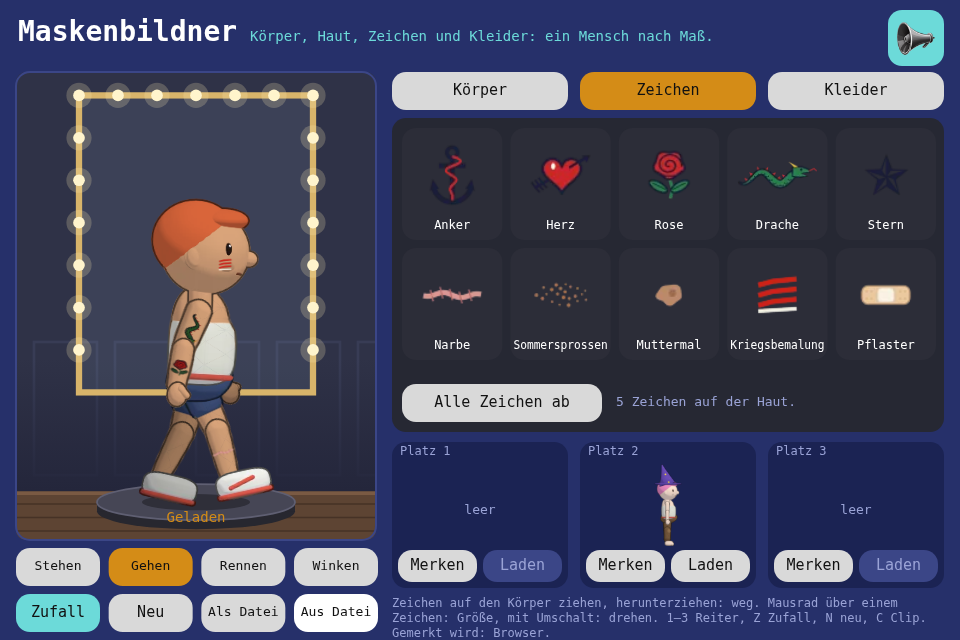
A model in a tank top and shorts stands in a make-up room and walks, runs or waves while you make it someone: taller, broader, rounder, thinner, with longer legs, another skin and hair colour, a dragon tattoo on the forearm, freckles and a plaster, and step 39's clothes over it all. The toolbox learns body shape and skin for its cut-out puppets: shape values that scale bones and bend parts as meshes, tints that keep the shading, marks laid onto the skin, and the whole person as plain data.
Play it · Source: collection-spielwerk/40-maskenbildner · Toolbox 6.2.0 or later
The game
There is nothing to win. The panel under the stage has three tabs:
- Körper: a slider for each of seven body shape values (Größe, Beinlänge, Schultern, Brust, Bauch, Arme, Beine) and palettes for the skin and the hair. The first swatch is the colour as drawn.
- Zeichen: a box of ten marks: five tattoos (anchor, heart, rose, dragon, star), a scar, freckles, a birthmark, warpaint and a plaster. Drag one onto the body and it sticks to the part you dropped it on; drag it off the body and it is gone. A click puts it on a spot of bare skin. The mouse wheel over a mark makes it larger or smaller, with Shift it turns.
- Kleider: step 39's wardrobe, five drawers of pieces to put on and take off.
The model keeps moving while it is made: the keys beside the stage play standing, walking, running and waving, so you see a round belly walk along and a tattoo stay on the arm through the run. "Zufall" makes a random person, "Neu" the plain model again. Three slots keep characters ("Merken", "Laden"; on the desktop they are files in /saves/tce-maskenbildner/), and "Als Datei" saves the character as a file that "Aus Datei", or another game, reads back.
- Mouse or touch: the sliders, the swatches, dragging marks, the keys.
- Keyboard: 1 to 3 open the tabs, Z makes a random character, N the plain one, C plays the next clip, M mutes. A gamepad switches tabs with LB and RB.
New in the toolbox: body shape and skin
The problem. Step 38's puppets are pictures on bones, so a second body means a second set of pictures. A character designer needs one set that can become many people: a taller one is longer bones, but a round belly is not a longer torso, and scaling a whole part makes the head as broad as the shoulders. Skin colour can't be a tint over the whole picture, which would colour the outline and flatten the shading. And a tattoo has to sit on the skin, not on top of a sleeve, and move with the arm.
Shape values. The rig names its shapes; each is a number from -1 to 1, 0 being the rig as drawn. A value scales bones ([length, width] per bone: height makes the torso and legs longer), or it pushes points of a mesh (belly, chest, arms, legs). The legs carry the hip: the puppet stands on its soles, and with longer or shorter legs it is lifted or lowered so its lowest sole stays on the floor through every clip.
Parts as meshes. Where a value pushes, the parts on that bone are drawn as a grid of points over the picture (16 pixels a cell). Each point moves by a weight: full in the middle of the belly, nothing at its edges, nothing at the joints. Points with no weight never move, so two bones that meet keep their joint closed. A coat on a meshed bone uses the same pushes, so it is as round as the belly beneath it; a hat or a sword on an anchor moves with the body but keeps its size.
Tints that keep the shading. The model's parts carry grey layers, rendered from their skin or hair alone. set_tint("skin", "#c29062") multiplies the colour into that grey and lays it over the part, so the shading and outline stay.
Marks on the skin. A mark sheet is a small atlas of pictures, each with a pivot, a kind and a blend: tattoos are multiplied into the skin, a plaster is laid on. A mark is placed in its bone's frame, so it moves, turns, stretches and bends with the part, and it is clipped to the part's skin layer, so nothing reaches past the outline or onto the clothes. For a game that drags marks, the puppet answers which part lies under a point (slot_at), where that point is in the part's frame (to_part, through the mesh) and which mark is under the pointer (mark_at).
A character is plain data, { skin, shape, tints, marks, outfit }:
const hero = this.load_puppet("model");             // catalogue_images: { model: "rendered/puppet/model" }
hero.use_marks(this.load_marks("marks"));           // a mark sheet, "rendered/puppet/marks"
hero.set_shape({ belly: 0.6, height: 0.3 });
hero.set_tint("skin", "#c29062");
hero.add_mark("dragon", "lower_arm_r", { x: 24, y: 0, size: 1.2 });
save(hero.character);                               // through SaveSlots, or as a file
other.set_character(loaded);                        // the same person on another puppet
set_character answers false when something doesn't fit (an unknown shape, part, mark or piece) and takes the rest.
What it costs. Drawing a mesh on a 2D canvas means one clipped, transformed triangle at a time. So the puppet doesn't: when its shape, tints or marks change, it lays each changed part once into a canvas (the part, its tints, its marks, bent through the mesh) and packs these looks side by side into one picture. Each frame it draws them as at shape 0, one transform and one drawImage a part. Measured in Chrome on an RTX 4070 (Intel i7-11700F), the most characters that still run at 57 frames a second: 400 plain, 85 shaped, tinted and marked, 5 drawn triangle by triangle. One character drawn triangle by triangle costs 0.76 ms; moving a slider, which lays the changed parts again, 1.4 ms. The laid parts stay in memory and only the packed picture goes to the graphics card; before that change the same scene managed 50.
The art. One Blender script (40-maskenbildner/model__blender/build.sh) renders the model on step 38's skeleton, part by part with the same toon shading, plus grey layers of its skin and hair, and writes the shape values; it also renders the ten marks. Both go into the asset library as rendered/puppet/model and rendered/puppet/marks.
Tests. The toolbox checks that shape 0 draws exactly step 38's puppet, that a longer leg keeps the foot on the ground through the run, that a mesh point with weight 0 never moves, that a mark stays at the same spot of its part at every key, that a mark past a part's edge is clipped, and that a character round-trips through SaveSlots. The game checks every slider at both ends over all clips for gaps at the joints (and that the check finds a gap when one is made), that the feet stay on the floor, that the coat widens with the shoulders, that a mark on the forearm is in the same place after a run, and that a random character saved and loaded draws the same. The browser check moves each slider, drags marks on and off, dresses, saves and loads a character and compares the pixels.
The modules are in src/canvas/puppet/ (PartMesh.ts, MarkSheet.ts, PuppetLook.ts, Skeleton.ts, Puppet.ts); the docs are the "Body shape and skin" section of docs/puppet.md.
From earlier steps
- The puppets and their clips from step 38, unchanged: shape is laid over the pose.
- The clothes from step 39, now following the body.
SaveSlotsfrom step 35: the three slots, kept as files on the desktop.- The catalogue hook from step 32:
load_markscomes through it asload_puppetdid. - The
ActionMapfrom step 30: keys and a gamepad.
The scaffold, start screen, intro and scaling are explained in Spielwerk 00: The workbench.
Embed it
<script src="https://www.game-object.de/tce-elements/tobidot/dll-tce-assets"></script>
<script src="https://www.game-object.de/tce-elements/tobidot/tce-maskenbildner"></script>
<tce-maskenbildner></tce-maskenbildner>
| Attribute | Values | Default |
|---|---|---|
init-seed |
whole number: what "Zufall" makes | random |
init-intro |
true / false: play the GO logo intro |
true |
Next
Previous: Spielwerk 39: Kleiderschrank · Next: Spielwerk 41: Gummihaut · All steps
Comments