
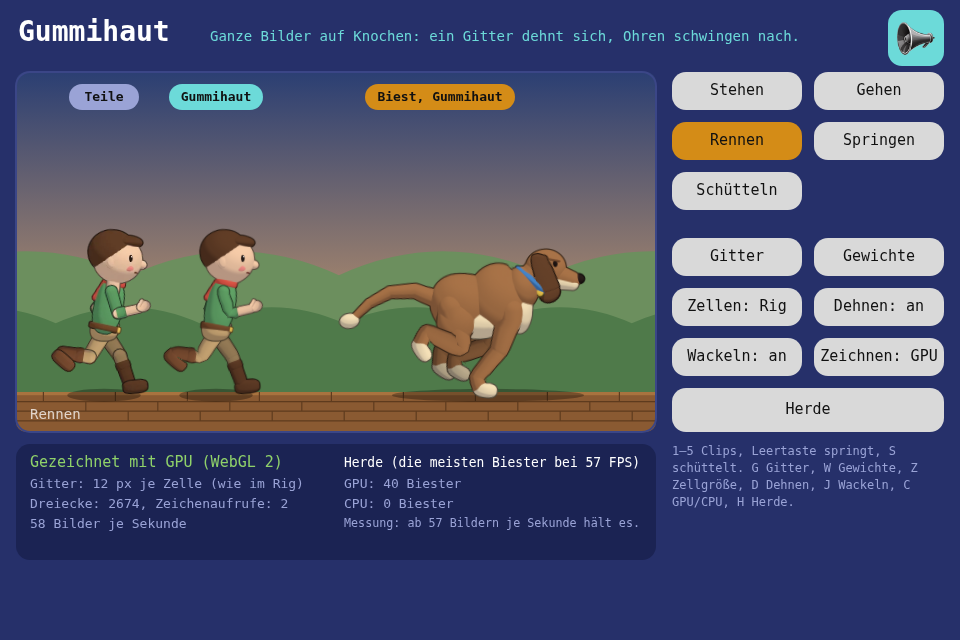
A wanderer runs next to himself: once as step 38's cut-out puppet, pictures turning on joints, and once as one whole picture under a fine grid that bends with the bones, no joints anywhere. Beside them a big brown dog-like beast breathes, gallops, jumps with a stretch and lands with a squash, and shakes like a wet dog, its floppy ears and long tail swinging after it. The toolbox learns soft skins for its puppets: a picture bound to its bones by a bone map, drawn on the graphics card with WebGL 2 or on the CPU behind one API, with stretch and squash in the clips and bones that jiggle.
Play it · Source: collection-spielwerk/41-gummihaut · Toolbox 6.3.0 or later
The game
There is nothing to win. All three play the clip on the keys, on the spot, while the floor slides by: Stehen (the beast breathes), Gehen, Rennen, Springen and Schütteln (the wanderers wave instead). The switches beside them:
-
Gitter shows the grid and the bones, Gewichte each grid point in its bones' colours: you see where the knee's crossover lies and how wide it is.
-
Zellen changes the grid: the rig's own (12 pixels a cell on the graphics card, 32 on the CPU), then 8, 16 and 32 for both.
-
Dehnen turns the stretch off: the jump's long body and the landing's squash are gone, the bones keep their length.
-
Wackeln turns the jiggle off: the ears and the tail stop swinging after the shake.
-
Zeichnen switches between GPU and CPU while it runs.
-
Herde fills the yard with small beasts while the frames hold 57 a second, first on the GPU, then on the CPU, and keeps how many each carried.
-
Mouse or touch: the keys.
-
Keyboard: 1 to 5 play the clips, Space jumps, S shakes; G, W, Z, D, J and C flip the switches, H starts the herd, M mutes. A gamepad has them on its buttons.
New in the toolbox: soft skins
The problem. Step 38's puppets are cut out: a thigh, a shin and a boot, each a picture turning on its joint. That reads well for a wooden doll, but every bent knee shows two round ends lying over each other, and nothing can stretch. A creature should bend like a body, and a jump should look like a jump: long at the take-off, squashed on the landing.
One picture, a grid, four bones a point. A soft skin is the creature rendered whole in its rest pose. A grid of small cells (12 pixels) lies over it where it has pixels, and every grid point follows up to four bones with weights (linear blend skinning): a point in the middle of the thigh follows the thigh alone, one at the knee half the thigh and half the shin, so the knee bends the picture smoothly. A creature whose legs pass each other comes in a few such pictures drawn back to front: the far legs, the body, the near legs, and each floppy ear on its own.
Weights from a bone map. Next to each picture lies its bone map, the same shape painted flat, every body part in its bone's colour. The weights are this map blurred and sampled at each grid point, so a point of the left leg never pulls on the right leg lying next to it, and the blur makes the soft crossover at a joint; the wider the blur, the rounder the bend. The top of a leg is painted in the body's colour, so the leg's root stretches with the body instead of turning like a cut-out part. Without a map, a point follows the nearest bones.
Stretch and squash. Clips get scale_x (along a bone) and scale_y (across) keys; one alone keeps the area, so longer is thinner. The beast is a fifth longer at the take-off and flattened on the landing, and both wanderers breathe in their idle.
Jiggle. The rig names bones that swing after the motion: the beast's ears, its belly and the last three bones of its tail. Each is a damped spring on the bone's tip with a half-life, a strength and a largest angle. It is stepped in fixed steps of 1/240 s, so it swings the same at 30 and at 144 frames a second.
const beast = this.load_puppet("beast");              // catalogue_images: { beast: "rendered/puppet/beast" }
const layer = new SoftLayer();                         // WebGL 2 where there is one, else the CPU
// every frame:
beast.update(delta_seconds);                           // clips, stretch, jiggle
beast.draw(context, x, floor_y, { layer, scale: 0.6 });
layer.draw(context);                                   // all soft puppets added since the last draw
layer.mode;                                            // "gpu" or "cpu"; layer.prefer = "cpu" switches
beast.rig.soft_skin.cell_size = 16;                    // a coarser grid for every beast
beast.jiggle.enabled = false;
On the graphics card. The meshes and the atlas go up once; each frame only the bone matrices do, one row per creature in a float texture. The vertex shader does the skinning, all creatures with the same skin are one instanced draw call into a WebGL canvas of its own, and that canvas is laid onto the game's 2D canvas with one drawImage, as step 33's particles are. Without WebGL 2 the same points are worked out on the CPU and the grid, coarser there, is drawn triangle by triangle. Games never see WebGL; a lost context draws on the CPU until it comes back. The shader's maths is written out once more in TypeScript, and the tests hold it against the CPU's. The browser check draws the beast both ways and compares them: about 1.3 % of its pixels differ by more than 48 of 255, along the edges.
What it costs. Measured in Chrome on an RTX 4070 (Intel i7-11700F), the most running beasts that still give 57 frames a second on a 960 × 640 canvas: about 2 500 on the GPU (2 560 drawn small, 2 400 at half size), and the bill there is updating their clips and springs, not drawing them. On the CPU, where every triangle is a clip, a transform and a drawImage, it is 10. The CPU path is a fallback for a few creatures, not for a herd. In headless Chromium, where WebGL runs in software, the GPU path carries 15 to 45.
The art. One Blender script (41-gummihaut/soft__blender/build.sh) renders step 38's wanderer whole in five layers, and a new beast on its own skeleton of 24 bones, in five layers, each with its bone map, and writes their rigs: the wanderer keeps step 38's skeleton and clips (with breathing and a stretched jump added), the beast gets jiggle and five clips of its own. Both go into the asset library as rendered/puppet/wanderer-soft and rendered/puppet/beast.
Tests. The toolbox checks that a point with weight 1 on one bone moves exactly with it, that weights sum to 1, that a point of the left leg has no weight on the right one when the map says so, that the CPU and the shader's maths agree, that soft and cut-out skins put the feet in the same place through the run, that scale keys keep the area, and that jiggle settles and gives the same swing at 30 and at 144 updates a second. The game checks that both wanderers stand on the same ground line through every clip, that the soft one stays within the cut-out one's outline, that no grid edge stretches past three times the largest stretch key and that under 3 % of the grid folds (inside a bent knee), and the herd's measuring run on a made-up machine. The browser check plays every clip, flips every switch, compares GPU and CPU, loses the WebGL context and gets it back, and runs the herd.
The modules are in src/canvas/puppet/ (SoftSkin.ts, SoftMesh.ts, SoftGpu.ts, SoftLayer.ts, PuppetJiggle.ts); the docs are the "Soft skins" section of docs/puppet.md.
From earlier steps
- The puppets, their rigs and clips from step 38: a soft skin is another skin on the same rig, and
set_skinswitches between them. - The bone scales from step 40: the clips' stretch rides on them.
- The GPU and CPU paths behind one API from step 33: a WebGL canvas of its own, laid on with one
drawImage. - The measuring run from step 37: doubling while the frames hold, then halving the gap.
- The
ActionMapfrom step 30: keys and a gamepad.
The scaffold, start screen, intro and scaling are explained in Spielwerk 00: The workbench.
Embed it
<script src="https://www.game-object.de/tce-elements/tobidot/dll-tce-assets"></script>
<script src="https://www.game-object.de/tce-elements/tobidot/tce-gummihaut"></script>
<tce-gummihaut></tce-gummihaut>
| Attribute | Values | Default |
|---|---|---|
init-seed |
whole number (the yard has no chance in it) | random |
init-intro |
true / false: play the GO logo intro |
true |
Next
Previous: Spielwerk 40: Maskenbildner · Next: Spielwerk 42: Bestiarium · All steps
Comments