Run, aim, shoot and club: the rigged figures of steps 38 to 43 fight. Steps 38 to 43 played one clip at a time on a quiet stage. A fight needs more from a rig: legs that run while the arms aim, an arm that points wherever the mouse is, a hit that lands on the bone it touched, and a body that falls over when it is beaten. The toolbox learns all of that, and a small side-scroller uses it.
Play it · Source: collection-spielwerk/44-knopper-klopper · Toolbox 6.3.0 or later
The game
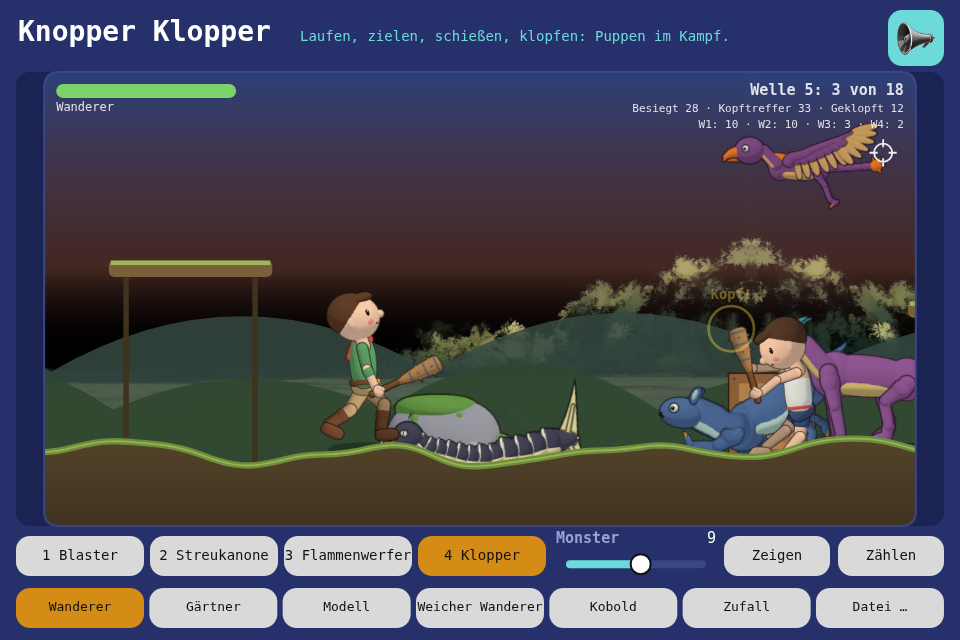
Run to the right through hills and over ledges. Monsters come from the right, from behind, from the air (fliers) and out of the ground (worms): step 42's generated monsters of all four kinds, and figures swinging a Klopper of their own. At the end of every lap a big monster waits. A wave is twice as many monsters as the slider says; the score is how many you beat.
It is a tech demo, so it is easy: health comes back after a moment, a fall costs a few seconds, and there is no game over.
- Blaster, Streukanone, Flammenwerfer and Klopper: the four weapons. Bolts, a spread of pellets, a flame, and a club that sends what it hits flying.
- A hit lands on the bone it touches. A hit on the head counts double ("Kopf!").
- Beaten monsters fall as ragdolls and fade. The Klopper knocks down whatever it hits; a beaten figure falls apart into its parts (the "Knopper").
- Monster sets how many come at once (1 to 16).
- Zeigen shows the hit capsules (the head in yellow), the clip layers, the constraints and the ragdolls' bones.
- Zählen counts how many monsters fight at 57 frames a second on your machine: more and more come while the frames hold, and the hero shoots by itself.
- The figure row picks the player: Wanderer, Gärtner, Modell, Weicher Wanderer (step 41's soft skin), Kobold (drawn in step 43), Zufall (a generated Zweibeiner from step 42's kit) or Datei …: a folder or zip from the Knochenwerkstatt. A folder or zip dropped onto the game works too.
Controls:
- Mouse: aim, hold the button to fire.
- Keyboard: A/D or the arrows run, W, Space or ↑ jumps, F fires, 1 to 4 or Q/E change the weapon, C shows the capsules.
- Gamepad: left stick runs, right stick aims, A jumps, the right trigger fires, the shoulder buttons change the weapon.
- Touch: a stick to run, a key to jump, a touch on the stage aims and fires.
New in the toolbox: puppets in action
Clip layers on bone masks. A puppet plays several clips at once, on layers in order. A layer covers some bones (a mask such as lower_body, upper_body or arm_r, made from the bone tree), mixes over the layers below with a weight, and either replaces their pose or adds to it. The hero runs on its legs while its upper body holds still, and a shot adds a recoil on top. An added clip whose keys are offsets from the rest pose ends exactly where it started.
hero.layers.play("hold", "idle", { mask: "upper_body" });
hero.layers.play("recoil", "kk-recoil", { mode: "add", restart: true, fade: 0 });
Aim, look and reach. After the clips, constraints turn bones towards a point. aim turns a chain (the spine, the upper arm, the forearm) so that a point on the hand's anchor, here the weapon's muzzle, lies on the line to the target, spread over the chain with weights and limits. look_at turns the head, reach bends a two-bone limb so the far hand holds the weapon's grip. Constraints fade in and out, and a rig can carry them as data.
const muzzle = weapon_part.points.muzzle;                 // in the hand anchor's frame
hero.constraints.aim("arm_r", mouse.x, mouse.y, { from: muzzle });
hero.constraints.look_at("head", mouse.x, mouse.y);
hero.constraints.reach("hand_l", grip.x, grip.y);
Hits on bones. Every bone gets a capsule as wide as its picture there, from a soft skin's grid or a cut-out part's pixels. ray_hit(from, to) answers the first bone a bolt passes through, with the point and the normal; overlaps(circle) serves the flame and the Klopper. flinch(bone, direction) springs the bone back from the hit.
const hit = monster.ray_hit(bolt_from, bolt_to);           // { bone, name, x, y, normal, t } or null
if (hit !== null) {
    monster.flinch(hit.bone, { x: bolt.vx, y: bolt.vy }, hit.name === "head" ? 1.4 : 0.8);
}
Ragdolls. A beaten puppet becomes a ragdoll in step 26's PhysicsWorld: a point at every joint and tip, sticks along the bones, the joints' angle limits from the skeleton, starting with the speeds the bones had in the last frames. A cut-out puppet can also come apart at its joints and scatter its parts. After a second slow, or after three seconds at the latest, a ragdoll comes to rest for good and leaves the world, so lying bodies cost nothing. get_up(clip) blends a lying puppet back into a clip.
monster.ragdoll(world, { push: { bone: "torso", x: 720, y: -520 }, scatter: true });
// later
monster.get_up("idle", { fade: 0.5 });
While building the game, the generated four-legged monsters crawled across the ground as ragdolls and spun up. Bending a joint back into its limits turned both sides of the joint by their weight, but it moved the whole body a little each time; a limit pressed on step after step became a motor. Each bend now takes back what it moved and turned the whole by, so the ragdoll keeps its momentum.
What it costs. The game counts it itself ("Zählen"): in Chrome on an RTX 4070, 768 monsters fight at 57 frames a second or more, every one playing its clips, attacking and tested by the bolts, the beaten falling as ragdolls (816 drop just under). In headless Chromium, which draws in software, it is 12. The game's rules for one frame with 384 monsters take 2.5 ms in Node. Making a monster takes some 40 ms, so the game makes two of each kind at the start, one a frame, and copies them.
Tests. The toolbox's tests check that a run under an aim leaves the arm where the aim put it, that an added recoil returns to the pose exactly, that the aim puts the muzzle on the line to a reachable target within a degree, that a bolt through the head hits the head and not the torso behind it, that a flinch springs back at any frame rate, and that a ragdoll starts with the bones where the pose had them, keeps its momentum, lands, comes to rest and lies still. The step's tests make every figure the player (the five of the library, three generated, the Kobold from a dropped folder and from a zip) and check that it runs, jumps, aims all round within a degree and holds every weapon; 200 seeded monsters of each kind check their capsules against their pictures and fall as ragdolls that come to rest on the ground; and short games check each weapon, headshots, the Klopper, a fall without a game over, a wave, the boss, the same game from the same seed and the measuring run. The browser check plays with the mouse and the keys: a run, the aim all round, each weapon, headshots, the Klopper, the capsules, a wave, a dropped Kobold folder, a generated figure, the soft wanderer and the upright layout.
The modules are in src/canvas/puppet/: PuppetLayers.ts, PuppetConstraints.ts, PuppetHits.ts and PuppetRagdoll.ts. The docs are the "Puppets in action" section of docs/puppet.md.
The art
Rendered in Blender by Claude in the style of steps 38 to 42 and marked as made with AI: the four weapons as one wardrobe (rendered/puppet/weapons, each piece on the hand_r anchor with its muzzle and grip), the bolt, the pellet and the flame puff (rendered/effect/*), and four props on the ground (rendered/prop/barrel, crate, rock, signpost). The background is the library's default/background. The sounds are the library's roles and retro hits; better ones for the blaster, the scatter gun, the flame and the club are on the wish list.
From earlier steps
- The puppets, rigs and keyed clips from step 38: the player's run and jump.
- The wardrobe from step 39: the weapons are pieces on the hand anchor, so any figure holds any weapon.
- The soft skin from step 41: the soft wanderer and every monster draw on the GPU.
- The generated monsters from step 42: their gaits, attacks and hit areas.
- The source folders from step 43: a dropped folder becomes the player.
- The noise from step 34: the hills. The physics world from steps 26 and 27: the ragdolls. The particles from step 33: the flame, the sparks, the dust. The
ActionMapfrom step 30: keys, pad and touch.
The scaffold, start screen, intro and scaling are explained in Spielwerk 00: The workbench.
Embed it
<script src="https://www.game-object.de/tce-elements/tobidot/dll-tce-assets"></script>
<script src="https://www.game-object.de/tce-elements/tobidot/tce-knopper-klopper"></script>
<tce-knopper-klopper></tce-knopper-klopper>
| Attribute | Values | Default |
|---|---|---|
init-seed |
whole number: the hills, the monsters and the waves | random |
init-intro |
true / false: play the GO logo intro |
true |
Next
Previous: Spielwerk 43: Knochenwerkstatt · All steps
Comments