
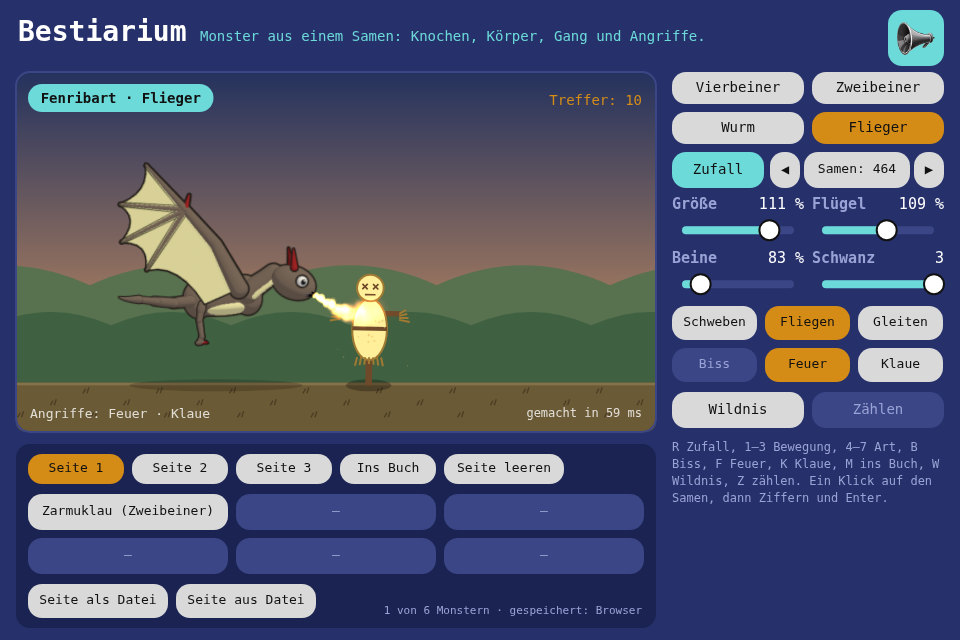
A monster from a seed: a dog-like Vierbeiner, an upright Zweibeiner, a Wurm or a winged Flieger, its bones, its body, its colours, its walk and its attacks all made from one number. The same number always makes the same monster. It walks, runs, crawls or flies, bites, breathes fire or claws at a straw dummy, goes into a bestiary of three pages, and roams the Wildnis with a dozen others. The toolbox learns generated creatures on step 41's soft skin: skeleton templates, a part kit painted into one picture, gaits made from the body's measurements and attacks with hit areas.
Play it · Source: collection-spielwerk/42-bestiarium · Toolbox 6.3.0 or later
The game
There is nothing to win or lose. The stage shows one monster and a straw dummy.
- Zufall makes a new monster. Vierbeiner, Zweibeiner, Wurm and Flieger pick the skeleton. The sliders change what the kind has: size, legs, arms, segments, wings or tail. The Samen field shows the seed: click it and type digits, or step with ◀ and ▶.
- Ruhe, Gehen and Rennen play the movement. A worm has Kriechen and Schlängeln instead, a flier Schweben, Fliegen and Gleiten.
- Biss, Feuer and Klaue play the attacks the monster has. The dummy leans, spins and counts the hits.
- Ins Buch keeps the monster on the open page, six to a page, three pages. A click on a name brings it back. Seite als Datei saves the page as a file, and Seite aus Datei reads one back.
- Wildnis lets a dozen monsters of all four kinds roam together. Zählen then adds copies while the frames hold 57 a second.
Controls:
- Mouse or touch: the keys.
- Keyboard: R for Zufall, 1 to 3 for the movement, 4 to 7 for the kind, B, F and K for the attacks, M for Ins Buch, W for the Wildnis, Z to count.
- A gamepad has them on its buttons.
New in the toolbox: generated creatures
The problem. Steps 38 to 41 drew every puppet by hand: a skeleton, parts, clips, all made once in Blender. A game that wants a hundred different monsters can't draw a hundred. It needs a recipe that makes them, and the recipe has to give the same monster every time it gets the same seed, so a monster can be saved as a few numbers.
A skeleton from a template. Each kind is a template written as plain data. A Vierbeiner has a spine of 3 to 5 bones, a neck, a head with a jaw, four legs of three bones and a tail of 2 to 6. Each chain has a range for its count, its length and its angles, and the generator picks inside the ranges. Each value and each chain draws from a random stream of its own, keyed by the seed and its name. A longer tail therefore leaves the legs exactly as they were. The spine tilts so all four feet stand, a worm lies on the ground, a flier hangs in the air.
A body from a part kit. A part kit is one atlas of body parts: heads, jaws, torsos, upper and lower legs, paws, claws, hands, wings, tails and tail ends, segments, eyes, horns, ears and spikes. Each part is drawn in grey, and beside it lies a tint mask whose red, green and blue say where the three colours go. Each part has a pivot and a tip, the line that goes onto a bone. A head also names its mouth, its jaw hinge and the places for the eyes, horns and ears.
One soft skin from the parts. compose_soft_skin places every part on its bone, scales and turns it, tints it and paints it into one picture per layer: the far legs, the body, the near legs. Beside each picture it paints step 41's bone map, every pixel in the colour of the bone it follows. Parts are painted twice, whole and then without their outlines, so where a thigh meets the hip only the outline around both shows. The top of each limb is painted in its parent's colour, so it stretches with the body. Step 41's soft mesh takes the result as it is: the monster bends as one skin with no joints showing.
Movement made from the measurements. No clip is keyed by hand:
- A walk or a run plants each foot for part of the cycle, sliding back exactly as fast as the floor moves, then swings it forward in an arc. Two-bone IK finds the hip and knee angles for every key.
- A worm's crawl sends humps from the head to the tail, the wavelength taken from its length.
- A flier beats its wings and rises on the downstroke, glides with the wings held out, or hovers.
- Idle breathes with step 41's stretch keys.
They are ordinary clips, so fades, moments and jiggle from steps 38 and 41 work on them.
Attacks with hit areas. Every attack is a clip with hit moments and an area around an anchor:
- Biss: the head lunges with the jaw open and snaps shut. One hit, in a circle at the mouth.
- Feuer: the monster rears back and opens the jaw. Fire pours from the mouth for about a second, with step 33's particles, and hits four times in a cone.
- Klaue: the near front paw, the arm or a flier's talons swipe. One hit, at the end of the swipe.
The body decides which attacks a monster has: a bite needs a jaw, a claw needs claws, and fire comes by chance, more often for worms and fliers.
const kit = this.load_kit("beasts");                  // catalogue_images: { beasts: "rendered/monster/quadruped-parts" }
// once kit.is_ready:
const monster = generate_creature("quadruped", 4711, kit);
monster.play("walk");                                  // idle, walk, run
monster.events.attach(CreatureHitEvent, (hit) => {
    const area = monster.area_now(hit.attack, x, floor_y, { scale: 0.5 });
    if (area !== null && in_area(area, dummy_x, dummy_y)) { dummy.hit(); }
});
monster.attack("bite");                                // once, then back to walking
// every frame:
monster.update(delta_seconds);
monster.draw(context, x, floor_y, { layer, scale: 0.5 });
layer.draw(context);
save(monster.data);                                    // { kind, seed, params, parts, tints, attacks }
The bestiary is plain data. A monster saves as its kind, seed, slider values, part ids, three colours and attacks. creature_from_data makes the same monster from it, pixel for pixel. A page of the bestiary is six of these in a save slot (step 35), or a JSON file.
The art. One Blender script (42-bestiarium/kit__blender/build.sh) builds every part from simple shapes in the style of steps 38 to 41. It renders each part twice, once shaded in grey with its outline and once as a flat mask, and packs them into one atlas per kind with their pivots, tips and points. The kits have 27 parts for the Vierbeiner, 31 for the Zweibeiner, 19 for the Wurm and 27 for the Flieger. They go into the asset library as rendered/monster/quadruped-parts, biped-parts, worm-parts and flyer-parts.
What it costs. Measured in Chrome on an RTX 4070 (Intel i7-11700F). Making a monster takes 14 ms for a worm and 54 ms for a Vierbeiner. That covers its skeleton, painting its parts into the skin, its clips and its attacks. Its grid adds 4 to 18 ms at its first drawing. That is one monster a frame at most, so the Wildnis makes its dozen one a frame. Roaming, 1 536 monsters still give 57 frames a second; copies share their rig, so their skin goes to the graphics card once. In headless Chromium, where WebGL runs in software, it is 57 to 72.
Tests. The toolbox's tests check the following:
- Two-bone IK puts the foot on its target, with the knee on the side asked.
- The same seed gives the same skeleton, and a longer tail leaves the legs alone.
- The composed picture has no seams, and its bone map paints a limb's root in its parent's colour.
- The same seed gives the same monster, data and pixels.
- Every walk keeps a planted foot within a pixel.
- A worm's wave travels backwards along its body.
- A bite's hit fires once per bite at any speed, and a monster without a jaw gets no bite.
- A monster comes back unchanged through
SaveSlots.
The game's tests cover 200 seeds of every kind:
- Every picture is whole, with no loose limb.
- Every joint is covered.
- Every foot stays on the ground through the walk.
- Every attack sends its hits.
They also check that every attack of every kind reaches the dummy, and that a kept monster comes back with the same pixels. The browser check makes monsters of every kind, plays every movement and attack, keeps one and loads it again pixel for pixel, exports and imports a page, and runs the Wildnis.
The modules are in src/canvas/puppet/: CreatureTemplate.ts, PartKit.ts, SoftCompose.ts, PuppetIk.ts, CreatureGait.ts, CreatureAttack.ts and Creature.ts. The docs are the "Generated creatures" section of docs/puppet.md.
From earlier steps
- The soft skin from step 41: a generated monster is one, with its pictures and bone maps painted at runtime instead of rendered.
- The puppets, rigs, clips and moments from step 38.
- The tints from step 40: grey shading times a colour, now through a three-colour mask.
- The particles from step 33 for the fire and the flying straw.
- The save slots from step 35 for the pages of the bestiary.
- The measuring run from step 37: doubling while the frames hold, then halving the gap.
- The
ActionMapfrom step 30: keys and a gamepad.
The scaffold, start screen, intro and scaling are explained in Spielwerk 00: The workbench.
Embed it
<script src="https://www.game-object.de/tce-elements/tobidot/dll-tce-assets"></script>
<script src="https://www.game-object.de/tce-elements/tobidot/tce-bestiarium"></script>
<tce-bestiarium></tce-bestiarium>
| Attribute | Values | Default |
|---|---|---|
init-seed |
whole number: the first monster's seed and the Wildnis's | random |
init-intro |
true / false: play the GO logo intro |
true |
Next
Previous: Spielwerk 41: Gummihaut · Next: Spielwerk 43: Knochenwerkstatt · All steps
Comments